69
Chapter 3 Advanced Usage
3
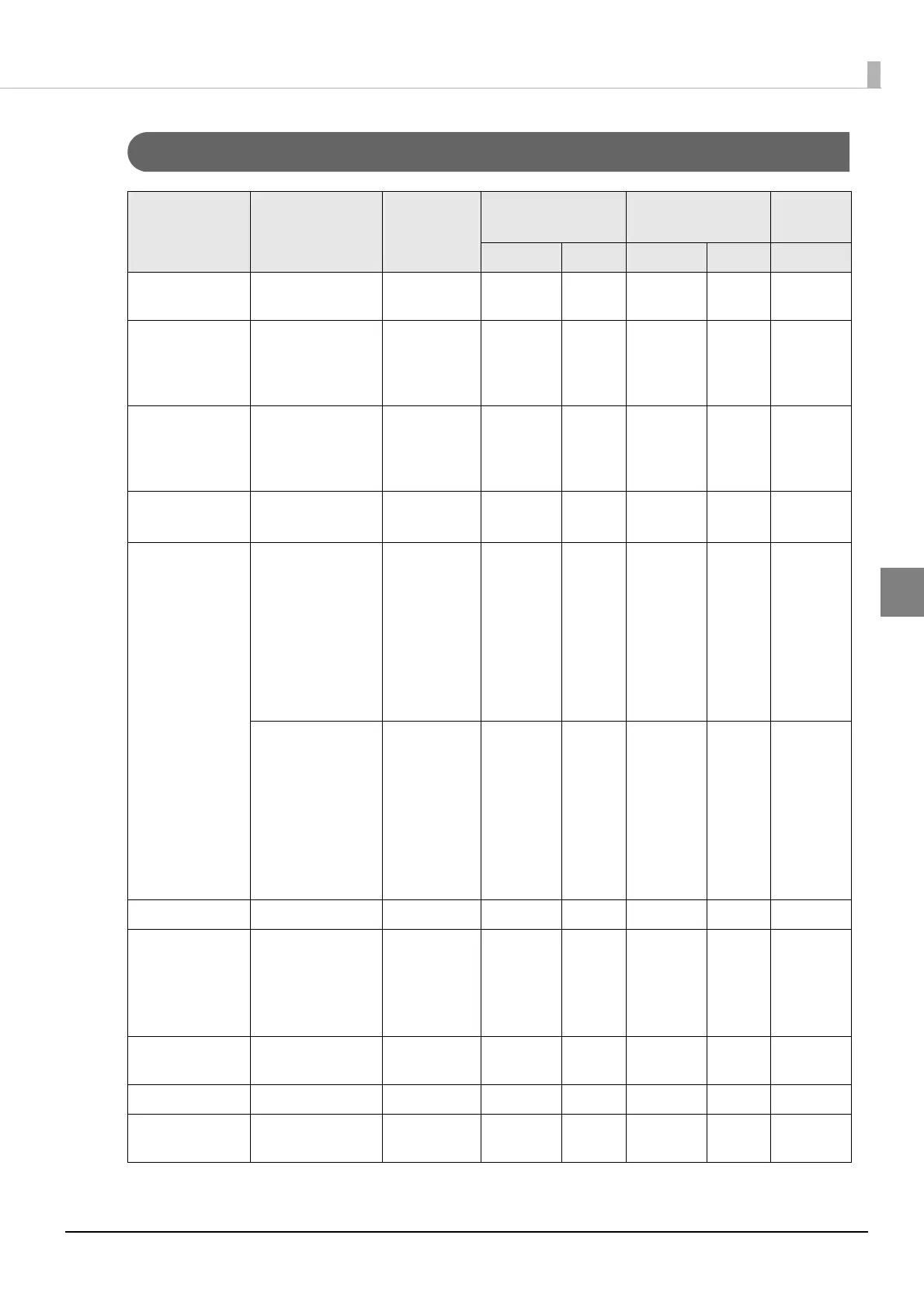
Setting and reference items for Wi-Fi
Channel setting is only available for Ad-Hoc mode. Channels available for use vary depending on the country.
Item Parameter
Default
setting
TM-H6000V
Utility
Web Browser
Status
Sheet
Reference Setting Reference Setting Reference
SSID (Up to 31
characters)
EPSON_Print
er
✔✔✔✔✔
WPA/WPA2 Pre-
Shared Key (Pass
Phrase)
8-63 ASCII charac-
ters or max 64
Hexadecimal char-
acters
EpsonNet - ✔ - ✔ -
MAC Address - (refer to
WLAN
option's
Label)
✔ - ✔ - ✔
Network mode Infrastructure
Ad-Hoc
Infrastructure ✔✔✔✔✔
WLAN Communi-
cation Standard
When using
OT-WL02
(Infrastructure)
802.11b/g/n
Auto
(Ad-Hoc)
802.11b/g
Auto
(Infrastruc-
ture)
802.11b/g/n
✔✔✔✔✔
When using
OT-WL05
(Infrastructure)
802.11b/g/n
802.11a/n Auto
(Ad-Hoc)
802.11b/g
802.11a Auto
(Infrastruc-
ture)
802.11b/g/n
✔✔✔✔✔
Channel * 1 - 13 1 ✔✔✔✔✔
Security Type None/ WEP (64)
WEP (128)/
WPA-PSK (AES)/
WPA2-PSK/
WPA2-Enterprise
WPA2-PSK ✔✔✔✔✔
Authentication
Algorithm
Open System/
Shared Key/ Auto
Open System ✔✔✔✔ -
Default WEP Key key1 - key4 key1 ✔✔✔✔ -
WLAN Power
Save
Enable/Disable Disable ✔✔✔✔ -


 To Next Page
 Loading...