85
Chapter 3 Application Development Information
3
ePOS-Device XML
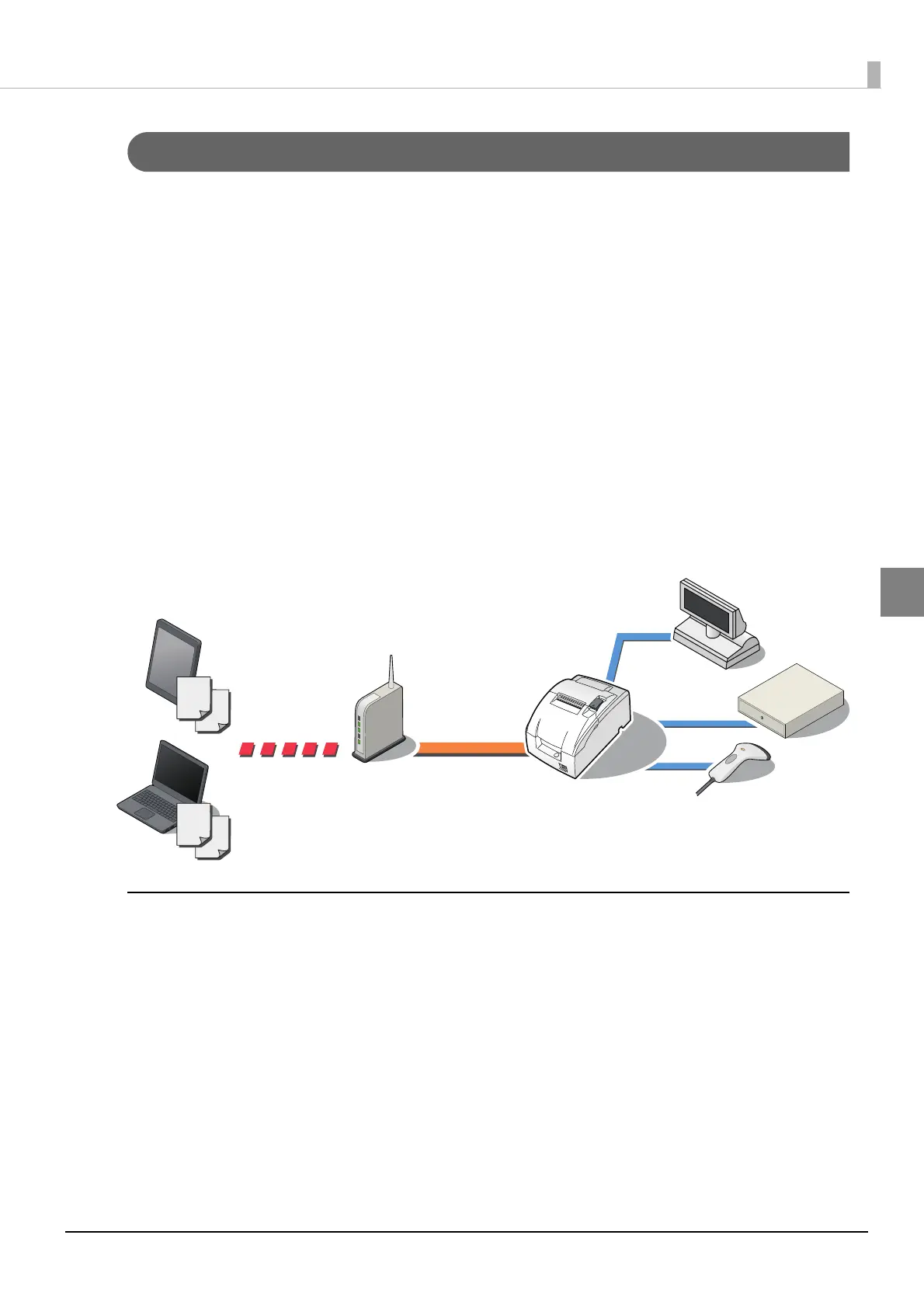
ePOS-Device XML is a command system that uses XML to define functions to control various POS
peripherals (including this product printer unit) connected to this product. An application creates a
request message in XML format and sends it to this prod
uct using socket communications.
This product executes control on peripherals and returns a response.
This command system has the following features:
•It enables use of the following devices via this product:
•Printing to TM printers on the network
•Displaying to the cus
tomer display
•Barcode scanner of USB interface, input via keyboard, etc.
•Transmission/reception to/from serial communication device
•Since print data can be saved in the spooler, the application can be released from print processing
regardless of the printer status.
•When a network printer is registered, forwarding process can be realized. Also whe
n the printer is
unavailable, you can print from another printer.
Operation environment
Application
Environment capable of performing socket communications and handling XML documents
OS
Example: iOS, Android, Windows, Linux, MacOS, etc.
Terminal
Environment connected to the network and capable of performing socket communications
Example: Smartphone, tablet devices, computer, etc.



 To Next Page
 Loading...