S
64
630791 DS MKII INSTALLATION MANUAL
S12
WARNING!
ENSURE POWER IS TURNED OFF BEFORE REMOVING ANY TCO.
There are two thermal cutouts: one in the LH room fan assembly (60°C) and the other aached to the exhaust
manifold (90°C or 120°C).
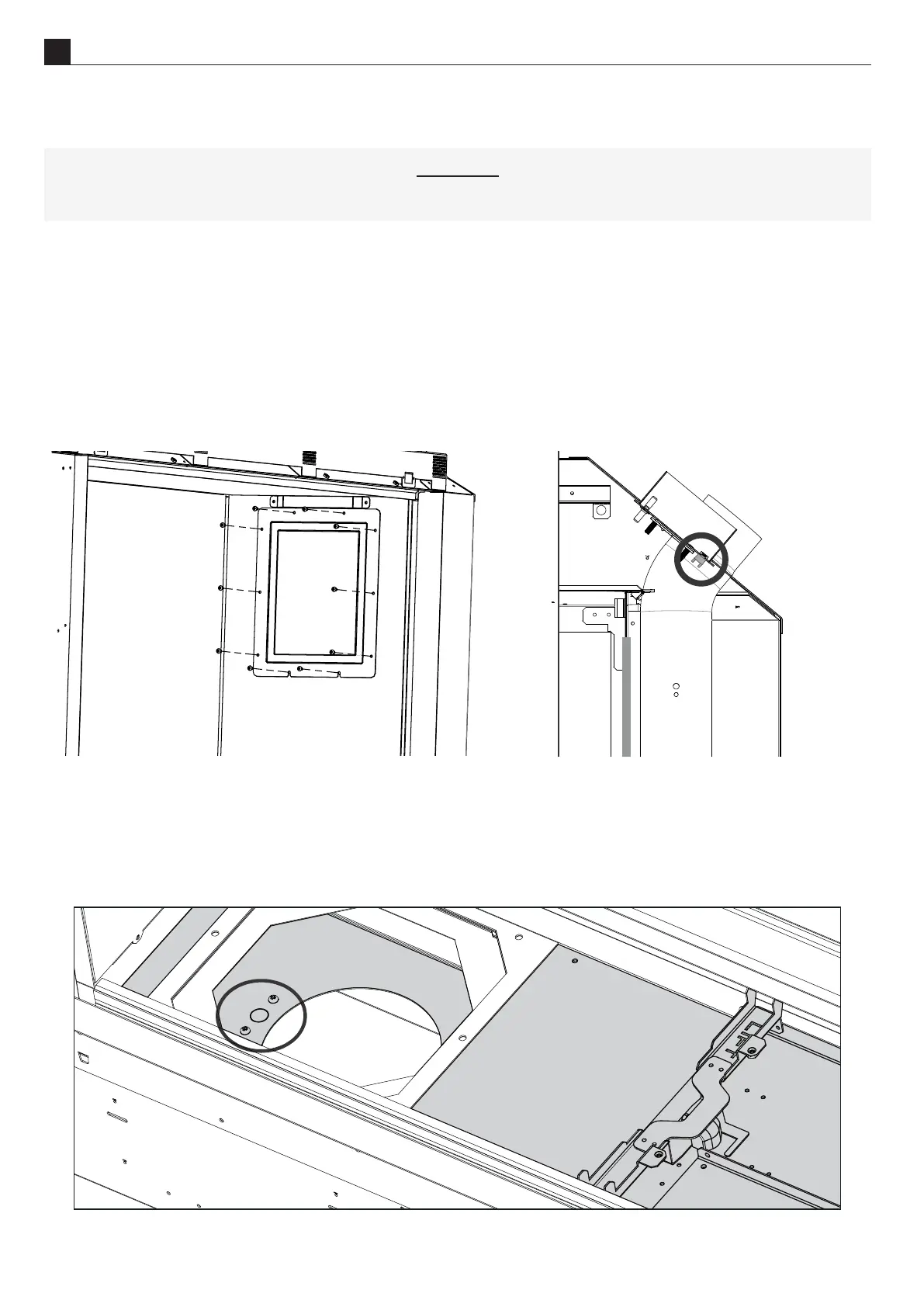
Access to this TCO can be made by following steps 1 to 2 from secon secon "S11 Pressure Switch Removal" on
page 63. Remove the 10 screws (shown in the diagram below) in the access hatch and carefully remove from
the rebox.
Reach in to the hatch and locate the TCO (circled in the diagram below). The TCO has two wires connected to
the main body; remove these. Unscrew the TCO using your hand and remove from the rebox.
Pressure switch
& TCO
hatch
Access to this TCO can be made by following the steps in secon secon "S9 Removing or Cleaning Fan(s)" on
page 61 and removing the le hand fan (not exhaust side). Once the fan is removed you will see the TCO
(circled in the diagram below). To remove this, unscrew the two visible screws and once free remove the two
wires connected to the TCO and remove from chassis.



 To Next Page