S
60
630791 DS MKII INSTALLATION MANUAL
S3
Follow "Removing (and Replacing) the Glass" on page 27 to remove the glass. Place the glass carefully aside.
Note that any soot on the glass can mark carpet and furnishings. Any standard ammonia-free glass cleaner may
be used to clean the glass. Use a so brush to clean the fuel bed media, being careful to replace it according to
the instrucons in "Finishing the Installaon" on page 35.
If soot build up on the fuelbed and/or the inside of the glass becomes excessive or regular then one of the
following acons may be required:
ͳ Reset the gas pressure - the pressure may be too high;
ͳ Reposion the fuelbed - check with specic fuelbed instrucons for details;
ͳ Clear any blockage from primary aeraon port of burner;
ͳ Check that the ue tube is not damaged or disconnected;
ͳ Check that the exhaust fan is operang and cowl is not blocked in any way.
S4
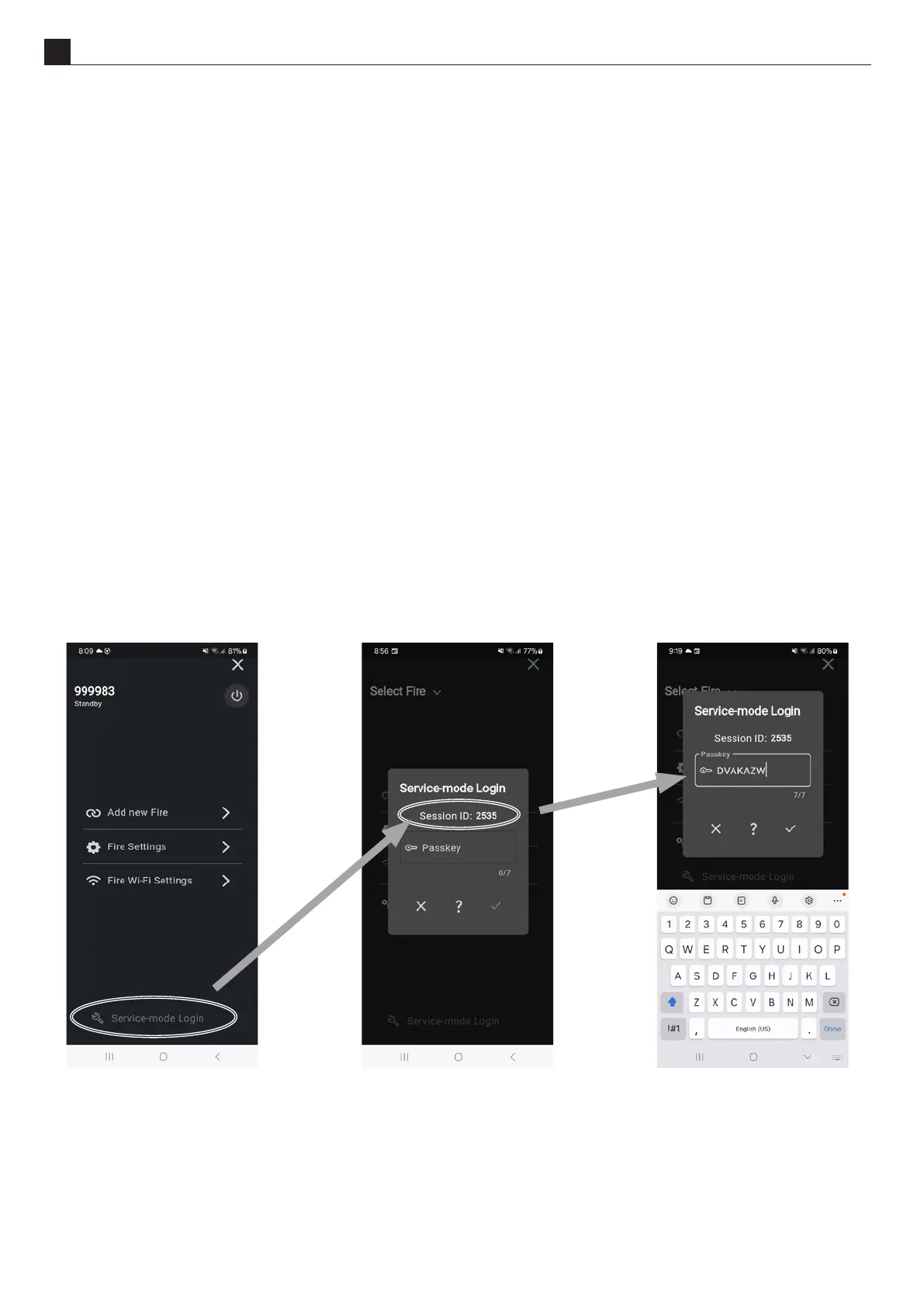
To gain access to the service mode with addional funconality, please follow these steps using the Escea Smart
Heat App. To obtain a service mode passkey, ensure you have your session ID ready and call Escea at: NZ : +64 3
478 8220 or Aus : 1-800 460 832
S5
See secon secon "E5 Checking the Gas Operang Pressure" on page 28.



 To Next Page