54
Chapter 12. Maintenance and Repair Instructions
Warning: “Turn off power or push E-STOP button before maintenance”
While using machines, the operational manual must be read carefully and thoroughly. Machine must be
maintained properly periodically. In the event of malfunction, abnormality, please refer to following table for
trouble shooting. All maintenance and repair must be operated by qualified technicians or operators. While
maintaining or repairing, the power must be turned off, the caution stand must be placed, and unrelated
persons must be kept away from.
12-1. Insufficient Sawing Pressure
Insufficient sawing pressure
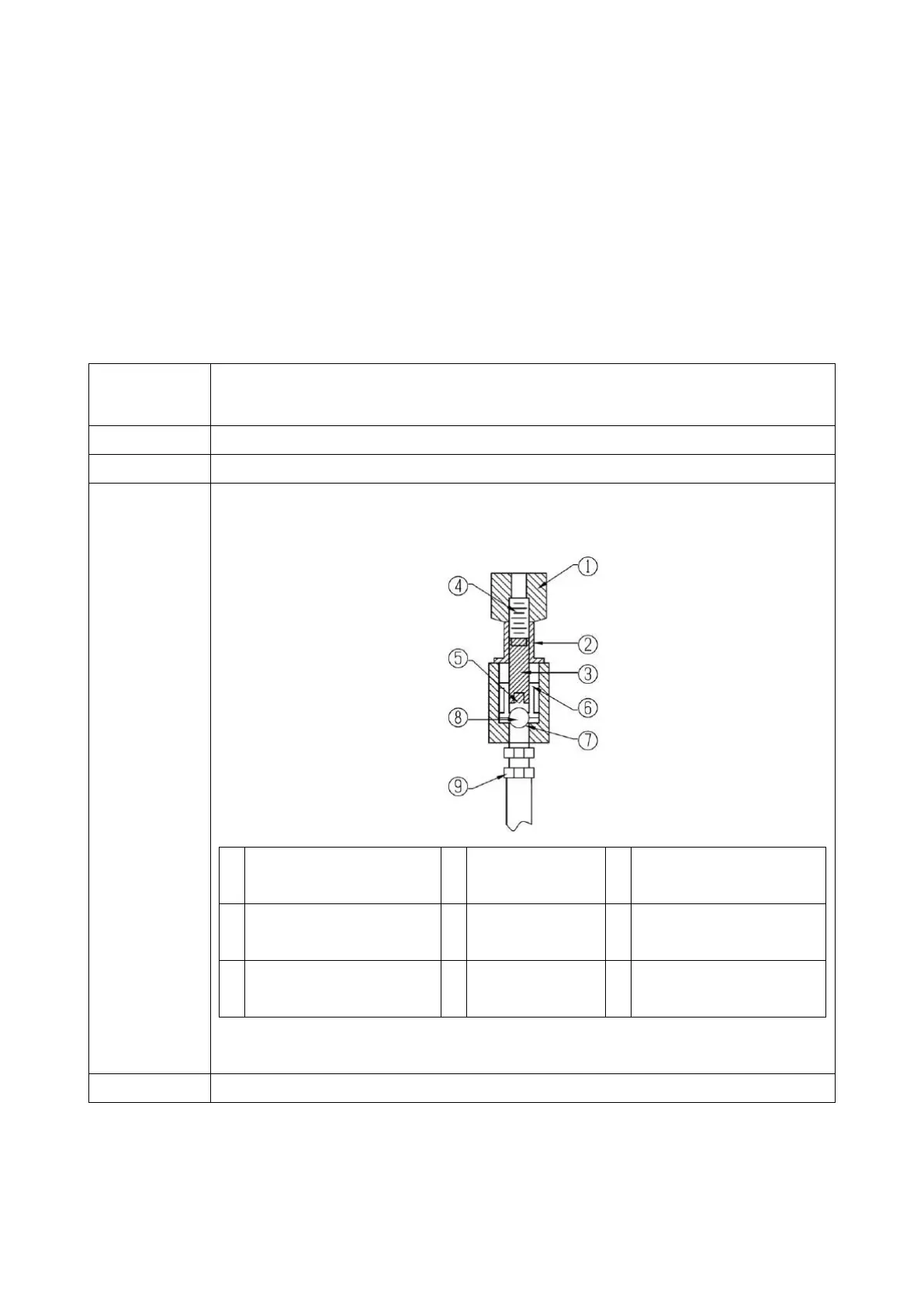
a. check if there is any dirt, dust, object inside the pressure adjusting valve, clean it
or replace the oil as illustration:
Pressure Adjusting
Spring
Steel Ball/Sphere
Contact
Dismantle○
7
section to see if there is any dirt, dust, or other object
Refer to manual, or contact local dealer/producer for prompt service


 To Next Page