49
9-5. Replacement of Cutting Liquid
Cutting liquid may affect the precision, lift of blade, which must be replaced periodically as following steps:
a. Turn off safety switch and place a caution mark to avoid danger before maintenance
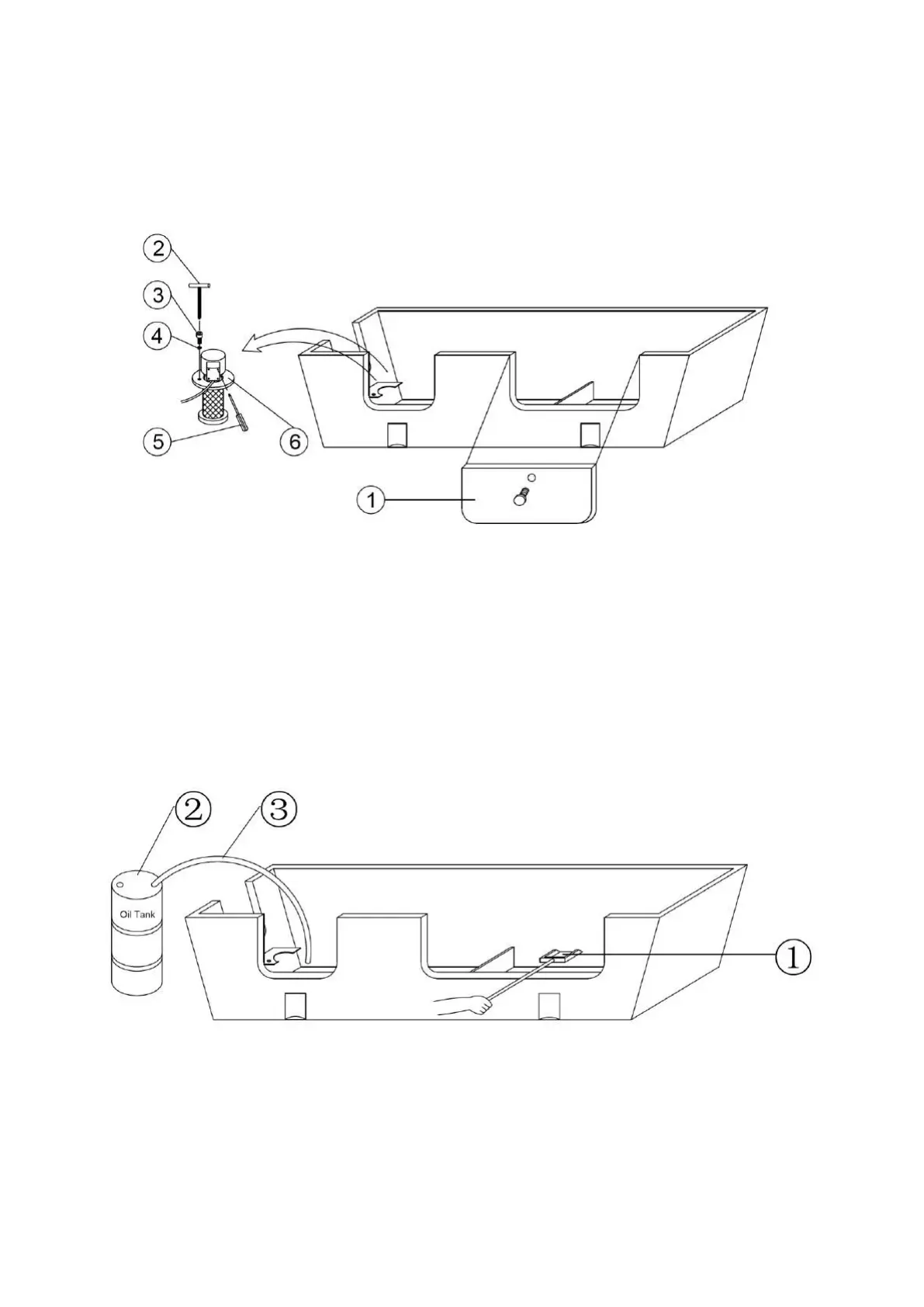
b. Remove protection covers○
1
, and put them in a clear place, remove dirt and dust thereof, as following
illustration
c. Use a crow driver○
5
to dismantle the cover of cable box, take out the protection chip, then, use a #7
wrench to release the fixed nut
d. Take out the power cable and place it in higher place to avoid wetting by cutting liquid, which may cause
electric shock
e. Use a 5mm T shape wrench○
2
to release the nut○
3
and washer○
4
, place them in safe place together
f. Take out the pumper out and place it in a proper place○
6
g. As following illustration, put a oil tank○
2
beside the machine, use a hose○
3
to extract the waste liquid into
the oil tank○
2
, do not spill the liquid
h. After extracting up, use a shaver○
1
to clean out the dust and accumulated dirt at the bottom, litter the
dust into a proper container to avoid pollution
i. Then, clean the filter using an air compressor as figure 1, finally, use a cloth to clean the filter thoroughly, as
figure 2


 To Next Page