151
(MT12 - Gb2004)
INTERNAL STATIONS
I
NTERCOMS *
VIDEO INTERCOMS *
TELECOMMUNICATION
S
T
U
D
I
O
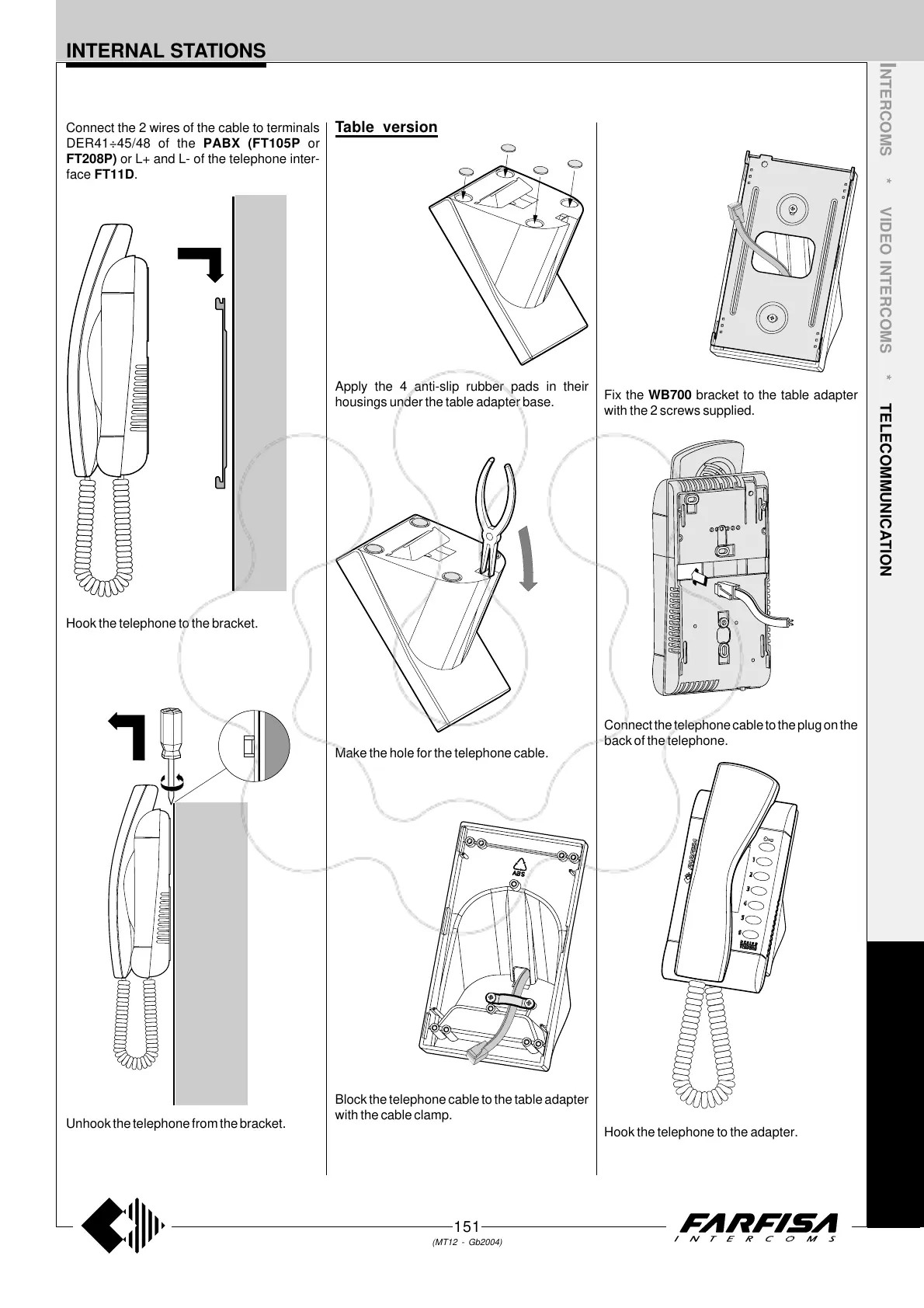
Hook the telephone to the bracket.
Unhook the telephone from the bracket.
Connect the 2 wires of the cable to terminals
DER41÷45/48 of the PABX (FT105P or
FT208P) or L+ and L- of the telephone inter-
face FT11D.
Table version
Apply the 4 anti-slip rubber pads in their
housings under the table adapter base.
Make the hole for the telephone cable.
Block the telephone cable to the table adapter
with the cable clamp.
Fix the WB700 bracket to the table adapter
with the 2 screws supplied.
Hook the telephone to the adapter.
Connect the telephone cable to the plug on the
back of the telephone.



 To Next Page