1. Installation
1−9
Festo P.BE−CPX−FB13−EN en 0811c
1 DI L switch 1:
Operating mode
2 DI L switch 2:
Reserved (must
be set to OFF)
3 DI L switch 3:
Diagnostic mode
4 DI L switch 4:
Station number
1234 5678
ON
12 12
ON ON
12
3
4
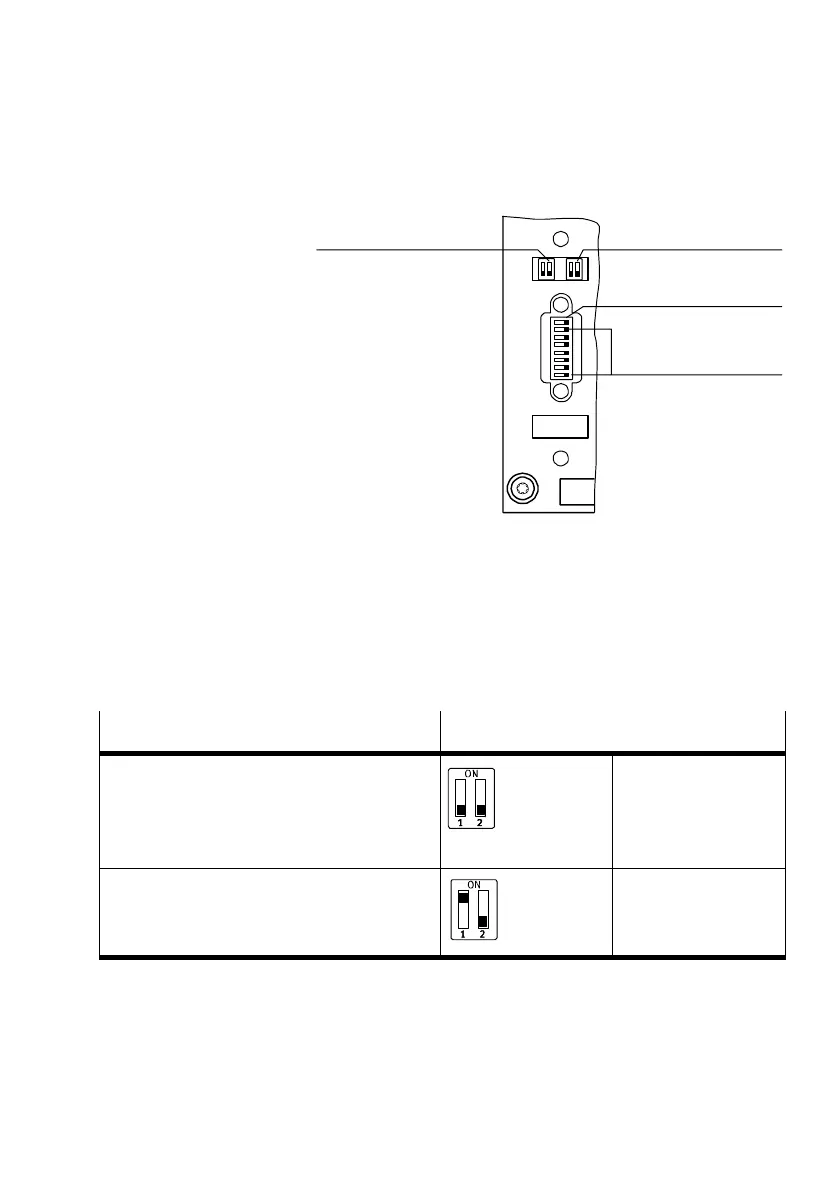
Fig.1/3: DI L switch in the field bus node
Setting the operating mode with DIL switch
1
You can set the operating mode of the field bus node with
switch element 1 of DIL switch 1:
Operating mode
Setting DIL switch 1
Remote I/O operating mode
All the functions of the CPX terminal are
controlled directly by the PROFIBUS master.
An FEC integrated in the CPX terminal works as a
passive function module without controller.
DIL 1.1: OFF
DIL 1.2: OFF
(factory setting)
Operating mode Remote Controller
An FEC integrated in the CPX terminal takes
control of the I/Os. This operating mode is only
useful if an FEC is integrated in the CPX terminal.
DIL 1.1: ON
DIL 1.2: OFF
Tab.1/1: Setting the operating mode with DIL switch 1



 To Next Page