6. Commissioning
© Festo Didactic 655633 101
6.10.3 Allen Bradley controller
• Controller: Micrologix (ML) 1500
• Programming software: RSLogix 500/RSLINXLite
1. Connect PC and PLC using the RS232 programming cable
2. Switch on power supply unit
3. Switch on the compressed air supply
4. Release the EMERGENCY-STOP pushbutton (if available)
Note
• Condition for the following operating steps is to configurate the necessary online
parameter (nodes, devices) with RSLINXLite/RSLogix 500!
• After using shutdown and exit RSLogix 500 and RSLINXLite to avoid conflicts with
the serial interface!
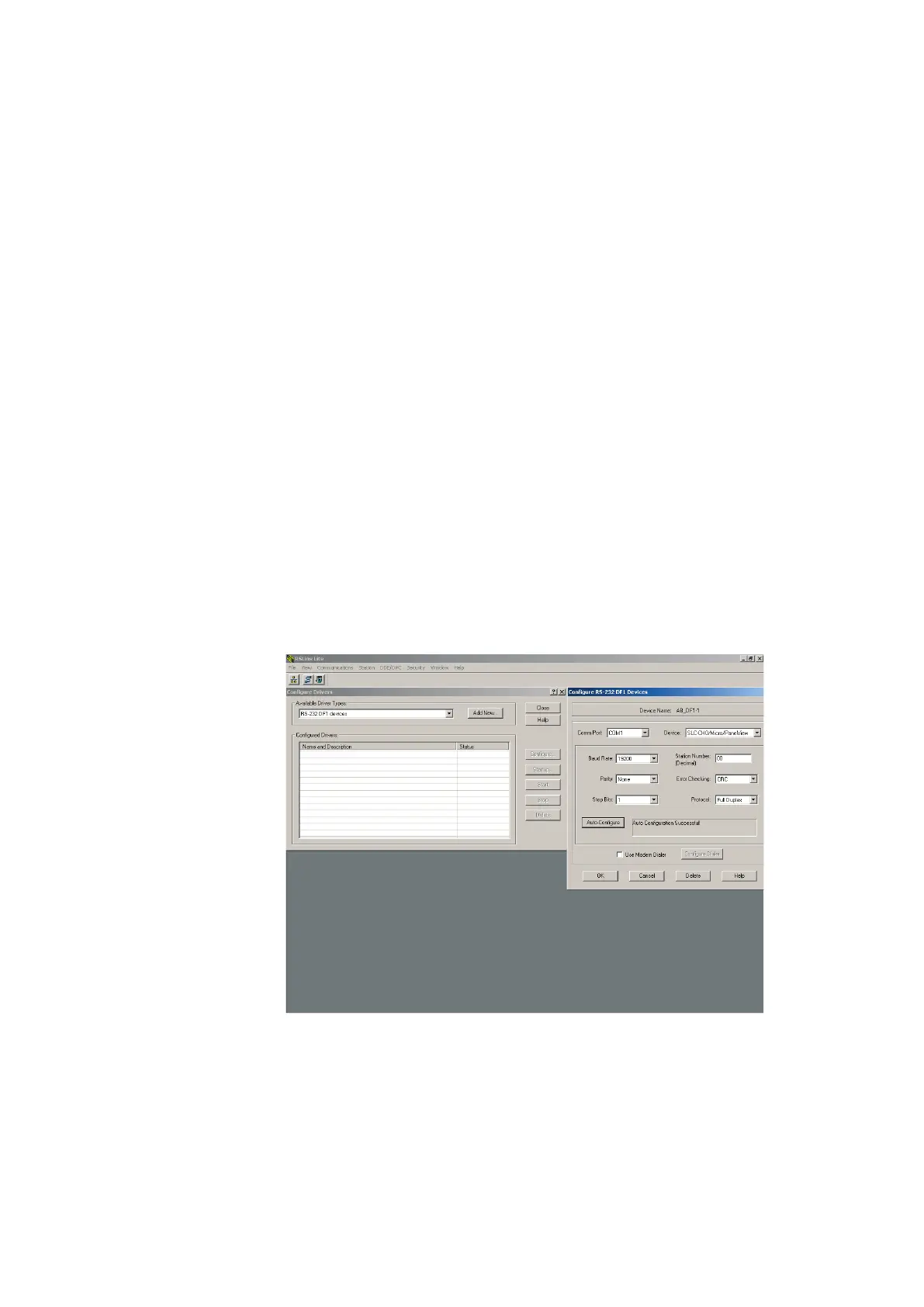
CPU ML 1500 – Onlineparameter configuration
– Wait until the PLC has carried out its test routines.
– Start the RSLINXLite software.
Communications Configure Drivers… select the setting “RS-232 DF1 devices“ from the list
“Available Driver Types“ and click Add New…
confirm note (“Choose a name…“, default: AB_DF1-1)
with OK
Auto configure OK Close





 To Next Page