A0U571B - KelNet Lock - User Guide 4. INPUT UNIT CONFIGURATION
23
4.2 Advanced configuration (Technician menu)
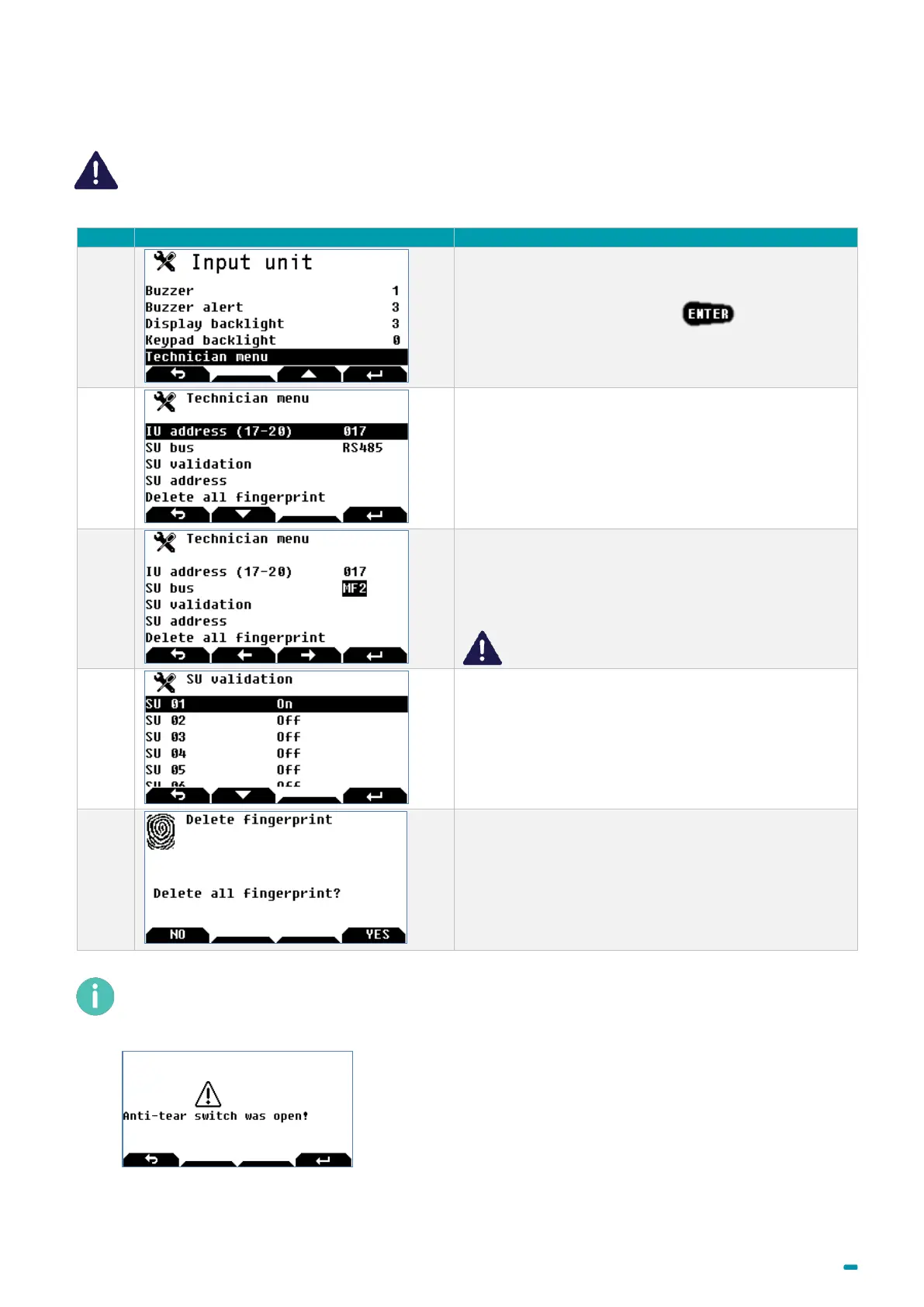
The Technician menu is only visible if the Input Unit anti-tear switch is open.
Select the Technician menu + .
Configuring the Input Unit’s address from 17 to 20.
Address 17 is for the 1st Input Unit.
The SU bus menu is for choosing the communications
bus with the locks:
• Either MF2 (by default)
• Or RS485
The RS485 bus cannot operate by battery only.
The SU validation menu is for validating the locks
which are managed by the Input Unit.
Switch the "valid locks" to ON.
The Delete Fingerprints menu is for deleting all the
fingerprints in the fingerprint sensor mounted on the
Input Unit.
As long as the anti-tear switch is open, the "Anti-tear open" message is displayed and only access to the
Input Unit’s menu is authorised.
Otherwise, the following message is displayed:
This message is displayed until there is a valid identification, but it does not prevent the lock from being used.



 To Next Page