Home
Fichet-Bauche
Locks
KelNet Lock
Page 6 (2 Product Description)
Fichet-Bauche KelNet Lock - 2 Product Description; Input Unit; Digital Display
59 pages
Manual
Save Page as PDF
To Next Page
To Next Page
To Previous Page
To Previous Page
Loading...
KelNet Lock
-
User Guide
A0U571B
6
2
PRODUCT
DESCRIPTION
2.1
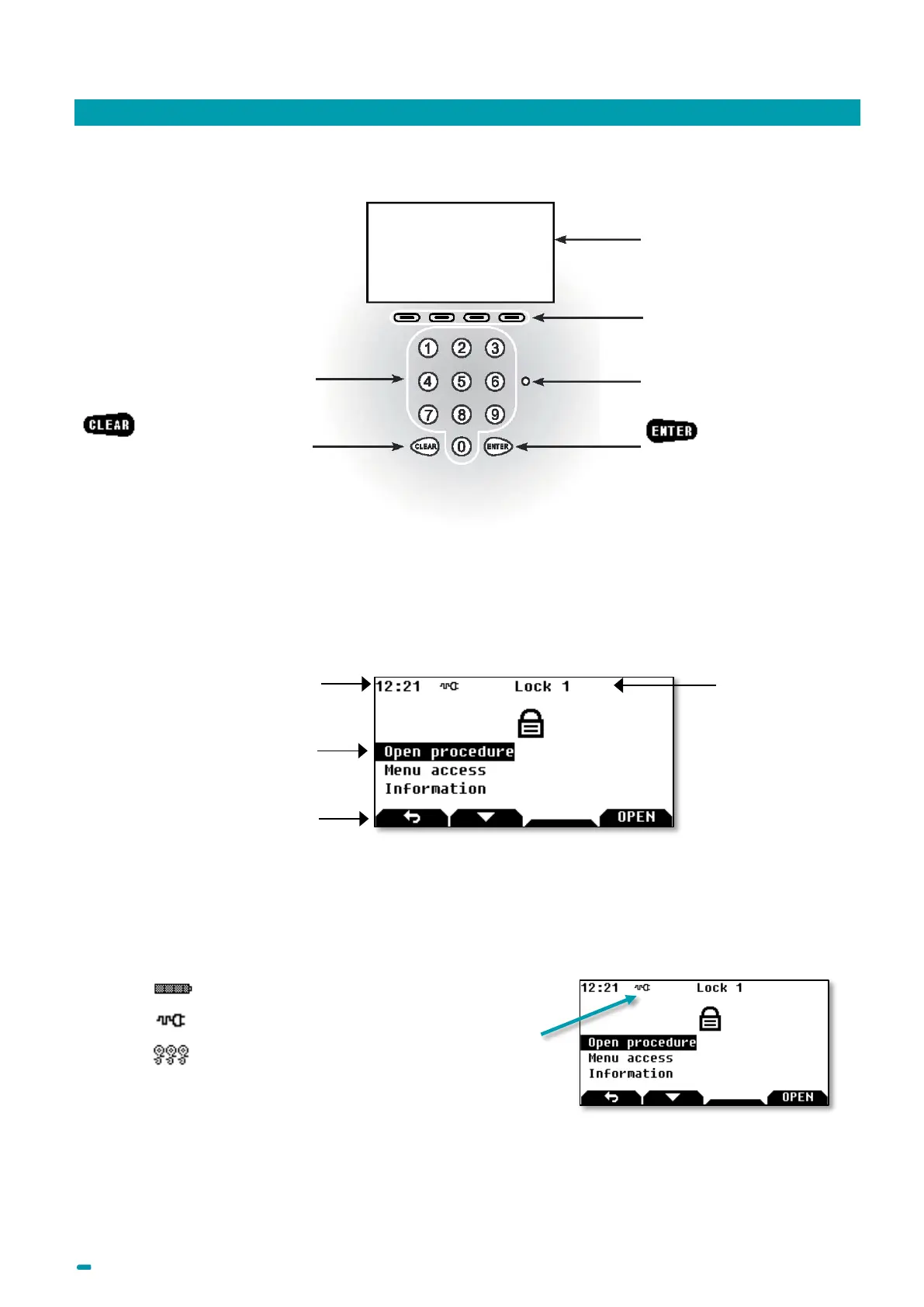
Input Un
it
2.2
Digital dis
play
2.2.1
Display zones
2.2.2
Status icons
Battery power supply a
nd low battery in
dication
External power su
pply
Wrong code
Contextual keys: t
he
function of each key is
described on the di
splay
above the key.
Indicator lamps: bi
-
color
ed
lamps red/green.
key:
Confirms
an
action.
Digital display
Keypad
key:
U
ndoes an action
Clock
, Icons
and
power supply
Main screen section
Active lo
ck
Navigation keys: Acti
vated or not,
according to the menu.
Contextual keys cha
nge
according to the menus (
Menu,
left, right, up
, down, Info, Val,
return, etc.).
5
7
Table of Contents
Main Page
Default Chapter
3
Table of Contents
3
1 Introduction
5
2 Product Description
6
Input Unit
6
Digital Display
6
Sound
7
Power Supply
8
3 Using the Lock
9
User Categories
9
Identification Settings
9
Opening Procedure (Class B Lock)
10
Opening Procedure (Class C or D Lock)
12
Closing Procedure (Class B Lock)
15
Closing Procedure (Class C or D Lock)
16
Emergency Blocking
17
CIT Anti-Passback Procedure
17
Wrong Code Blocking Rules
17
Messages
18
Mandatory Changing of the Opening Code When Using the Lock for the First Time
19
Changing the Opening Code by the User Himself
20
4 Input Unit Configuration
22
Basic Input Unit Configuration
22
Advanced Configuration (Technician Menu)
23
5 Secure Unit Configuration
24
Access to Configuration Menu
24
Menus List
26
User's Parameters Configuration
28
Schedules Configuration
29
Delays Configuration
30
Calendar Configuration
31
Identification Configuration
32
Secure Unit Configuration
33
System Configuration
37
Maintenance
38
Audit
39
6 Changing the Configuration with a Usb Key
40
Introduction
40
Writing Configuration with a USB Key
40
Reading Configuration and Saving on a USB Key
41
Writing Schedules with a USB Key
42
Reading Schedules and Saving on a USB Key
43
7 Fingerprint
44
Instructions for Enrolling Fingerprints
44
Enrolment in Mode "Code + Fingerprint
44
Enrolling Procedure
45
Opening Procedure with Fingerprint
48
Changing the Fingerprint by the User Himself
49
Deleting a Fingerprint by the User Himself
50
Deleting All Fingerprints
51
8 Redundant Lock Specificities
52
9 Factory Settings
53
10 Recycling
54
Recycling the Secure Unit's Authentication Keys
54
Recycling the Secure Unit's Address
54
Complete Recycling of the Secure Unit
55
Recycling the Input Unit's Authentication Keys
55
Complete Recycling of the Input Unit
55
11 Maintenance
56
Replacing an Input Unit Operating in Factory Mode
56
Replacing a Secure Unit Operating in Factory Mode
57
12 Glossary
58
Related product manuals
Fichet-Bauche MC4
24 pages
Fichet-Bauche NECTRA BASIC
172 pages



 To Next Page