MS-9050 Series Manual — P/N 52413:F 10/22/2010 43
ANN-BUS Devices Installation
The following table shows the ANN-80 connections to the MS-9050UD.
Programming
Following installation and wiring of the ANN-80 LCD annunciator to the FACP, the annunciator
must be added to the system via FACP programming. Refer to the programming section titled
“ANN-BUS” on page 108 in this manual for detailed programming information. Select the LCD
option for programming.
Trouble Response
If the ANN-80 is installed but the ANN-BUS is not enabled at the FACP, the ANN-80 will indicate
a trouble condition by NOT turning on its AC Power indicator. The LCD will also display Key Bus
Trouble and the piezo will sound approximately once every 10 seconds. Note that the FACP will
provide no indication of an ANN-80 trouble.
To clear the ANN-80 trouble condition, enable the ANN-BUS and program the address correspond-
ing to the address set on the ANN-80 at the FACP.
2.9.4 ANN-S/PG Serial/Parallel Interface Module
The ANN-S/PG Serial/Parallel Interface module allows the connection of a serial or parallel printer
to the FACP for a real-time log of system events, detector status reports and event history. The
module is provided with a plastic enclosure for surface mounting. Proceed with the installation as
described in the following:
1. Ensure that all power (AC and DC) has been removed from the FACP.
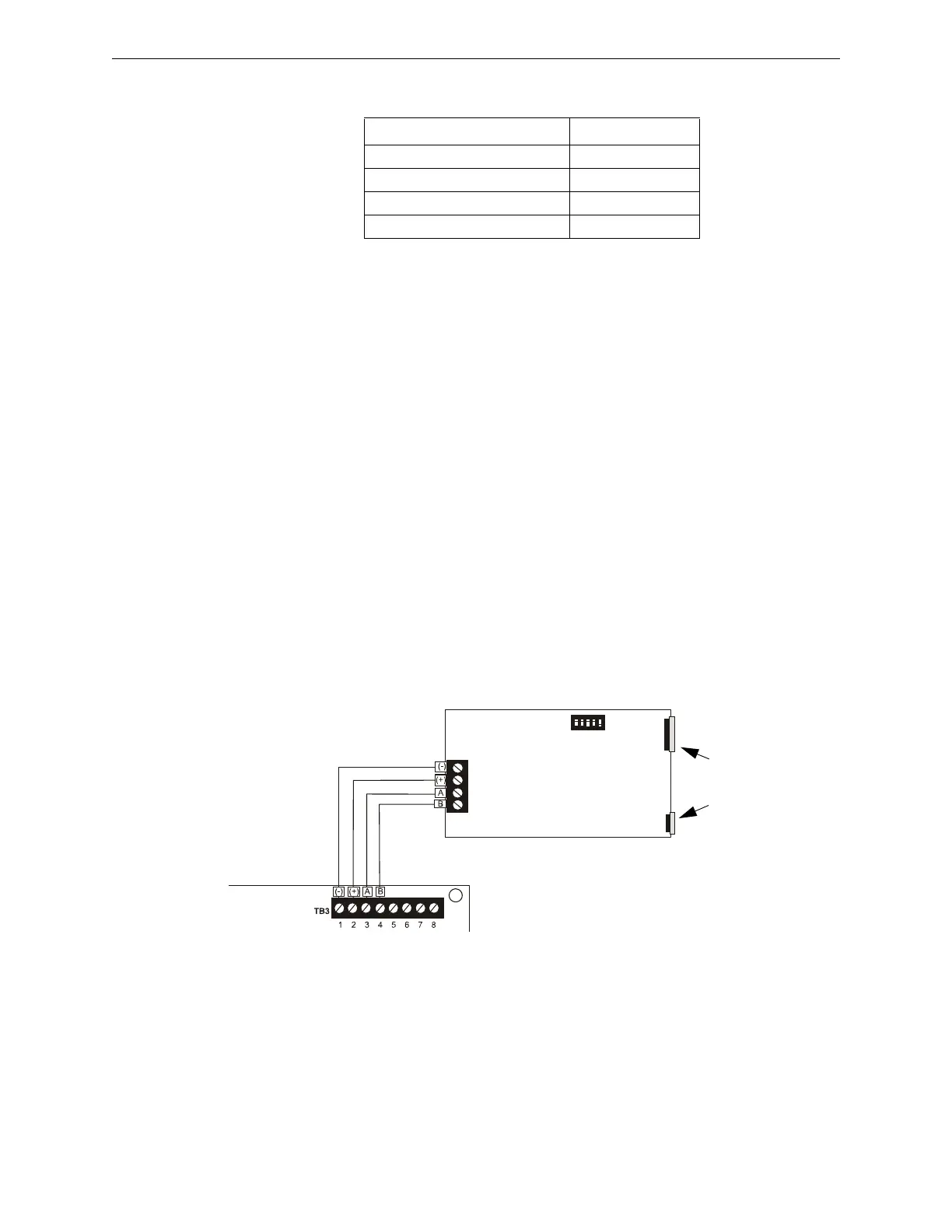
2. Connect the ANN-S/PG to the FACP as illustrated in Figure 2.16.
3. Using the DIP switches on the back of the ANN-S/PG module, assign an ID number (address)
to the module.
4. Select the address and configuration options for the ANN-S/PG module as described in the
Programming section of this manual (refer to “ANN-BUS” on page 108).
Note that the Auto-configure feature allows the programmer to quickly bring all installed
ANN-BUS modules online (refer to “Auto-Configure” on page 117).
5. Connect a printer to the ANN-S/PG Parallel or Serial connectors (refer to Figure 2.16). Only
one printer can be connected.
MS-9050UD (TB3) ANN-80 (TB1)
Terminal 1 GND (-) Terminal 1 (-)
Terminal 2 PWR (+) Terminal 2 (+)
Terminal 3 A (ANN-BUS) Terminal 3 (A)
Terminal 4 B (ANN-BUS) Terminal 4 (B)
Figure 2.16 ANN-S/PG Connection to FACP
ANN-S/PG Module
MS-9050UD
Cable
Connectors
for connection
to printer
Parallel
Serial
ANN-BUS and power wiring are
supervised and power-limited
annspgto9050ud.wmf
Primary
ANN-BUS














 To Next Page