FLUXUS WW 8 Connection
54 UMFLUXUS_WWV1-1EN, 2018-02-28
8.1.2 Connection of the extension cable to the transmitter
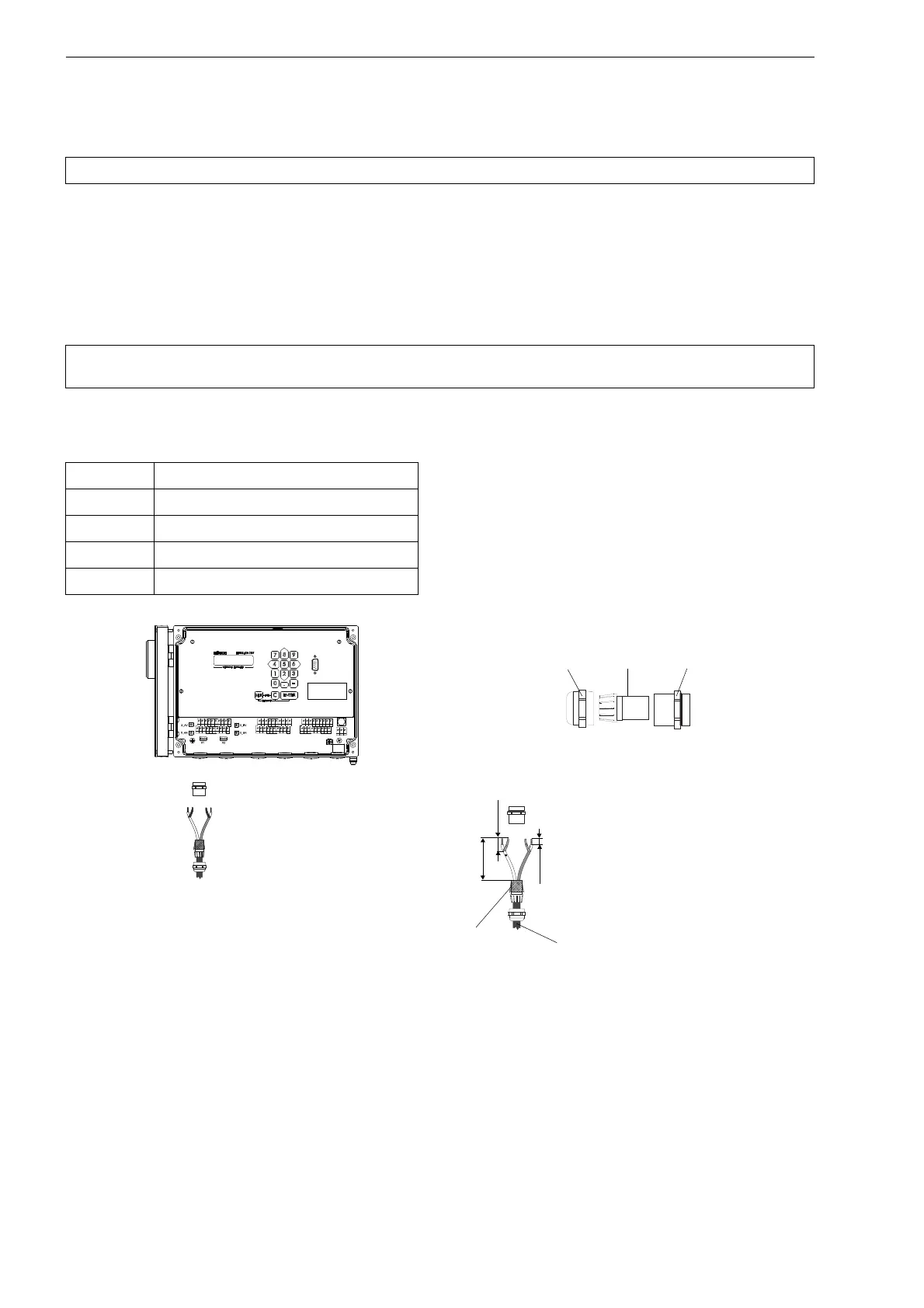
• Remove the left blind plug for the connection of extension cable (see Fig. 8.5).
• Open the cable gland of the extension cable. The compression part remains in the cap nut.
• Push the extension cable through the cap nut and the compression part.
• Prepare the extension cable.
• Shorten the external shield and brush it back over the compression part.
• Screw the sealing ring side of the basic part tightly into the housing of the transmitter.
• Insert the extension cable into the housing.
• Fix the cable gland by screwing the cap nut onto the basic part.
• Connect the extension cable to the terminals of the transmitter (see Fig. 8.1, Fig. 8.5 and Tab. 8.4)
Attention! Observe the "Safety instructions for the use in explosive atmospheres" (see SIFLUXUS document).
Attention! For good high frequency shielding, it is important to ensure good electrical contact between the exter-
nal shield and the cap nut (and thus to the housing).
Tab. 8.4: Terminal assignment
terminal connection
AV white or marked cable (core)
AVS white or marked cable (shield)
ARS brown cable (shield)
AR brown cable (core)
Fig. 8.5: Connection of the extension cable with plastic cable jacket and stripped cable ends to the transmitter
AVSAV
AGN
ARS
AR
BVSBV
BGN
BRS
BR
SA1
SA2
SA3
SA4
SB1
SB2
SB3
SB4
T1a
T1b
S2 T2a
T3a
T3b
S4
T4a
T2b
T4b
T1A
T1B
S1 T2A
T3A
T3B
S3
T4A
T2B
T4B
A+
B-
P1+ P2+
P4+
P5a
P6a P7a
P3+
101
103
P1- P2-
P4-
P5b
P6b
P7b
P3-
PE
N(-)
L(+)
U L T R A S O N I C F L O W M E T E R
1 32
0
4 65
7 8
N E X T
Q
O N
Q -
Q +
M U X
D I S P
Q
O F F
9
D I S P
E N T E R
C
B R K
R E S T A R T
I N IT
70 mm
20 mm
10 mm
extension cable
cable gland
external shield,
brushed back
cap nut
compression part basic part










 To Next Page