INSTALLATION ST51A/ST75A/ST75AV Mass Flow Meters
14 Fluid Components International LLC
Local Enclosure
Install the local enclosure as described in Installing ST51A Flow Element and Installing ST75A/ST75AV Flow Element above. Depending
on the configuration as specified by the order information sheet the ST51A local enclosure is supplied with a ½" or ¾” process connection,
and the ST75A/ST75AV is supplied with a male NPT, female NPT or flanged process connection.
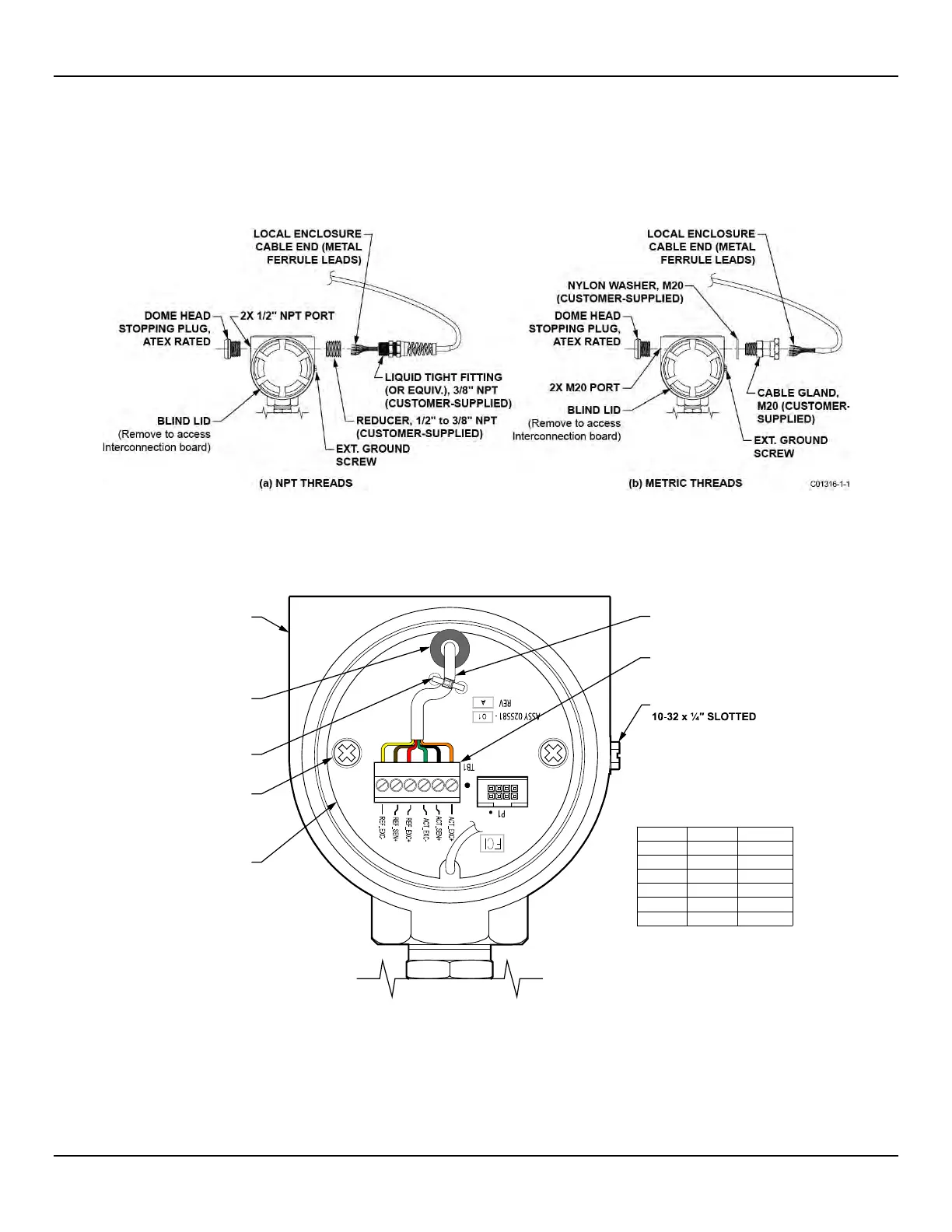
Figure 11 below shows the local enclosure remote cable installation.
Figure 11 – Remote Cable Installation, Local Enclosure
Figure 12 below shows the remote cable wiring inside the local enclosure. After installing the local enclosure in the pipe follow the steps
below to install the local enclosure cable. Refer to Figure 11 and Figure 12 when following the steps.
Figure 12 – Local Enclosure Remote Cable Wiring
1. Remove local enclosure blind lid covering interconnection board (note orientation of external ground screw in Figure 12). Remove
blind lid as described in Accessing the Interface Board Connection Terminals on page 18.
2. If not already installed, install supplied dome head stopping plug in local enclosure’s other (unused) cable port.
3. Remove interconnection board (remove two ea. 6-32 x ½" pan hd. Phillips screw/#6 star washer).
EXT. GROUND SCREW,
HEX WASHER
LOCAL
ENCLOSURE
(BLIND LID
REMOVED)
REMOTE CABLE
C01317-1-1
6-POS. PHOENIX
CONN. TB1
Remote Cable Connnections to TB1
2X 6-32 x ½" PAN HD.
PHILLIPS SCREW/
#6 STAR WASHER
INTER-
CONNECTION
BOARD
TIE-WRAP
GROMMET
TB1 Pin No. Wire Color Label
1 Orange ACT_EXC+
Black ACT_SEN+
Green ACT_EXC-
Red REF_EXC+
Brown REF_SEN+
Yellow REF_EXC-
2
3
4
5
6



 To Next Page