OPERATION ST51A/ST75A/ST75AV Mass Flow Meters
62 Fluid Components International LLC
Checking K Factor Values
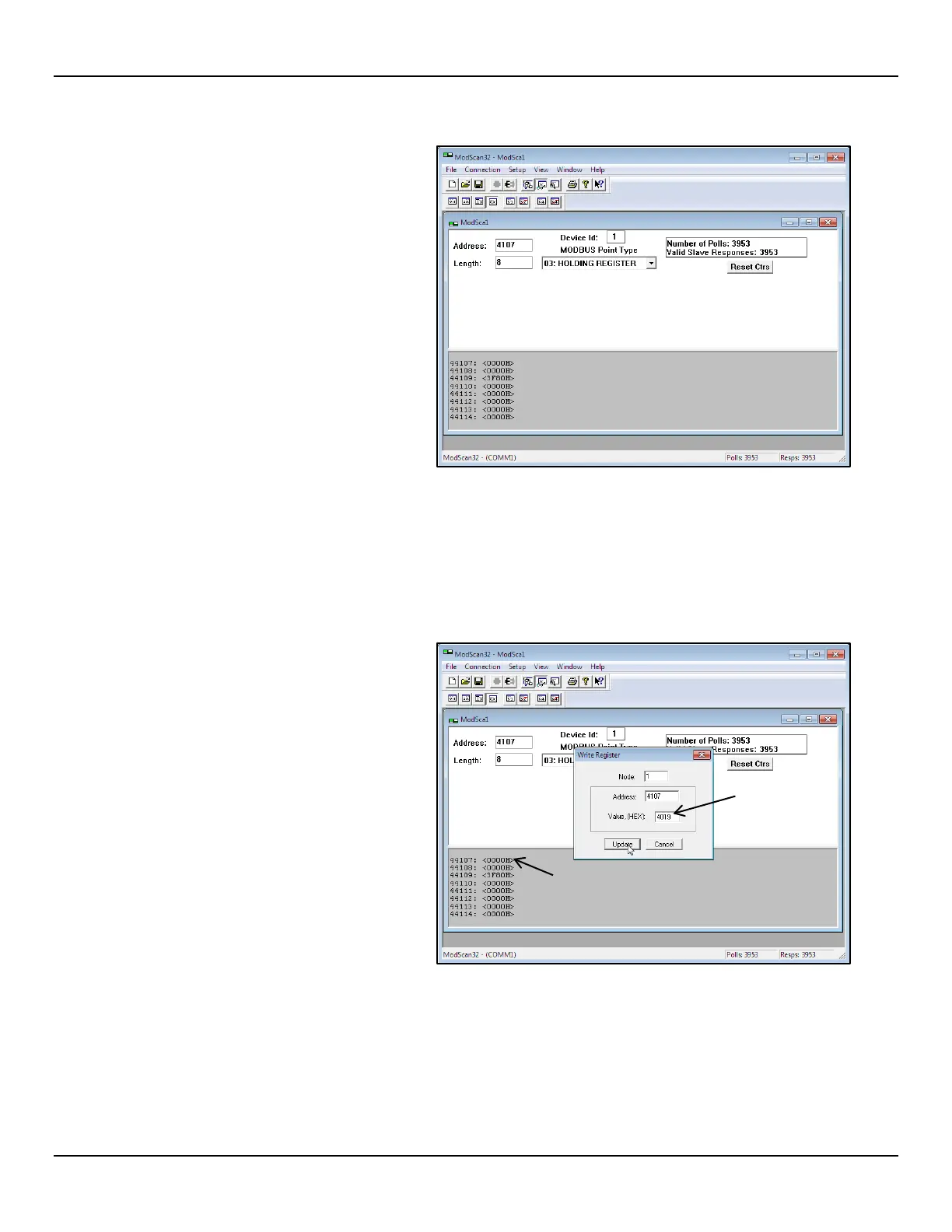
● Referring to Checking the Totalizer Value
above, repeat step 1, but specify register
#41xx instead (i.e., K Factor registers
#4107 through #4114). In this case, specify
Length as “2” to check an MS/LS pair (i.e.,
4107, 4109, 4111, or 4113). Or specify
register #4107 with Length = “8” to check
them all (4 pairs) at once. Assuming that
ModScan32 is already connected and
configured, the K Factor registers are then
displayed as shown at right after clicking
OK in the Data Definition dialog (with
Length = “8”).
Changing/Setting K Factor Values
In the below example, the desired value of K Factor 1 is 2.4 (floating point). This floating point number is converted into a hexadecimal
value (0x4019999A), which is then programmed into Modbus registers #4107 (Most Significant) and #4108 (Least Significant).
1. Referring to Changing/Setting K Factor Values above, use the Display Definition dialog to show all K Factor registers (i.e., specify
register #4107 with Length = “8”.
2. Double click on the MS register #4107 line
(see figure at right). In the resulting Write
Register dialog, enter “4019” in the
window’s value field, and then click
Update.



 To Next Page