ST51A/ST75A/ST75AV Mass Flow Meters OPERATION
Fluid Components International LLC 63
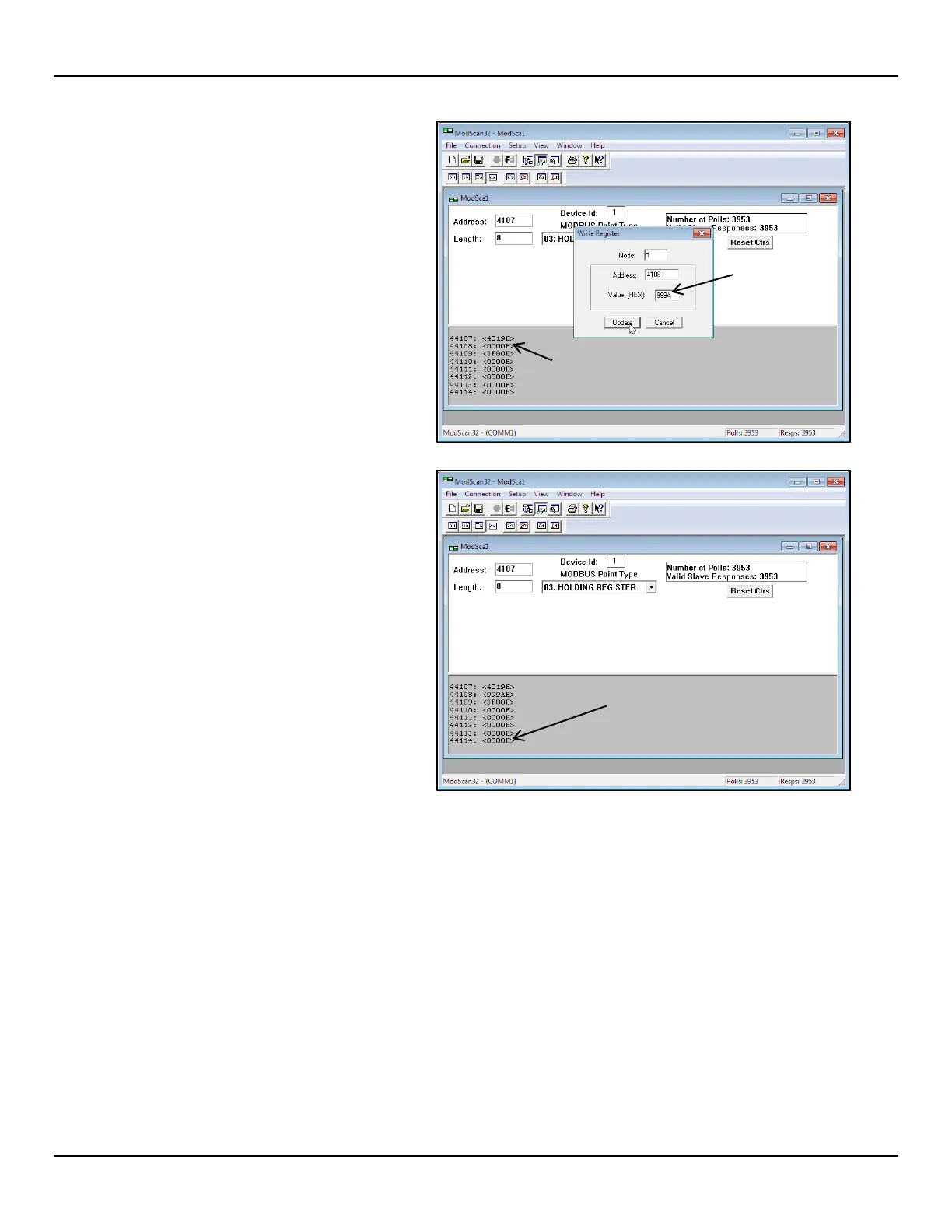
3. Double click on the LS register #4108 line
(see figure at right). In the resulting Write
Register dialog, enter “999A” in the
window’s value field, and then click
Update.
4. Verify that the upper 8 bits are programmed
into register #4107 (0x4019) and that the
lower 8 bits are programmed into register
#4108 (0x999A). See figure at right. Repeat
steps 2 and 3 to change other K Factor
registers as required.
To finalize any K Factor register change,
update register #4114 last even if the
register needs no changes (click Update
with the existing value shown in the Write
Register dialog). It is a requ
K Factor register change includes an
update of register #4114.
LAST STEP: DOUBLE CLICK AND
UPDATE REGISTER #4114



 To Next Page