3-16 Section 3: Model 9100 Controls: Modes of Operation
Final Width = 215mm
TODAYS DATE TIME
TODAYS DATE TIME
Test Point Specifications —
'Borderline' Reporting
For users who wish to know when a
UUT is drifting towards the limits of
(while still within) the manufacturer's
specification, it is useful to provide
some 'borderline' indication. This can
be expressed as a percentage of the
manufacturer's specification for each
test point, beyond which the indication
will be given.
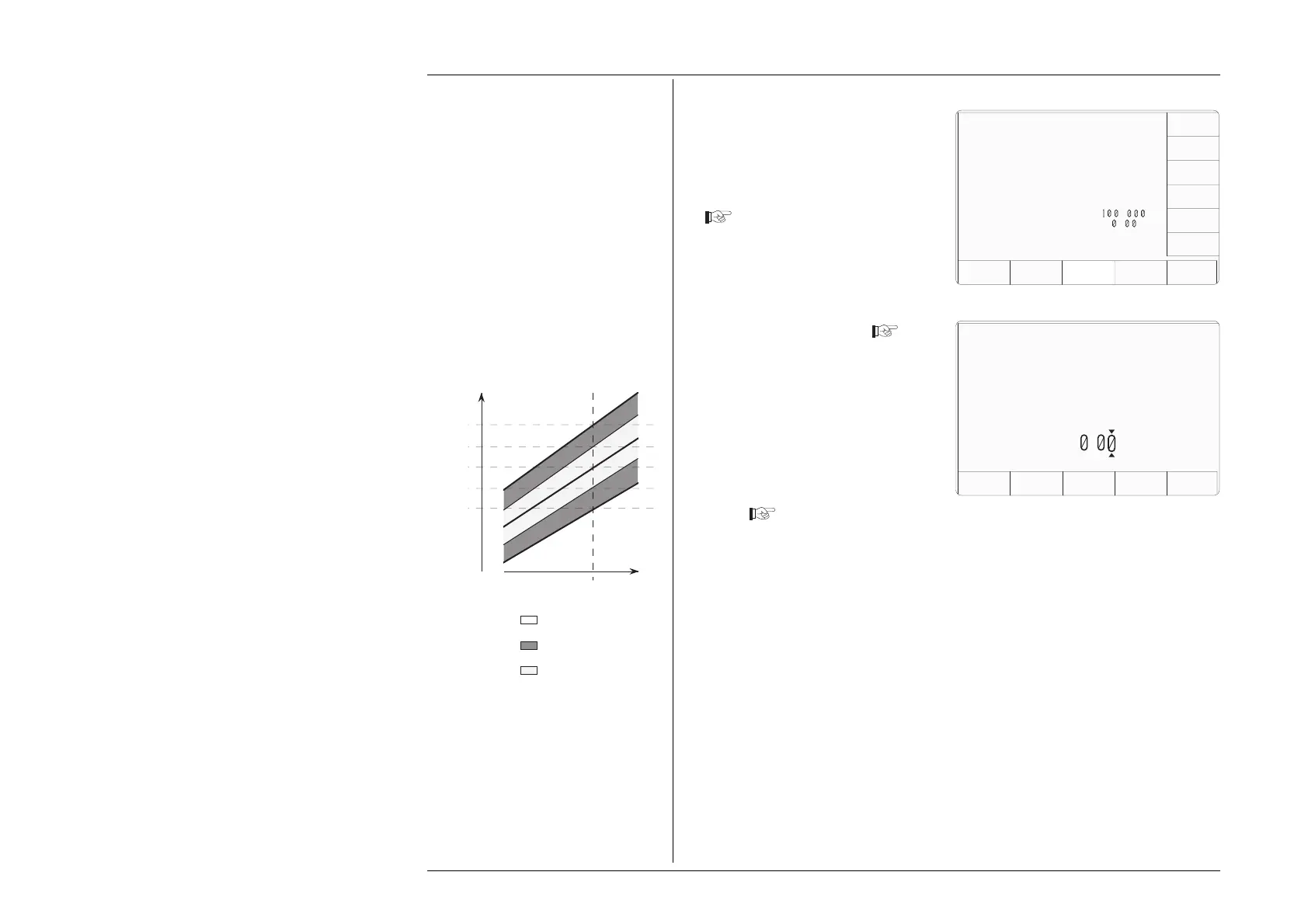
In the figure, the pass, borderline and
fail regions of the specification
tolerance are indicated at the test point.
Actual UUT
Input Value
Actual Test
Point Value
UUT
Indicated
Value
Nominal Test
Point Value
Upper 100%
Spec Limit
Lower 100%
Spec Limit
Borderline
Percentage
Borderline
Percentage
9100 Indicates 'Pass'
9100 Indicates 'Borderline'
9100 Indicates 'Fail'
When in Procedure mode, the direct-
printing certificate (Style 1), and the
data on the 'Results' card, will report
'Borderline' test results. Users have
access via Configuration mode to set
the percentage for borderline reporting.
3.3.2.11 'BORDER LINE'
1. For access to allow the borderline
reporting threshold to be altered,
press the BORDER LINE screen
key on the 'Present Settings' screen
Configuration
EXIT
Borderline =
7
.
2. This transfers to a configuration
screen designed for changing the
threshold. In our representation,
the default value is shown
3. Use Digit edit or Direct edit to set
the required percentage of
specification tolerance. Results
which lie between this percentage
and 100% of tolerance will be
reported as 'Borderline'.
4. Press the EXIT screen key to return
to the 'Present settings' menu
screen
Subsequently, during each '1 Year Verification' in Procedure mode, the 9100 will detect
its own slewed output and place the UUT measurement error into the 'Pass', 'Borderline'
or 'Fail' category. When a (Style 1) certificate is printed, and on any active results card,
each test point will indicate a 'Pass', 'Borderline' or 'Fail' result.
The percentage of UUT specification
tolerance beyond which a "borderline"
is reported can be adjusted by using
digit or direct editing.
Configuration
Present Settings:
Language English
Power-up mode Manual
Bus Address 1
Printer NONE
Results Card Disabled
Safety Voltage
.
V
Border Line
7
.
%
Scope option Option 600
Crystal option High acc
Ser. No. XXXXXX Rev. XXX
VOLTAGE
LIMIT
DATE
TIME
BORDER
LINE
SELECT
LANG
MORE
POWER
UP MODE
BUS
ADDRESS
RESULTS
CARD
PRINTER
CLEAR
USER
LIST



 To Next Page