8
General vehicle settings
1.
2.
3.
4.
5.
6.
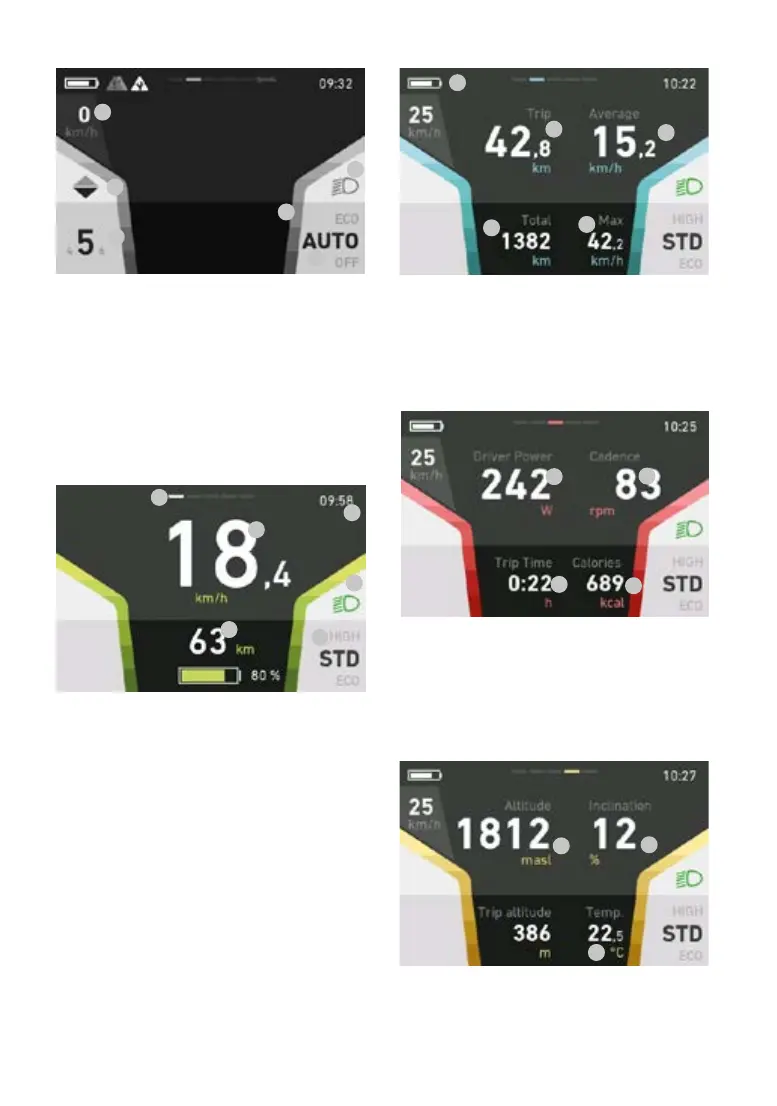
This display remains the same in all views and
shows you key settings and information on the
vehicle and the current journey.
1. Speed
2. Gear recommendation
3. Gear display
4. Light (high/low beam)
5. Current assistance level
6. Coloured bars: Assist power indicator
Drive
1.
2.
3.
4.
5.
6.
1. Current speed
2. Remaining range/battery level based on the
current assistance level (battery is red if
remaining range is below 20%)
3. Light (high/low beam)
4. Current assistance level
5. Time
6. Current screen top-centre bar
Info
1.
2.
3.
4.
5.
1. Charging status (top-left symbol)
2. Distance travelled on current tour (trip)
3. Average speed on current tour (trip)
4. Total distance travelled (cannot be reset)
5. Maximumspeedoncurrenttour(trip)
Fitness
1.
2.
3.
4.
1. Rider’s current power
2. Rider’s current cadence
3. Ride time on current tour (trip); ride time
alone is measured (no speed/standstill =
not added to ride time)
4. Energy consumed in kilocalories
Data
1.
2.
3.
1. Elevation
2. Route gradient in per cent
3. Ambient temperature



 To Next Page