29
EN
5.16 Units menu
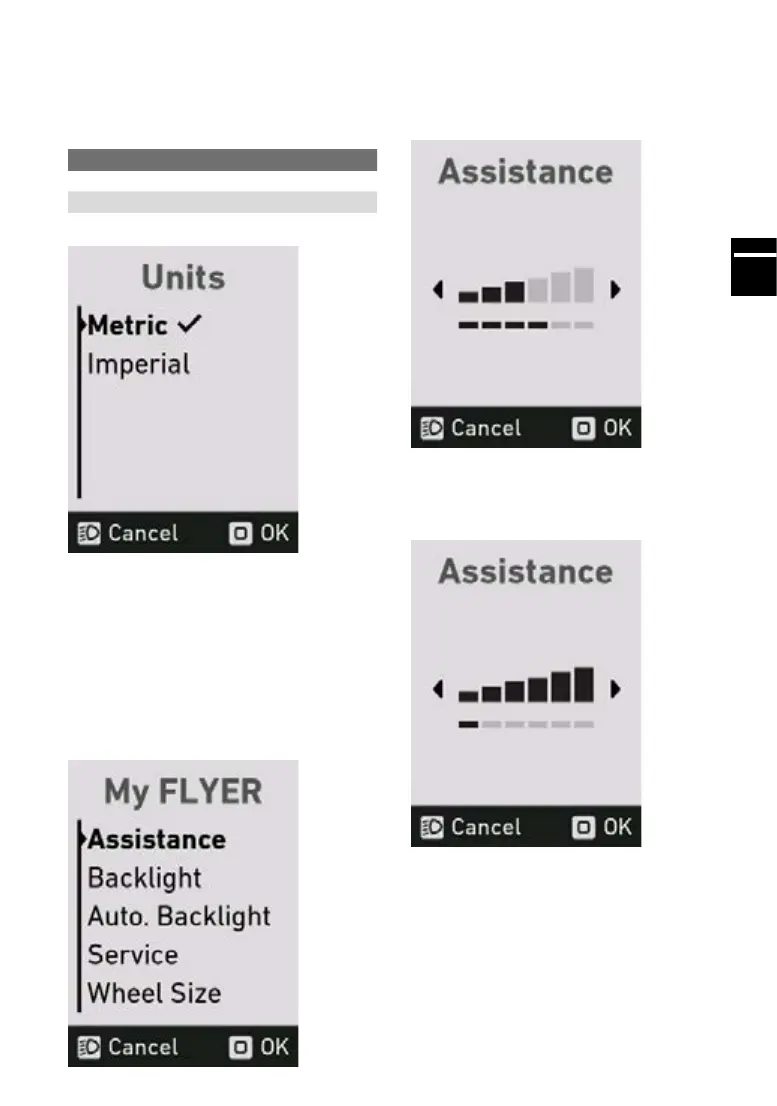
In the units menu, you can switch between the
metric and British system. The following units will
be changed:
Metric British
Distance Kilometres Miles
Speed km/h mph
The check mark indicates which units are current-
lyapplied.Toconrmtheselectedunit,pressthe
“Mode” button.
5.17 Assistance menu
You can individually adjust the amount of as-
sistance for your FLYER e-bike.
In the “My FLYER” menu, select the “Assistance”
sub-menu by pressing the “Mode” button.
In the assistance menu, you can use the + and –
buttons to set the desired assistance level. The
level of assistance is always set for all three levels
(“Eco”, “Standard” and “Auto”). The motor always
runs with full assistance at the “High” level.
Ifallthebarsonthedisplayareblack,themaxi-
mum possible amount of assistance is set in the
assistance levels “Eco”, “Standard” and “Auto”.
This setting has a lower range as a result.
If only the bar at the far left of the display is black,
the minimum amount of assistance is set in the
assistance levels “Eco”, “Standard” and “Auto”.
Thissettingenablesthemaximumpossiblerange
to be achieved in the “Eco” assistance level.



 To Next Page