16
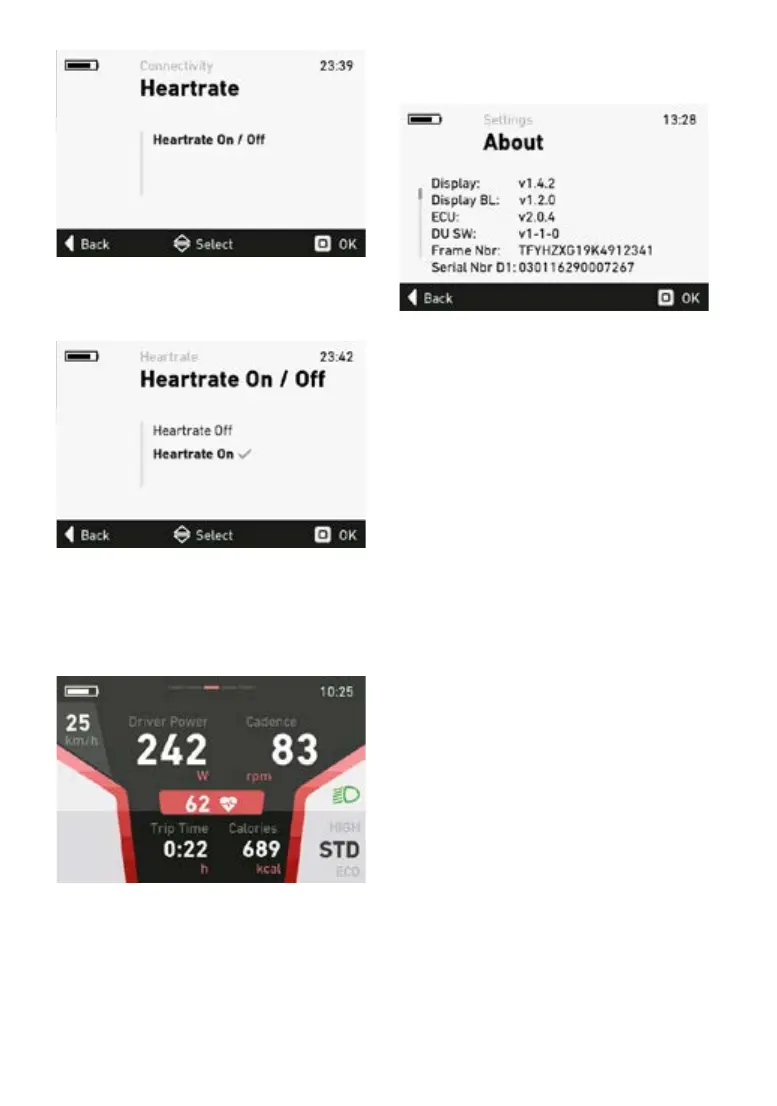
Inthe“PulseOn/O”menu,selectthesub-menu
“Pulse On” by pressing the “OK” button. The pul-
se function is now activated.
When the pulse function is activated, the FLYER
e-bike automatically searches for the nearest
Bluetooth pulse band or pulse watch and estab-
lishes a connection.
To deactivate the pulse function, select the sub-
menu“PulseO”bypressingthe“OK”button.
If a pulse measuring device is connected to the
FLYER e-bike, the pulse values are shown on the
tnessscreen.
5.5.20 About menu
The About menu shows the current software
versions of the individual components.
5.5.21 Connection with Android smartphones
Installing the komoot app
You can download the komoot app from the Goo-
gle Play Store. You will also have to install the
„komoot Connect” app from the Play Store.
If you cannot nd the „komoot Connect” app in
the store, your smartphone does not support this
function. It will not be possible to pair it with your
e-bike.
Setting up the komoot app and pairing it with
youre-bike
Once both apps have been installed, you must
createauserprolewithkomoot.
You can register directly in the app or via the ko-
moot website:
www.komoot.de/



 To Next Page