9
EN
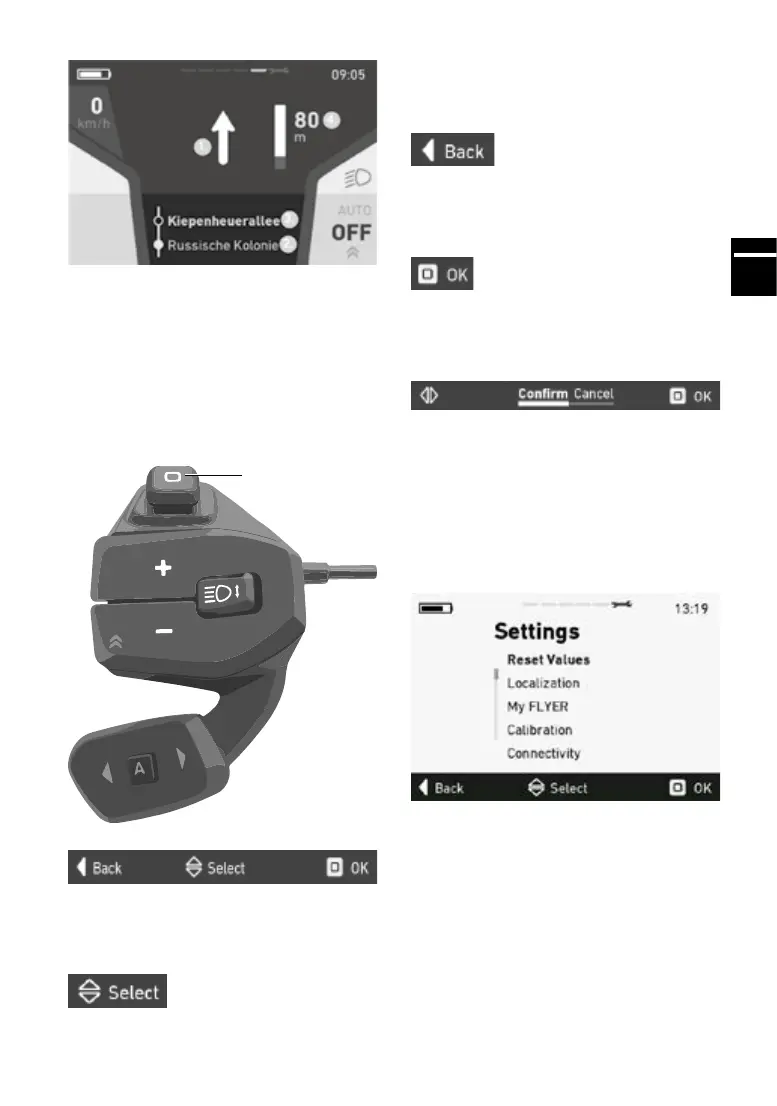
Navi
3.
1. Navigation direction
2. Current road
3. Road ahead
4. Distancetonextnavigationpoint
5.3 Menu navigation and settings
Use the joystick to navigate through the menu.
Thenavigationbarthatappears(gure1indi-
cates which joystick movement triggers which
action.
5.3.1 Select menu
Move the joystick up and down to select the cor-
responding menu.
Joystick
5.3.2 Quit menu
Move the joystick to the left to return to the pre-
vious menu. Moving the joystick to the left in the
main menu will close the settings menu and the
data screen will be displayed.
5.3.3 Select menu item
Press the centre of the joystick to jump to the se-
lected menu.
5.4 Conrmingaselection
Whenyouconrmaselection,thefollowingview
is shown in the navigation bar:
Move the joystick left or right to select the desired
function.Pressthejoysticktoconrmorrejectthe
input.
5.5 Settings menu
Open the settings menu by navigating all the way
to the right with the joystick. You can only open
the settings menu while stationary.



 To Next Page