15
EN
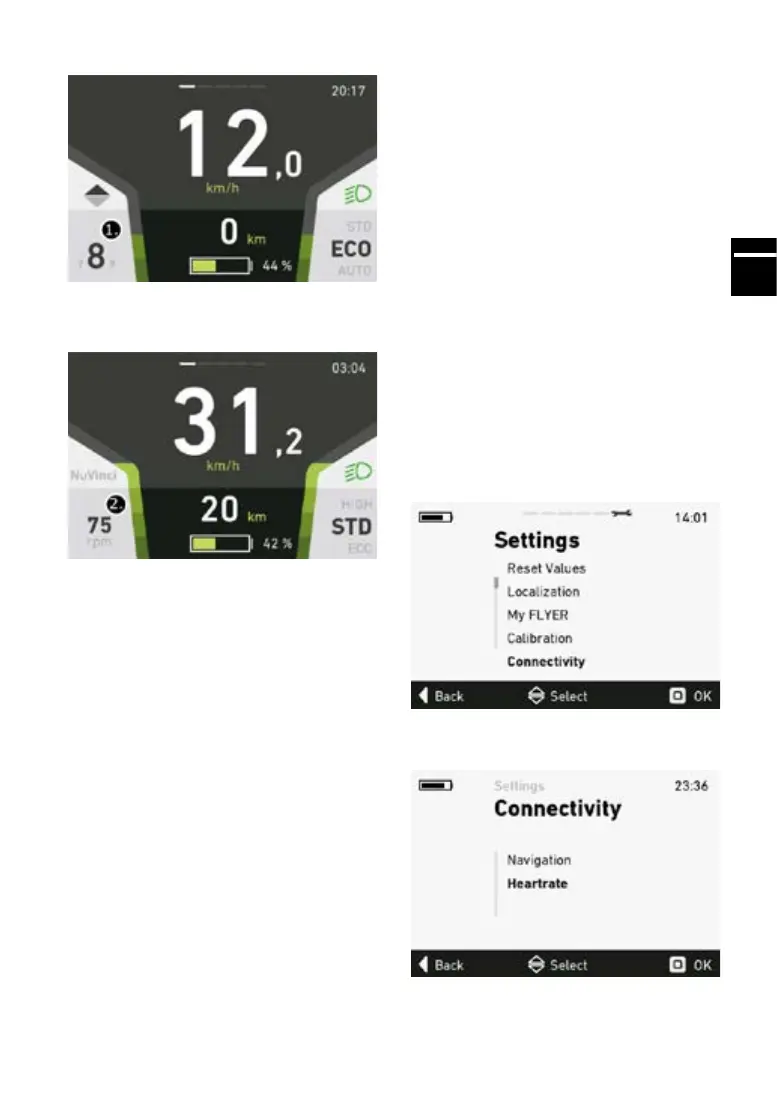
1. Currently selected gear (manual mode)
2.Conguredpedalfrequencyinrevolutionsper
minute. (automatic mode)
5.5.18 komoot navigation
The hard copy of the user manual may not be
consistent with the content on your smartphone.
Komoot continuously works to keep its app up-
to-date. We therefore reserve the right to publish
changes to the connection with komoot directly on
ourwebsite.Youcanndthelatestversionhere:
www.yer-bikes.com/navigation/
The outdoor navigation app komoot enables you
to use your FLYER e-bike as a navigation device.
This function is only available with the FLYER D1
display and in conjunction with a smartphone.
The procedure for starting up the app will dier
depending on whether you have an Android-ba-
sed smartphone or an iPhone.
Firstly the start-up sequence for Android smart-
phones will be shown below. The start-up sequen-
ceforiPhonesisdescribedinthenextchapter
Briefguide
1. Install the komoot app on your smartphone and
create your own komoot account, either in the
app itself or online at www.komoot.de.
2. Collect your komoot voucher code at
www.yer-bikes.com/navigation/
3. Activate komoot’s full range of maps using your
voucher code: www.komoot.de/g.
4. Connect your FLYER e-bike to the komoot app
andenjoyyourrsttourwithkomoot.
5. Please refer to section 5.5.19 onwards of the
user manual for more detailed information.
5.5.19 Pulse
Your FLYER e-bike can be connected to a pulse
measuring device via Bluetooth. Follow the steps
below to activate the pulse function. This function
is only available in conjunction with the FLYER
D1 display.
In the “Settings” menu, select the sub-menu
“Connections” by pressing the “OK” button.
n the “Connections” menu, select the sub-menu
“Pulse” by pressing the “OK” button.
In the “Pulse” menu, select the sub-menu “Pulse
On/O”bypressingthe“OK”button.



 To Next Page