24
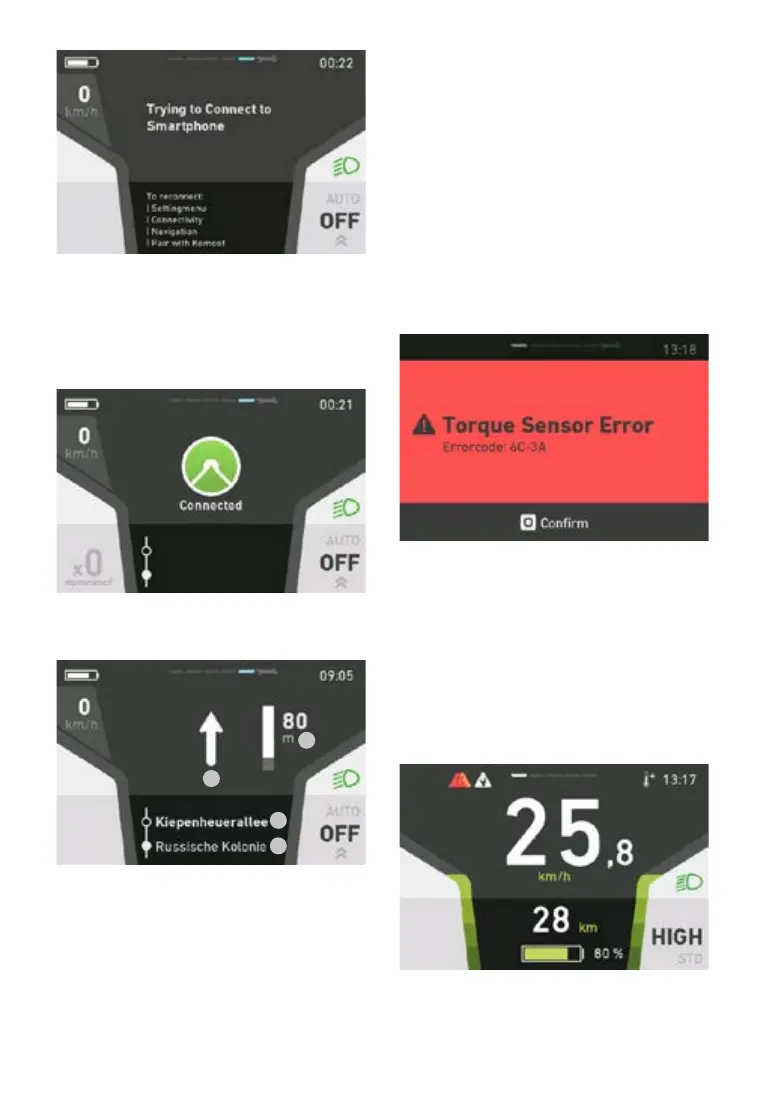
Now launch your desired route on your smartpho-
ne.
Aconrmationmessageappearsoncethee-bike
is connected to the komoot app.
The e-bike is now in navigation mode.
1.
2.
3.
4.
1. Navigation direction
2. Current road
3. Road ahead
4.Distancetonextnavigationpoint
More information on the komoot app:
http://support.komoot.de/
https://www.komoot.de/about/routeplanner
5.5.23 Errordisplay
The parts of the e-bike system are monitored at
all times during use and charging. If an error is de-
tected, an error code will be displayed on the con-
sole. To switch the console back to the standard
display, press the joystick button to acknowledge
the error. If the fault cannot be acknowledged,
troubleshoot it according to the fault table (section
5.7 fault table) or contact your FLYER dealer. De-
pending on the error code, the assistance is auto-
matically stopped as necessary. You can continue
to use the bicycle normally without the drive even
if the assistance function is no longer being pro-
vided bythemotor.Youcan nd information on
the individual error codes in the error table.
The error code gives a precise description of the
error.
5.5.24 Messagedisplay
At the top left in red: Error message (error was
displayed and acknowledged. Rectify the error
and restart the system)
At the top left in white: Service message (service
recommendation from your specialist retailer)
At the top right in white: Motor overheated (Mes-
sage “Motor overheated” was displayed. The
motor power is reduced as a protective measure.
You can continue to ride normally.)



 To Next Page