27
EN
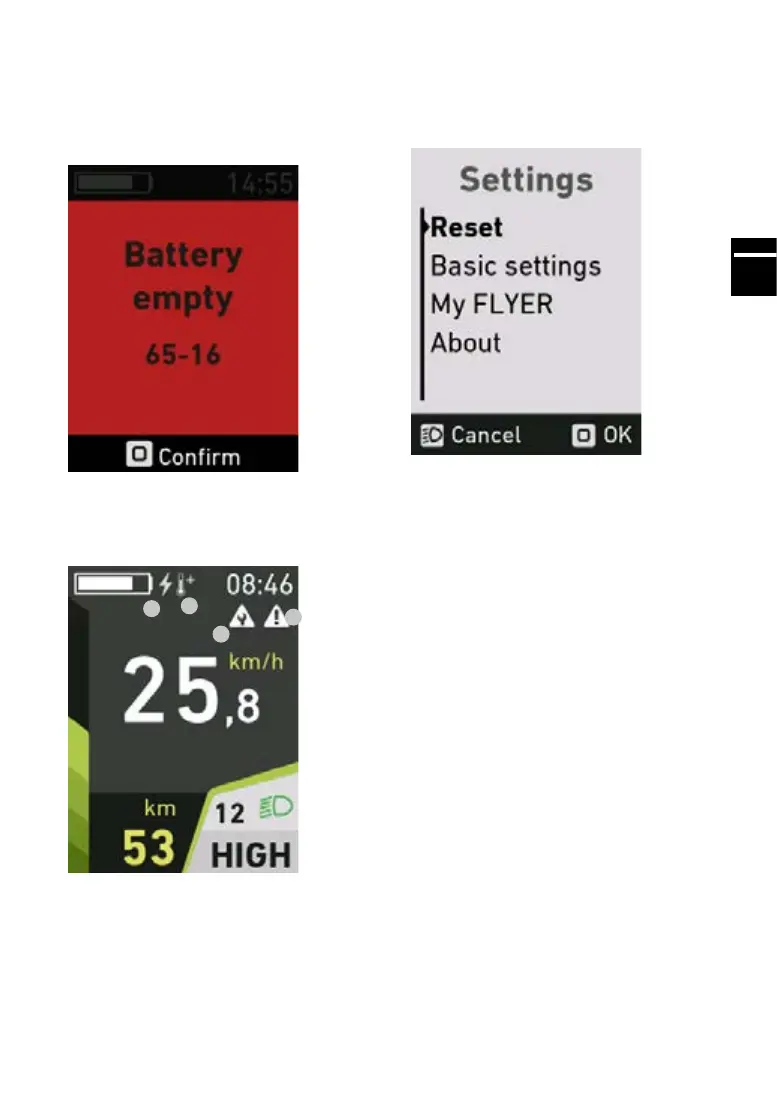
5.8 Errordisplay
Press the “Mode” button to acknowledge the error
display. Once you have acknowledged it, the dis-
play disappears.
The error code gives a precise description of the
error.
5.9 Messagedisplay
Current messages are shown on the main menu
of the display for information purposes.
1.
2.
3.
4.
1. USB charging active
2. Motor overheated (“Motor overheated” warning
was displayed and acknowledged. The motor
power is reduced as a protective measure. Let
the drive unit cool down and restart the system)
3. Service message (service recommendation
from your specialist retailer)
4. Error message (error was displayed and ack-
nowledged. Rectify the error and restart the system)
5.10 Settings menu
Access the settings menu by holding down the
“Mode” button for at least 3 seconds. You can only
open the settings menu while stationary.
5.11 Menu structure
i. Reset
i. Trip Reset
ii. Factory Reset
ii. Basic settings
i. Language
ii. Time
iii. Units
iii. My FLYER
i. Assistance
ii. Light
iii. Automatic light
iv. Service
v. Wheel circumference
vi. Auto-Mode
iv. About
5.12 Menu navigation
Use the + and - assistance level buttons to navi-
gate the menu and congure the values. Press
the “Mode” button to access sub-menus or con-
rmanaction.Pressthelightbuttontoleavethe
current menu.



 To Next Page