17
EN
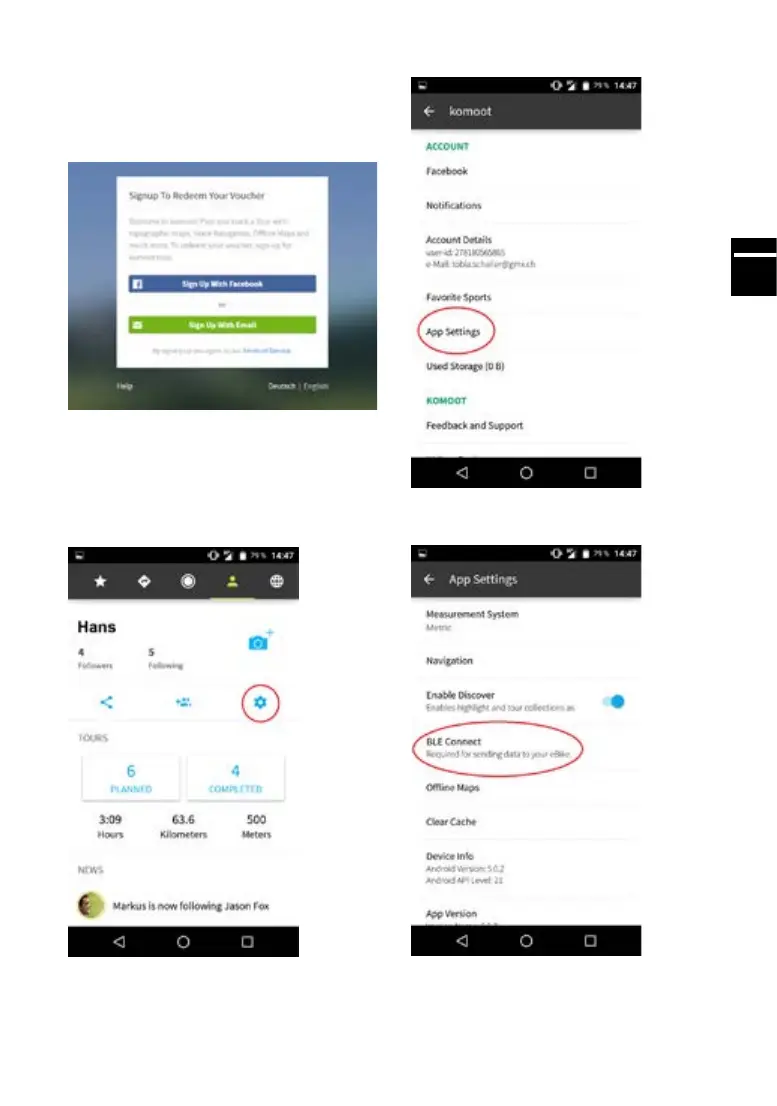
Activatingthemapsusingyourvouchercode
A voucher for the komoot app is included with
your e-bike purchase. Visit our website to collect
yourcode:www.yer-bikes.com/navigation/
You will then receive your voucher code by e-mail,
which you can use to activate the full range of
maps of the world at www.komoot.com/g
You must pair the app with your FLYER e-bike in
order to use the navigation function. Follow the
steps below to establish a connection:
1. Open the komoot app on your smartphone
2.Selectthe“Prole”symbol
3. Select the “Settings” symbol
4. Open the sub-menu “App Settings”
5. Select “BLE Connect”



 To Next Page