Adjusting diaphragm timing for high viscosity reagent dispensing
One way to improve accuracies and CVs for higher viscosity reagent dispensing is by
running the diaphragm chips at a slower rate. By doing so, you will achieve a more
complete filling and emptying of the diaphragms. Slow the timing on the chip by telling
the software that your standard LV or HV silicone chip is actually an LV or HV PFE chip.
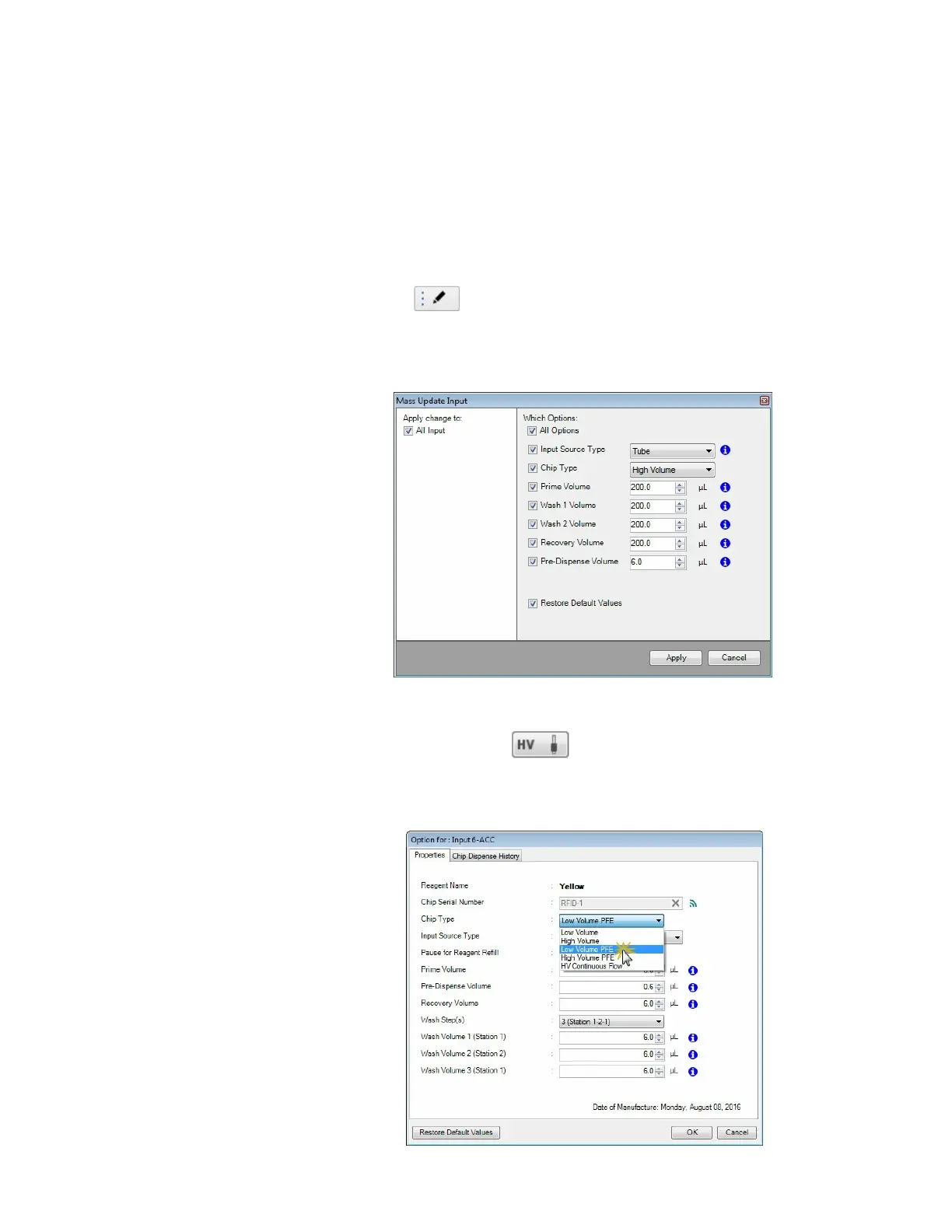
There are two ways to change your chip types:
1. For changing the chip types in all or more than one input items:
a. Go to the Input Control panel and click the Mass Update Input
button .
b. Select Low Volume PFE or High Volume PFE from the Chip Type list
accordingly.
c. Click Apply.
2. To change the chip types individually:
a. Click the Input button next to every reagent name box.
b. Select Low Volume PFE or High Volume PFE from the Chip Type list
accordingly.
c. Click OK.
Low Volume PFE and High Volume PFE Chips
Low Volume PFE and High Volume PFE Chips
MANTIS User's Guide | Chapter 9: Dispensing With the MANTIS



 To Next Page