6. Click to start the dispense or click to run dispense with protocol.
7. The MANTIS will complete your plate dispense design. You may now run
Reagent Recovery (optional). When you're finished dispensing, please clean the
chips.
You can perform a factory reset if you find corrupted data, experience an unexpected
software- or hardware-related error, or accidentally change the MANTIS configuration
data. Resetting the MANTIS software will revert it back to the software version that was
first installed on your MANTIS system. The user data, such as dispense lists, dispense
summaries, plate definitions, protocols, and reagent configurations will be preserved.
Follow the steps below to reset the MANTIS software.
Prerequisites
● You have closed the MANTIS software.
● You have the Factory Data folder that contains all of the required files on your
MANTIS USB drive (i.e. Usb Drive:\MANTIS\Data\Factory Data).
To perform the factory reset:
1. Go to Usb Drive:\MANTIS\Bin.
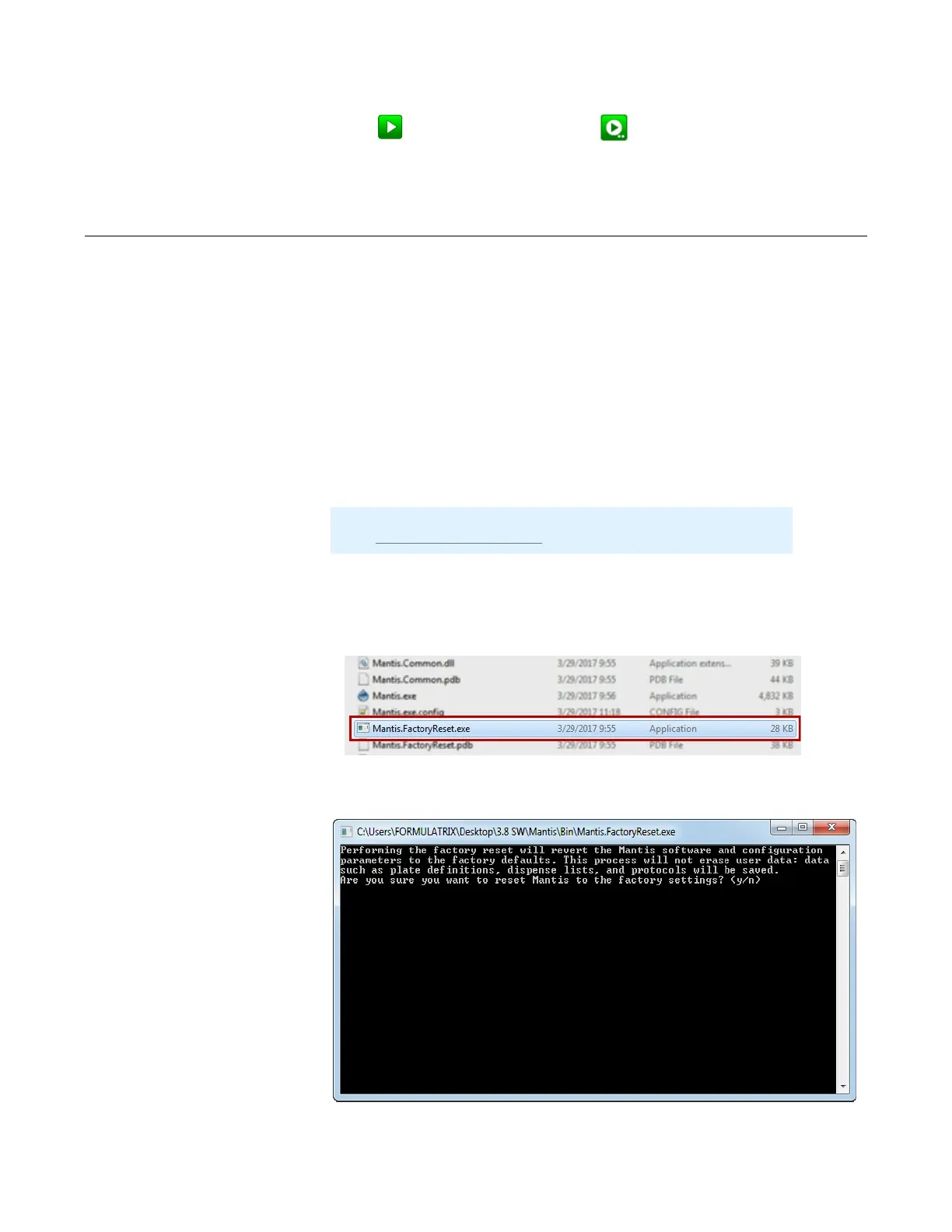
2. Locate Mantis.FactoryReset.exe.
3. Double-click the file. The console application window appears on your screen.
Performing a MANTIS Factory Reset
Note: If you do not have the folder, contact our support by emailing
us at support@formulatrix.com.
MANTIS User's Guide | Chapter 9: Dispensing With the MANTIS
The MANTIS Factory Reset Application
The MANTIS Factory Reset Application



 To Next Page