If your lab is equipped with both the FORMULATOR and MANTIS, the two liquid handlers
can be integrated so that non-precious reagents are dispensed with the FORMULATOR,
and precious reagents are dispensed with the MANTIS.
Prerequisites
● You have configured MANTIS-FORMULATOR integration. For more Information,
please see Configuring MANTIS-FORMULATOR Integration page 104.
● You have sent reagents from the FORMULATOR software to the MANTIS
software.
● The plate definition names are the same in MANTIS as they are in FORMULATOR.
● If you are dispensing some reagents with the FORMULATOR, you have already
performed this part of the process.
To run FORMULATOR experiment designs with MANTIS:
1. Place the MANTIS chips into the chip pallets.
2. Attach the reagent tubes or pipette tips to the ingredient inputs at each chip.
3. Place the microplate on the plate holder.
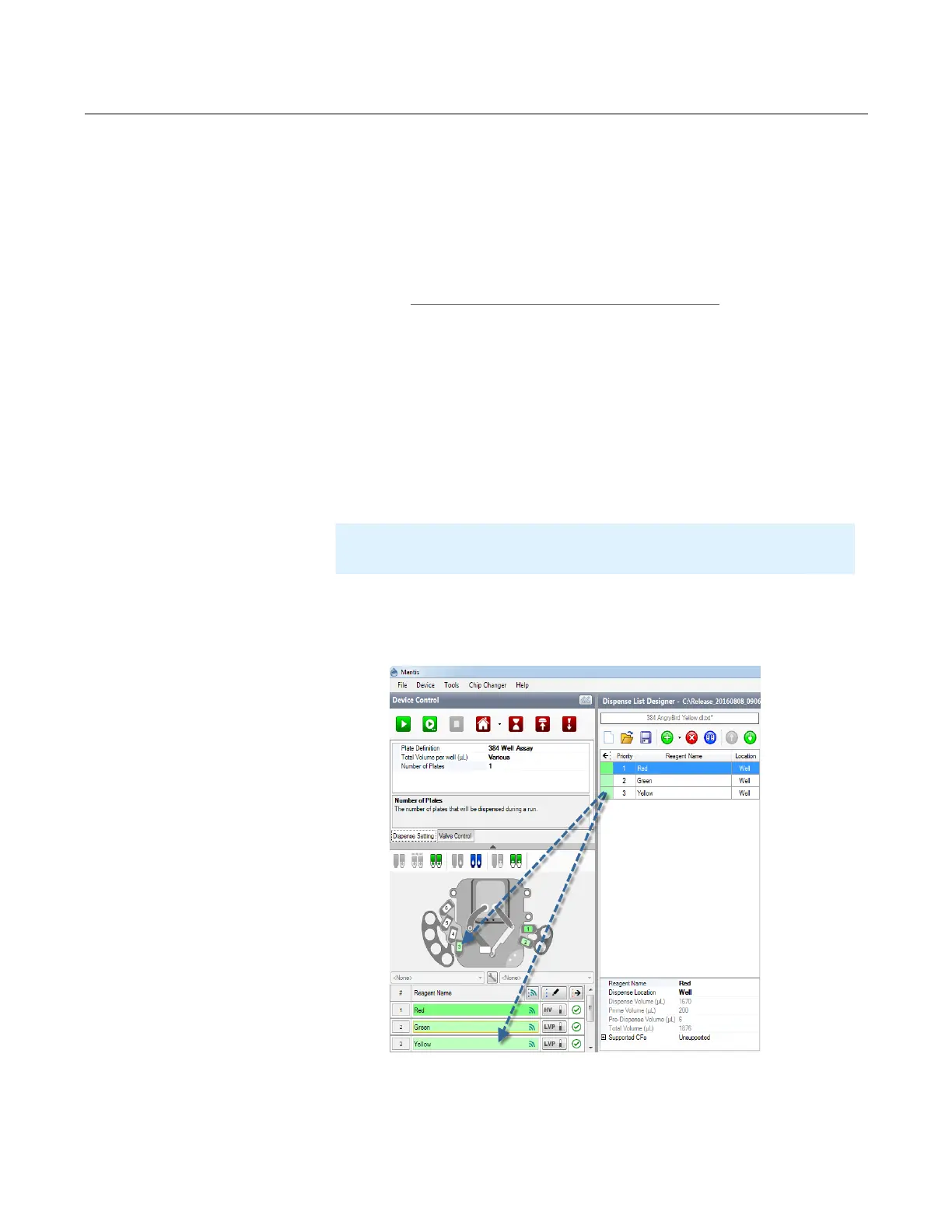
4. Drag the reagents from the Dispense List Designer panel to the corresponding
inputs.
5. Attach your reagents to the MANTIS chips (if you are using pipette tips, you will
need to remove the black adapter from the chip’s input first).
Dispensing FORMULATOR
®
Screen Builder Plate Designs
Note
: If you are using a pipette tip, you will need to remove the black adapter
from the chip’s input.
MANTIS User's Guide | Chapter 9: Dispensing With the MANTIS
Drag Reagent to the Device Control



 To Next Page