6-5
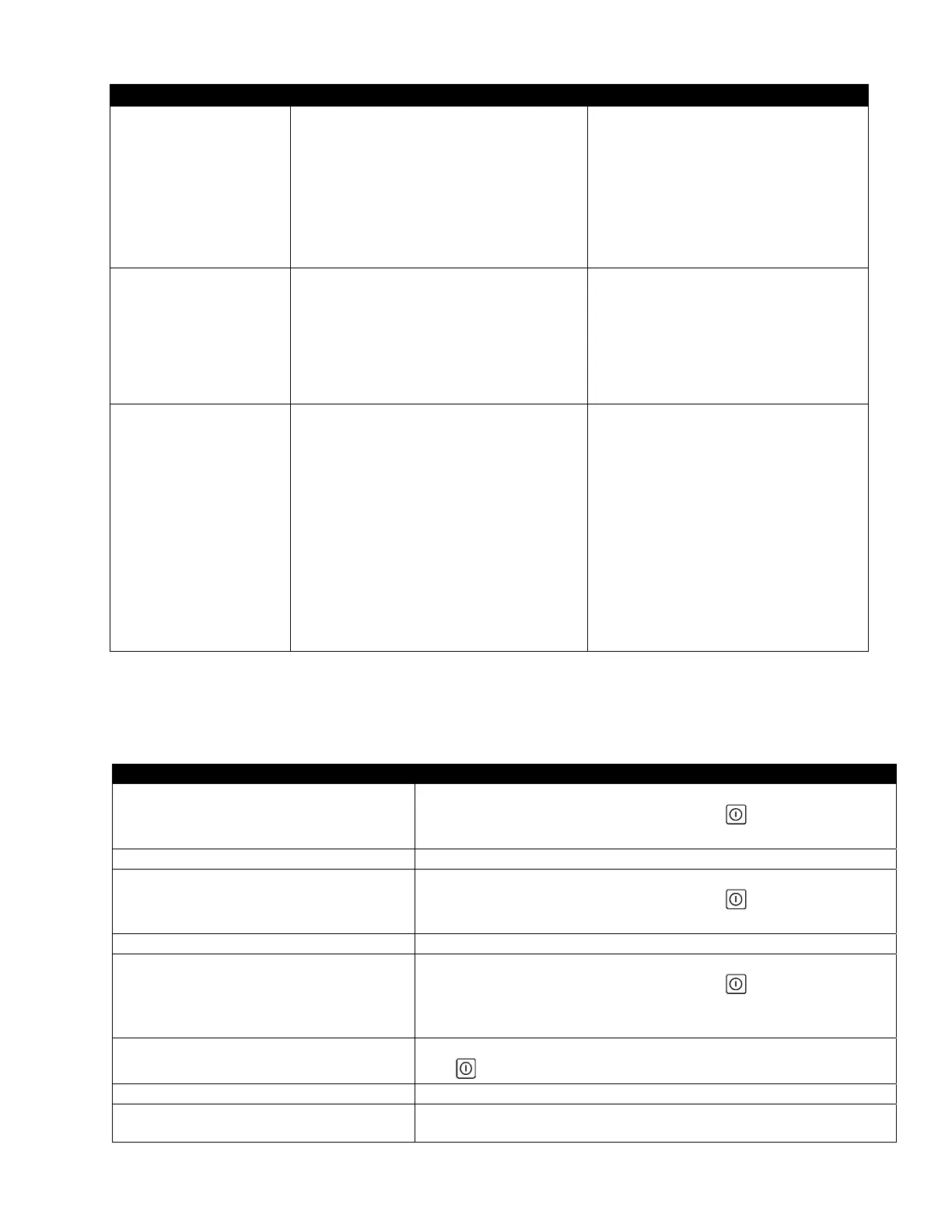
Problem Probable Causes Corrective Action
FQ4000 display shows
INSERT pan.
A. Filter pan is not fully set into fryer.
B. Missing filter pan magnet.
C. Defective filter pan switch.
A. Pull filter pan out and fully reinsert into
fryer. Ensure controller does not display
P.
B. Ensure the filter pan magnet is in place
and replace if missing.
C. If the filter pan magnet is fully against
the switch and controller continues to
display INSERT PAN, switch is possibly
defective.
Auto filtration, OQS filter
won’t start.
A. Oil level too low.
B. Oil temperature is too low.
C. Filter Pan out.
D. Filtration in recipe settings is set to OFF.
E. Filter relay has failed.
A. Ensure oil level is at the top oil fill line (at
the top oil level sensor).
B. Ensure the oil temperature is at setpoint.
C. Ensure controller does not display P.
Ensure the filter pan is fully seated into
fryer. Power cycle the fryer.
D. Set filtration in recipes to ON.
E. Call your FAS for assistance.
Filter Pump runs, but oil
return is very slow.
A. Clogged filter pad/paper.
B. Improperly installed or prepared filter pan
components.
C. Pre-filter screen may be clogged or not fully
tightened.
A. Ensure the filter is not clogged. If so
replace the filter.
B. Remove the oil from the filter pan and
replace the filter pad/paper, ensuring
that the filter screen is in place under
the pad/paper.
Verify, if using a pad, that the rough side
is facing up.
Verify that O-rings are present and in
good condition on filter pan connection
fitting.
C. Clean pre-filter (see section 4.5.4) and
ensure it is tightened with the attached
wrench.
6.2.4.1 Incomplete Filtration
Should the auto filtration procedure fail an error message is generated. Follow the instructions on the screen to return
the oil and clear the error.
DISPLAY ACTION
IS VAT FULL?
1. Press the √ (check) button if the vat is full to continue. The
controller returns to idle cook mode or . Press X if vat is not
filled completely.
FILLING IN PROGRESS 2. No action required as the pump runs.
IS VAT FULL?
3. Press the √ (check) button if the vat is full to continue. The
controller returns to idle cook mode or . Press X if vat is not
filled completely.
FILLING IN PROGRESS 4. No action required as the pump runs.
IS VAT FULL?
5. Press the √ (check) button if the vat is full to continue. The
controller returns to idle cook mode or . Press X if vat is not
filled completely. If this is the sixth consecutive sequence of
incomplete filtration skip to step 10.
CHANGE FILTER PAPER?
6. Press the √ (check) button to continue. Pressing X advances to
.
REMOVE PAN 7. Remove the filter pan.
CHANGE FILTER PAPER
8. Change the filter paper/pad and ensure the filter pan has been
pulled forward, out of the cabinet for at least 30 seconds. Once











 To Next Page