1-39
1.15 Loading and Updating Software Procedures
Updating the software takes approximately 30 minutes. The software only needs to be loaded in ONE controller or the
far left controller in a battery and it will update all the controllers and boards in the system. Press the TEMP button to
check current 3000 and ATO software version. Remove the bezel by removing the screws under the bottom of the
bezel. Remove the two screws securing the controller allow it to swing down. Remove the two screws on the left side
cover plate of the 3000 controller or far left controller in a battery.
To update the software, follow these steps carefully:
Left Display Right Display Action
OFF OFF
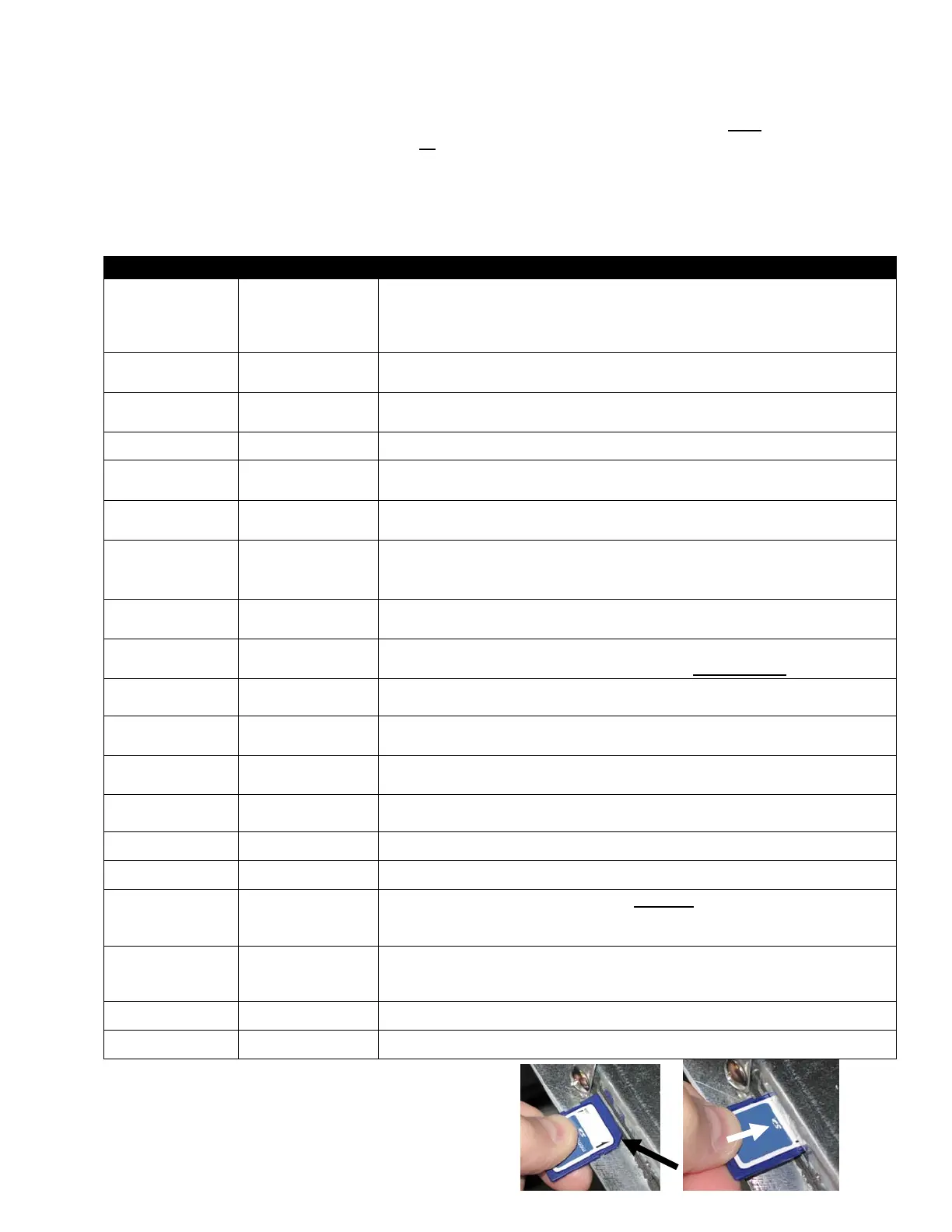
With the controller folded down, insert the SD card, with the contacts facing
down and the notch on the bottom right (see Figure 7 and 8), into the slot on the
left side of the 3000 controller. ENSURE THE CARD IS FULLY
INSERTED INTO THE SD CARD SLOT.
UPGRADE IN
PROGRESS
WAIT
None required.
CC
UPDATING
PERCENTAGE
COMPLETE
None required.
BOOT
BLANK
None required.
CALL TECH
If this message is displayed, press the FILTER button and the software load will
continue.
UPGRADE IN
PROGRESS
WAIT
None required.
IF_COOK
HEXand
IF_aTO HEX
PERCENTAGE
COMPLETE
None required.
REMOVE SD
CARD
100
Remove the SD card using the fingernail slot on the top of the SD card.
CYCLE
POWER.
BLANK Cycle the control power using the hidden reset switch under the far left control
box. ENSURE THE SWITCH IS HELD FOR 10 SECONDS.
BOARD ID
Zero or a number
from 1-4
Press the IO (Power) button.
System
type
OCF30
Press the or to choose correct fryer type. OCF30 (Frymaster)
System
type
OCF30 Press . Ensure correct fryer type is displayed.
TYPE
GL30 Press the or to select proper fryer model. One of several fryer models may
be displayed.
TYPE
GL30 Once proper fryer model is displayed, press .
EXIT EXIT
Press the
(check) button.
OFF OFF
With the controller displaying OFF, VERIFY software update by pressing
the TEMP button to check updated 3000 version on each controller. 3000
should display software version 40.0159.03 for 3000 and 35.0157.00 for ATO.
OFF OFF
Once the software has been updated and the versions are correct, replace the
cover and screws covering the SD card slot. Replace the screws attaching the
controller and replace the bezel and screws.
OFF OFF
Using the instruction sheet 819-6806, perform tech mode setup and vat setup.
OFF OFF
Set the current date and time using instructions 819-6806.
Fi
ure 7 Fi
ure 8






 To Next Page