8 GPSMAP 5000 Series Owner’s Manual
Using Charts
USinG
ChartS
Navigate To—allows you to navigate to the selected location (page 6).
Create Waypoint—marks a waypoint at the pointer location (page 23).
Information—allows you to view tide (page 29), current (page 29), celestial (page 30), weather (if
available, see page 53), or chart information near the pointer.
You can change the position of the pointer by touching and dragging it to the desired location.
Accessing Additional Object Information
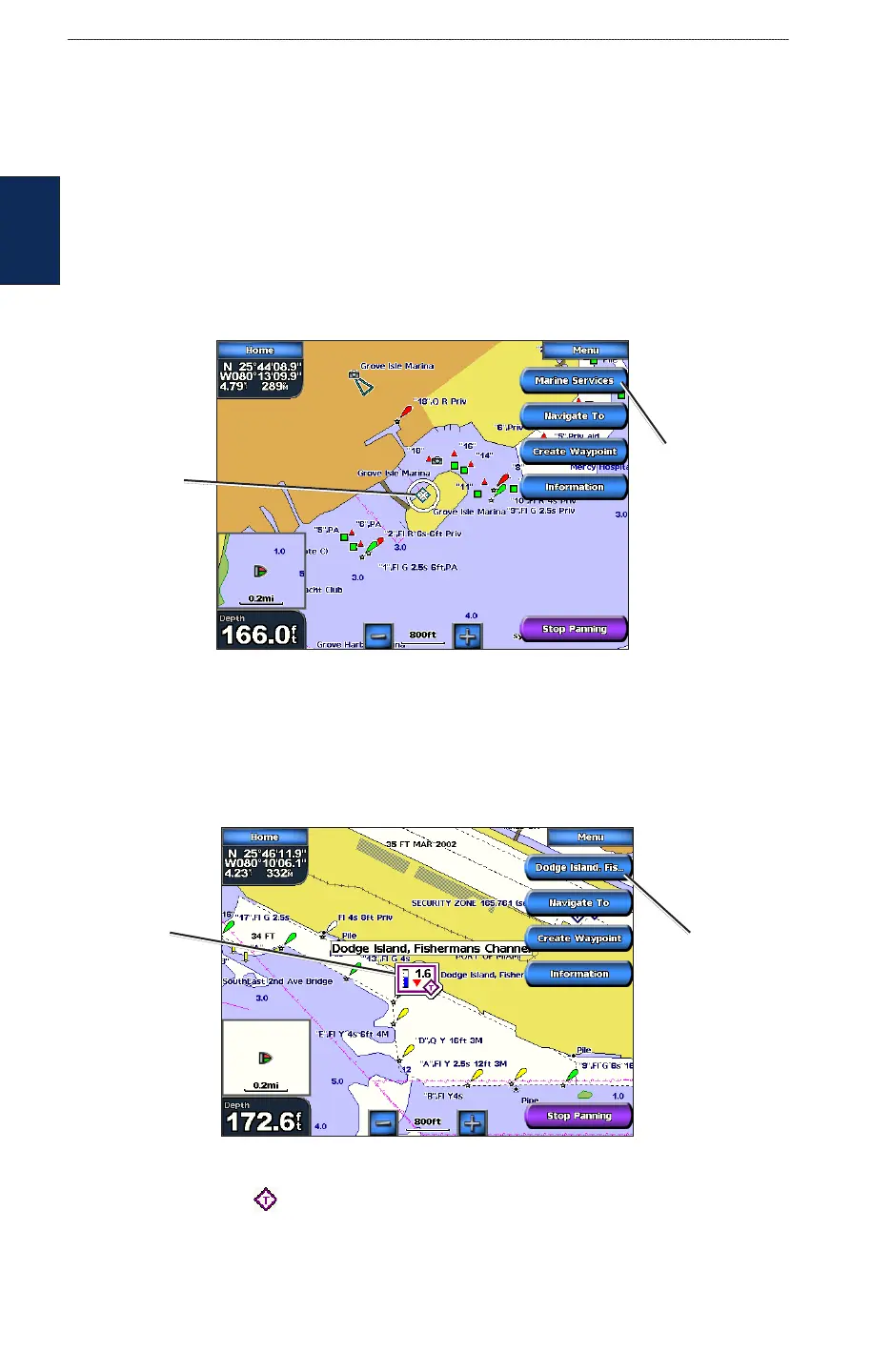
Touch an item on the screen to view information about map items, waypoints, weather (if available),
and charts. Touch the button with the item’s name to view the information.
Object Selected on a GPSMAP 5208
Selected
item
Additional
object
information
Viewing Tide-Station Information
Tide-station information appears on the chart with a detailed icon showing the relevant tide level.
You can view an in-depth graph for a tide station to help predict the tide level at different times or on
different days.
Tide level
Detailed
tide station
information
Tide Station Selected on a GPSMAP 5208
Touch a tide station icon ( ), then touch the button with the station name (or Review if more
than one item is in the vicinity) to view a detailed tide graph. For more information about tides, see
page 29.



 To Next Page