JF-240UV User Manual
112
The required dimension of braille sign differs according to the regulations in different countries. To
meet various requirements, users can manually define the height of a cell to create the sign that
complies with local regulation.
The formula for the calculation of the height of a cell is (b x 2) + e, where b means “Vertical dot to
dot (mm)” and e means “Dot base diam. (mm)”, as shown in the table above.
Take an example of how to calculate the height of a cell based on American Standard Sign:
According to “American Standard Sign”, the value of b is between 2.3mm to 2.5mm, defines a value
of b as 2.5mm; the value of e is between 1.5mm to 1.6mm and defines a value of e as 1.6mm, then
applies the values of b and e to the formula to get the result:
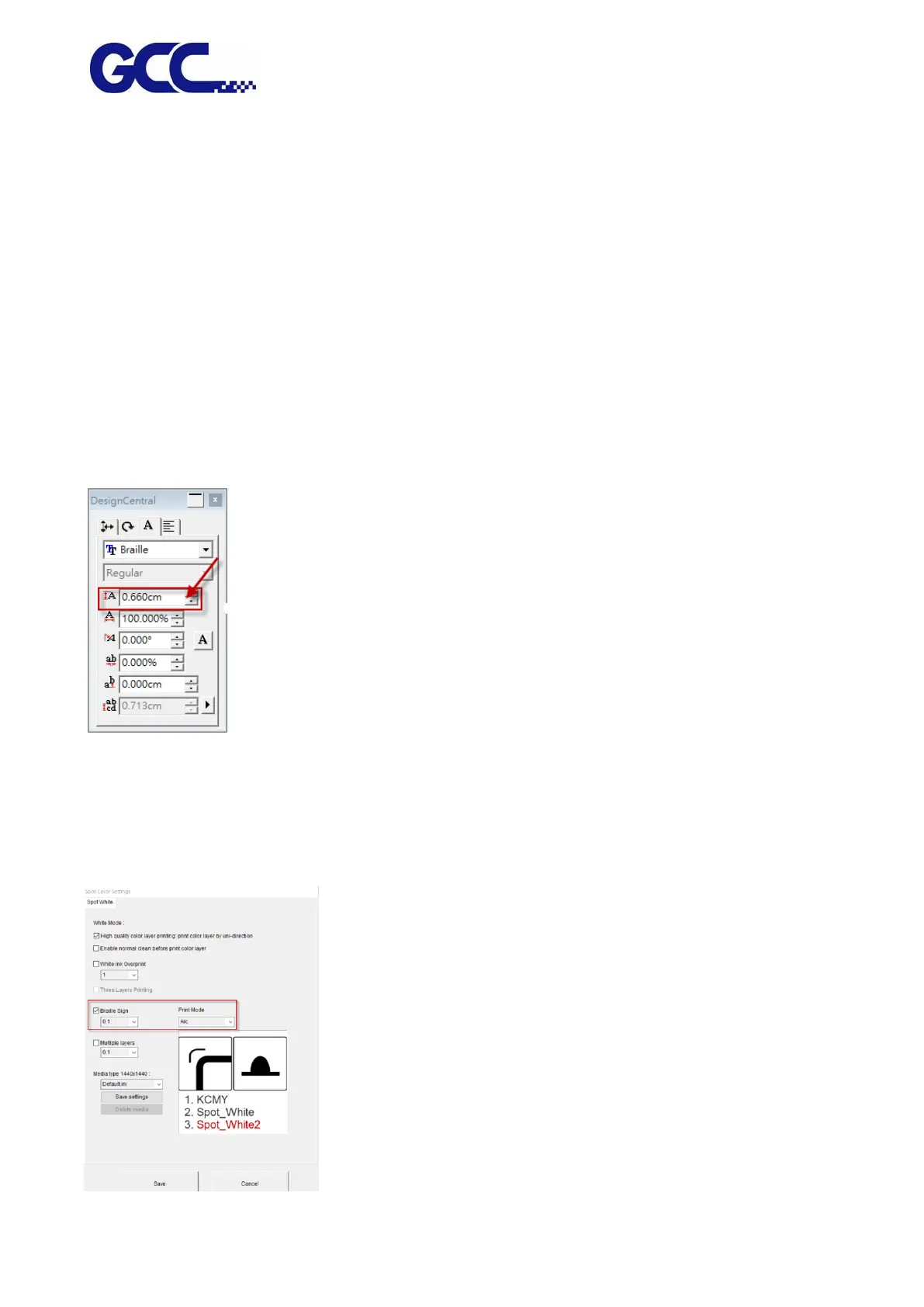
b = 2.5 mm, e = 1.6mm; formula (b x 2) + e = (2.5 x 2) + 1.6 = 6.6 (mm)
Step 1 Set cell height to 6.6mm in DesignCentral window in FlexiPRINT GCC EDITOR.
Step 2 Refer to Chapter 4.7.2 “How to set FlexiPRINT GCC Editor for color-white/white-color/
color-white-color” to complete the settings.
Step 3 Under Spot Colors Settings window, tick “Braille Sign” and select the dot height from the
drop down menu and press Save. The setting is complete.






 To Next Page