JF-240UV User Manual
134
Step 2. Use a magnify lens to observe that Magenta line and the Black line are aligned at number
“-3” line (as Example 2), please keep a record on the number where two lines are aligned.
Step 3. Use the same method to observe and record each color line aligned with Black color line.
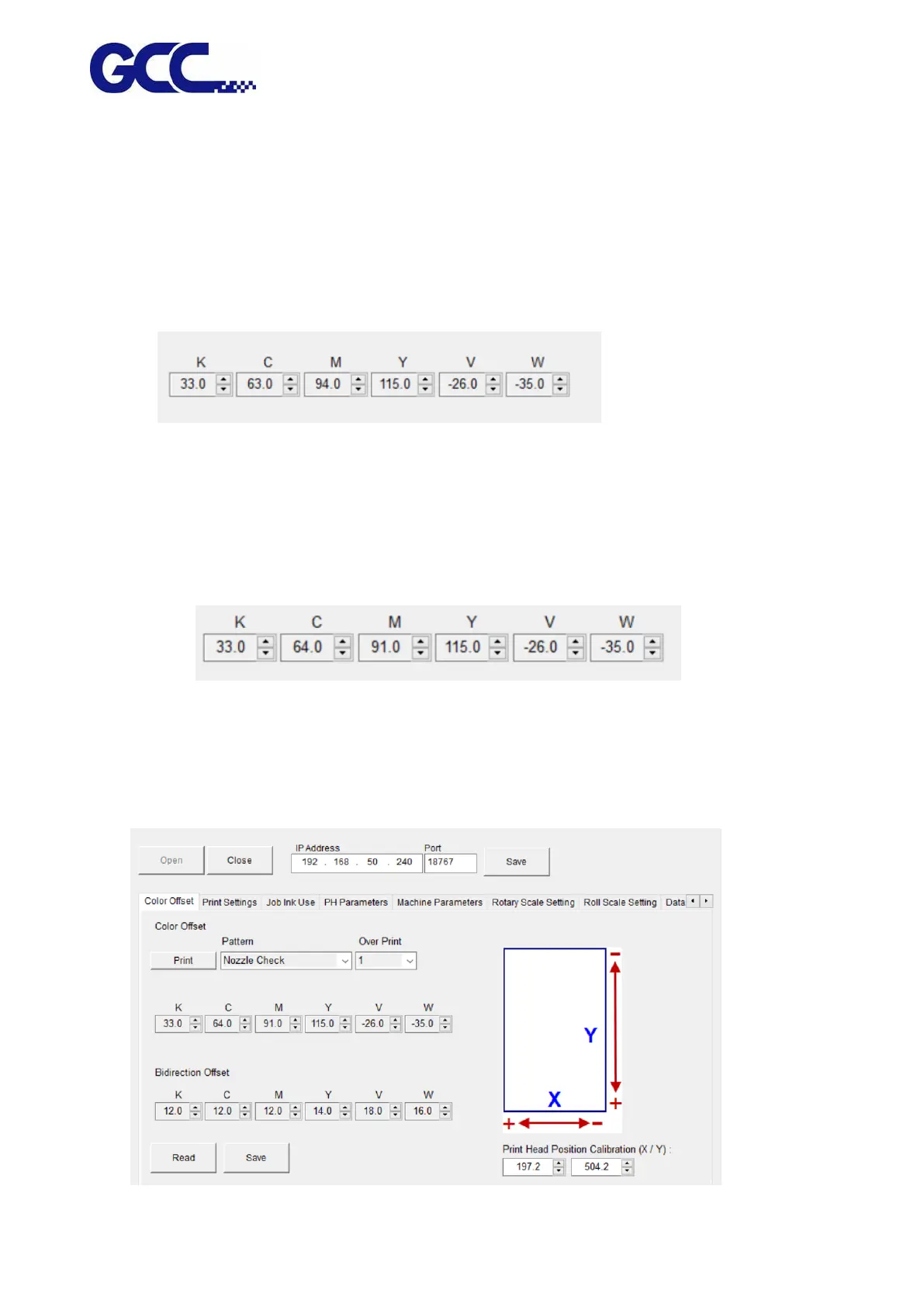
Step 4. After record all the numbers, go to the control interface of “Unidirection Offset「K、C、M、
Y、LC、LM、W、V」” for JF-240UV VCLD software (as shown below) to conduct horizontal
fine tuning.
In the Example 1: “1” indicates that the horizontal offset for the color Cyan need to be increased 1.
In the Example 2: “-3” stands for that the horizontal offset for the color Magenta need to be
decreased 3.
For example: M=94-3=91 (Enter 91 in JF-240UV (VLCD)
C=63+1=64 (Enter 64 in JF-240UV (VLCD)
Step 5. Use the same approach to calibrate other inkjet heads.
Step 6. Use this method to enter the offset values for all the inkjet heads (as shown below), then
press Save to update the settings.






 To Next Page