27
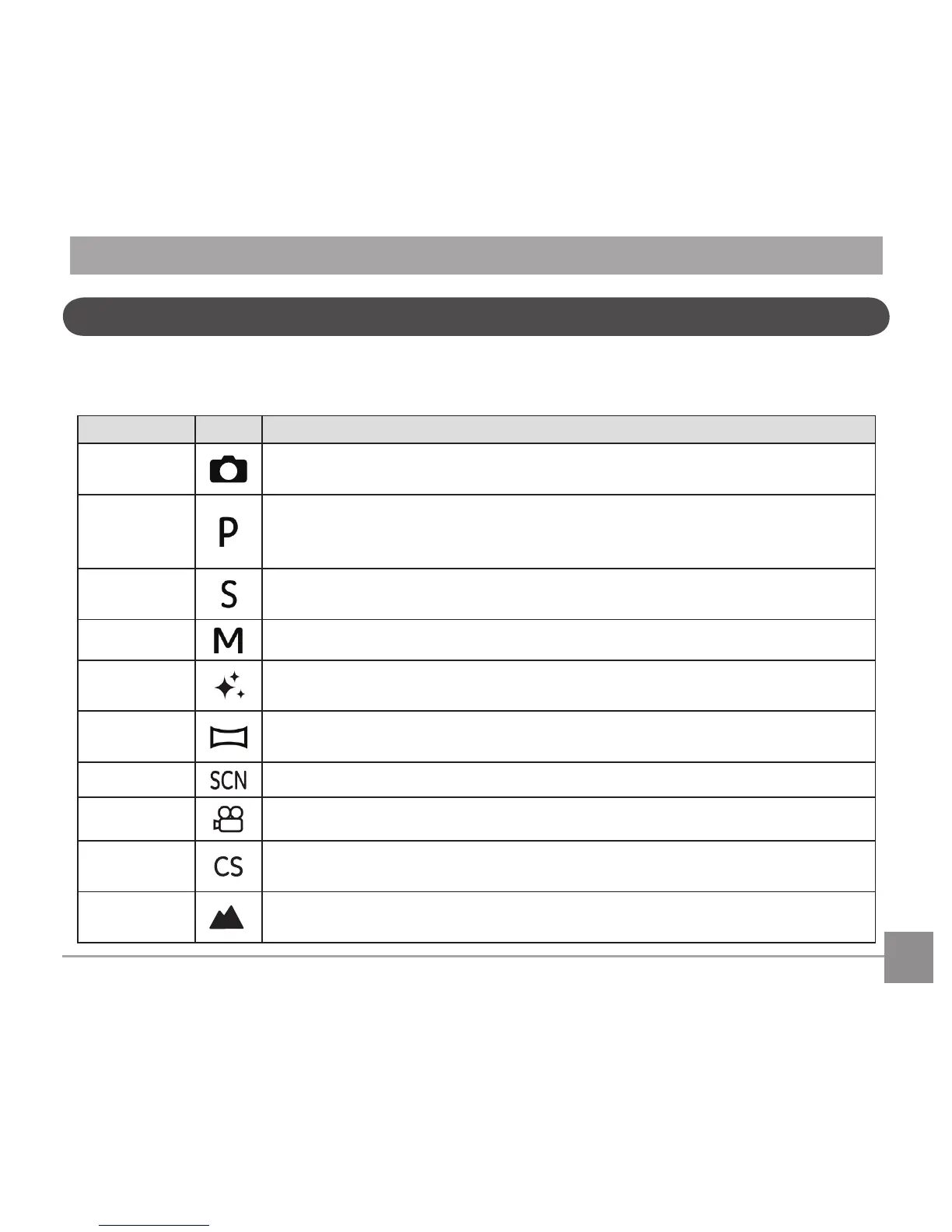
Using the Mode Dial
ThisCameraprovidesaconvenientmodedialthatallowsyoutomanuallyswitchbetweendierentmodes
with ease. The available modes are listed below:
Mode Name Icon Description
Auto Mode
In this mode, the optimal conditions for taking pictures will be set based on the
subject and environment. It is the most commonly used mode for taking pictures.
Program AE
Underdierentscenes,theusercanswitchtheISOandEVvalueaccordingto
personal preference, the camera can automatically set the shutter speed and
aperture value.
Shutter
priority
Settingallowsyoutochooseaspecicshutterspeedsothecamerawilladjust
theapertureautomaticallytoensurecorrectexposure.
Manual Mode Manyofthecamerasettingscanbeconguredmanuallyinthismode.
Face
Beautier
This mode automatically enhances facial features with skin softening touches
and eye brightening capabilities.
Panorama
Mode
In this mode, up to 4 frames can be stitched together to create a single
panoramic photo.
Scene Mode Choosefrom22dierentpre-setscenetypesandeectsforyourphotos.
Movie Mode Record videos.
Custom
Settings
The user can store the frequently used shooting modes and parameters and
switch to this mode for quick adjustment.
Landscape
Mode
For landscapes and outdoor shots. Vivid reproduction of green and blue.



 To Next Page