7
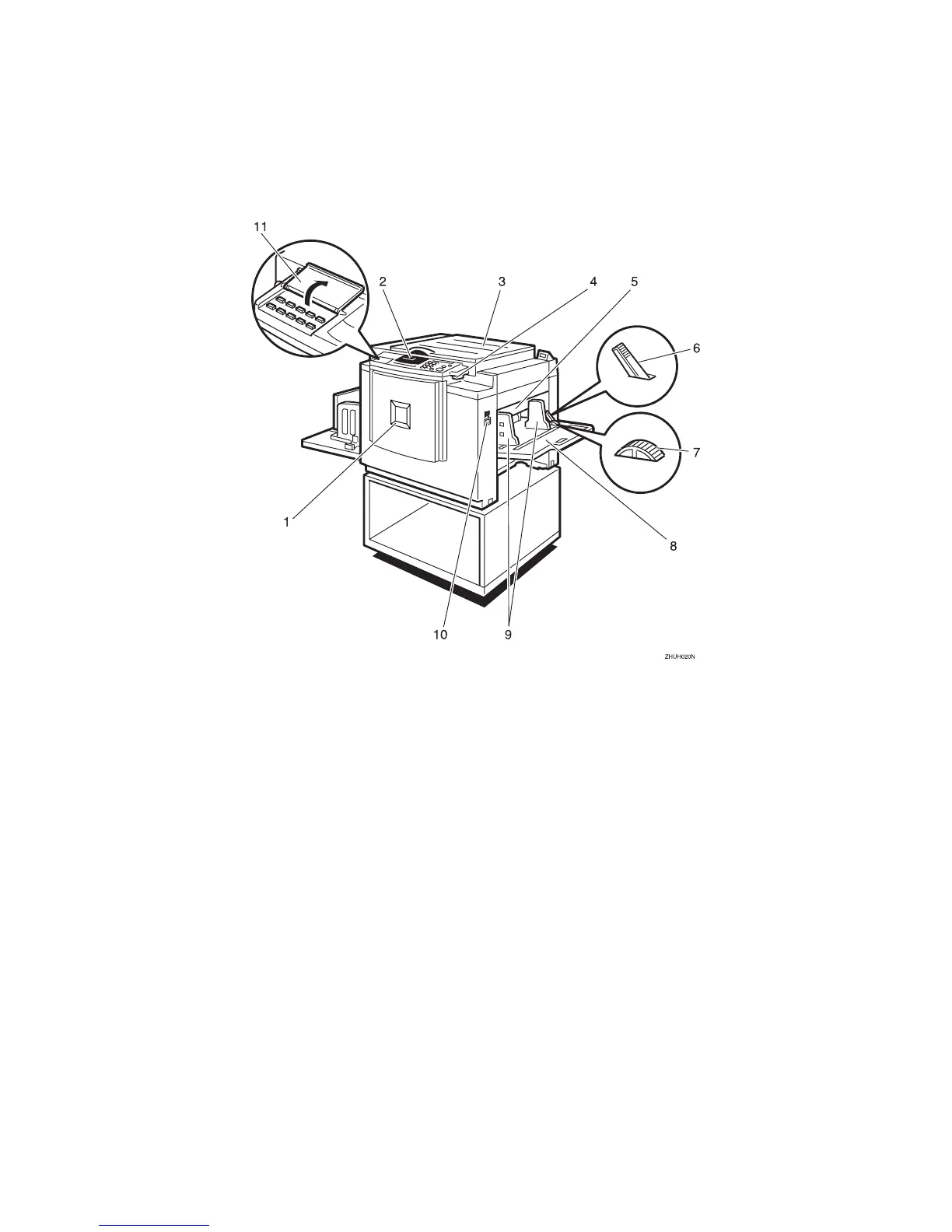
Machine Exterior
1. Front door
Open for access to the inside of the ma-
chine.
2. Control panel
Operator controls and indicators are lo-
cated here. See ⇒ p.10 “Control Panel”.
3. Exposure glass cover
Lower this cover over an original before
printing.
4. Original tray release lever
Use to open the original tray unit when
installing the master.
5. Feed roller pressure lever
Use to adjust the contact pressure of the
paper feed roller according to paper
thickness.
6. Paper feed side plate lock lever
Use to lock or unlock the paper feed side
plates.
7. Side tray fine adjusting dial
Use to shift the paper feed tray sideways.
8. Paper feed tray
Set paper on this tray for printing.
9. Paper feed side plates
Use to prevent paper skew.
10. Paper feed tray down key
Press to lower the paper feed tray.
11. Behind cover
Flip up when you use the keys under-
neath.



 To Next Page