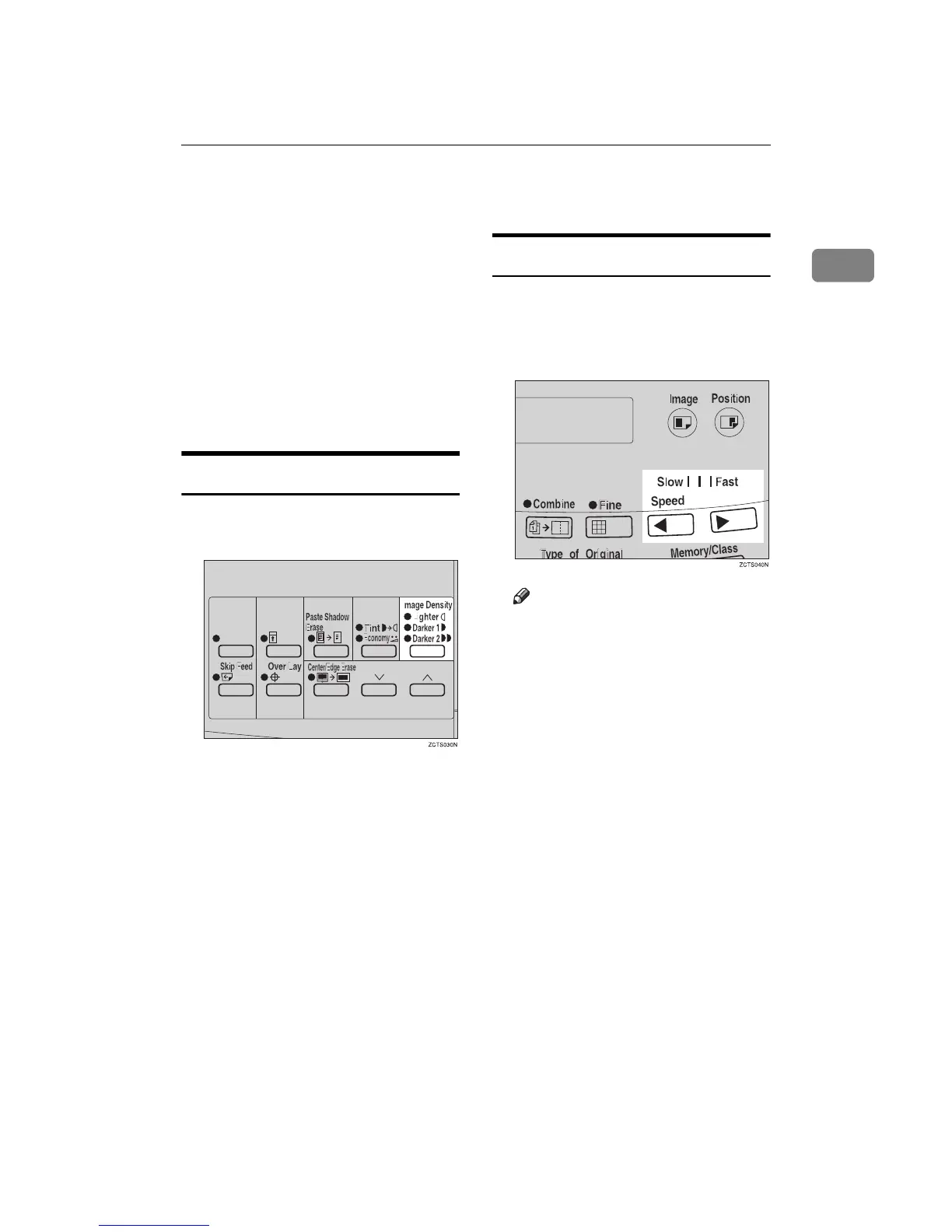
Adjusting the Print Image Density
23
1
Adjusting the Print Image Density
You can adjust the print image densi-
ty to suit your needs. There are two
ways:
❖
❖❖
❖ Before Making a Master
Adjust the image density using the
{
{{
{Image Density}
}}
} key.
❖
❖❖
❖ After Making a Master
Adjust the image density using the
{
{{
{W
WW
W}
}}
} or {
{{
{V
VV
V}
}}
} key.
Before Making a Master
A
AA
A
Use the {
{{
{Image Density}
}}
} key before
pressing the {
{{
{Master Making}
}}
} key.
After Making a Master
A
AA
A
Press the {
{{
{W
WW
W}
}}
} or {
{{
{V
VV
V}
}}
} key. To in-
crease the speed, press the {
{{
{V
VV
V}
}}
}
key. To reduce the speed, press
the {
{{
{W
WW
W}
}}
} key.
Note
❒ The faster the printing speed be-
comes, the lighter the printing
density is. If you want darker
prints, decrease the printing
speed.



 To Next Page