EasyManua.ls Logo

Getinge 9128 - Enter Pacs ID

Getinge 9128
168 pages
Print Icon
To Next Page IconTo Next Page
To Previous Page IconTo Previous Page
Loading...
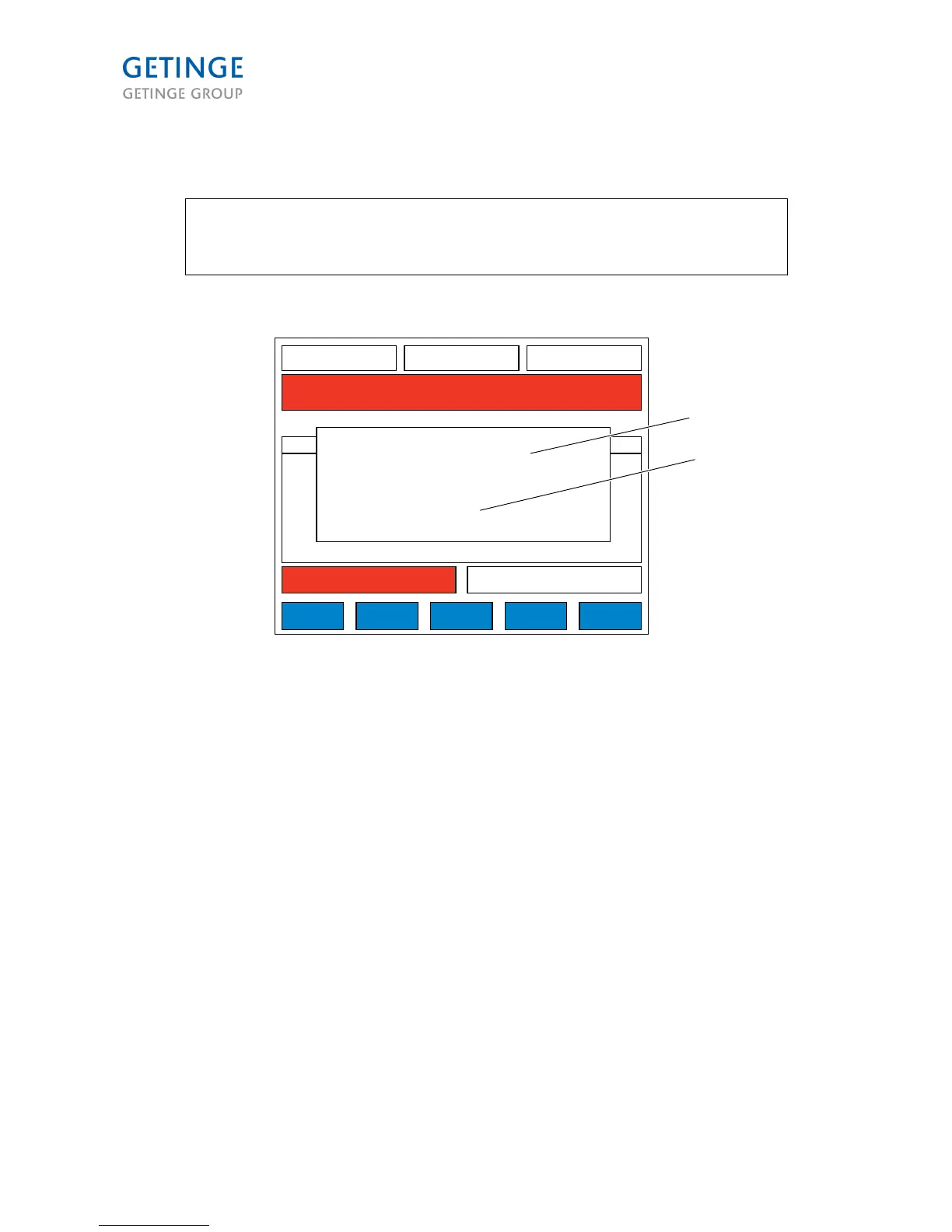
Enter PACs id (2.1.6.8.3.1)
Note: This screen is also displayed at startup if no communication can be
established with a PACS. Function NA. Used when more than one PACS is used/
system.
49,1 C
WASH1 TEMP SP
P1 HC SHORT 00:12:24
01 STANDBY 00:02:22
A34 I/O FAULT
00:03:00
WASH1 TIME
128,1 C
DRYER TEMP
CANCEL
000770
PACS ADDRESSES
9128
PACSNAMN ADRESS
01
ENTER PACS ID:
VALID ID (1-99)
1
1
2
1. ENTER PACS ID
2. VALID ID (1-99)
Default value is "1".
ENTER key starts communication with new PACS ID. The PACS NAME is requested from PACS. The
screen closes and screen (2.1.6.8.3) opens in SAVE mode.
If no communication can be established after a certain time (to be determined by CS), and error message
will be displayed.
Page 100 of 166
<Doc_TEC><Doc_6001341502><Rel.A><Lang_en>

Table of Contents

Other manuals for Getinge 9128

Related product manuals