Service
Access
code:
Access rights to:
A Authorization to modify the program, adjustable parameters (A parameters).
B Authorization to modify time settings
C Authorization to use calibration function.
D Authorization to acknowledge alarms and start password protected programs.
E Authorization to service menu.
F Authorization to change dipswitches.
G Authorization to modify the non-process-critical configuration, extended parameters
H Authorization to modify the process-critical configuration, system setup.
I Authorization to change Boolean codes.
J Authorization to define new users and change passwords.
K Authorization to the documentation system.
Screen Layout
Button:
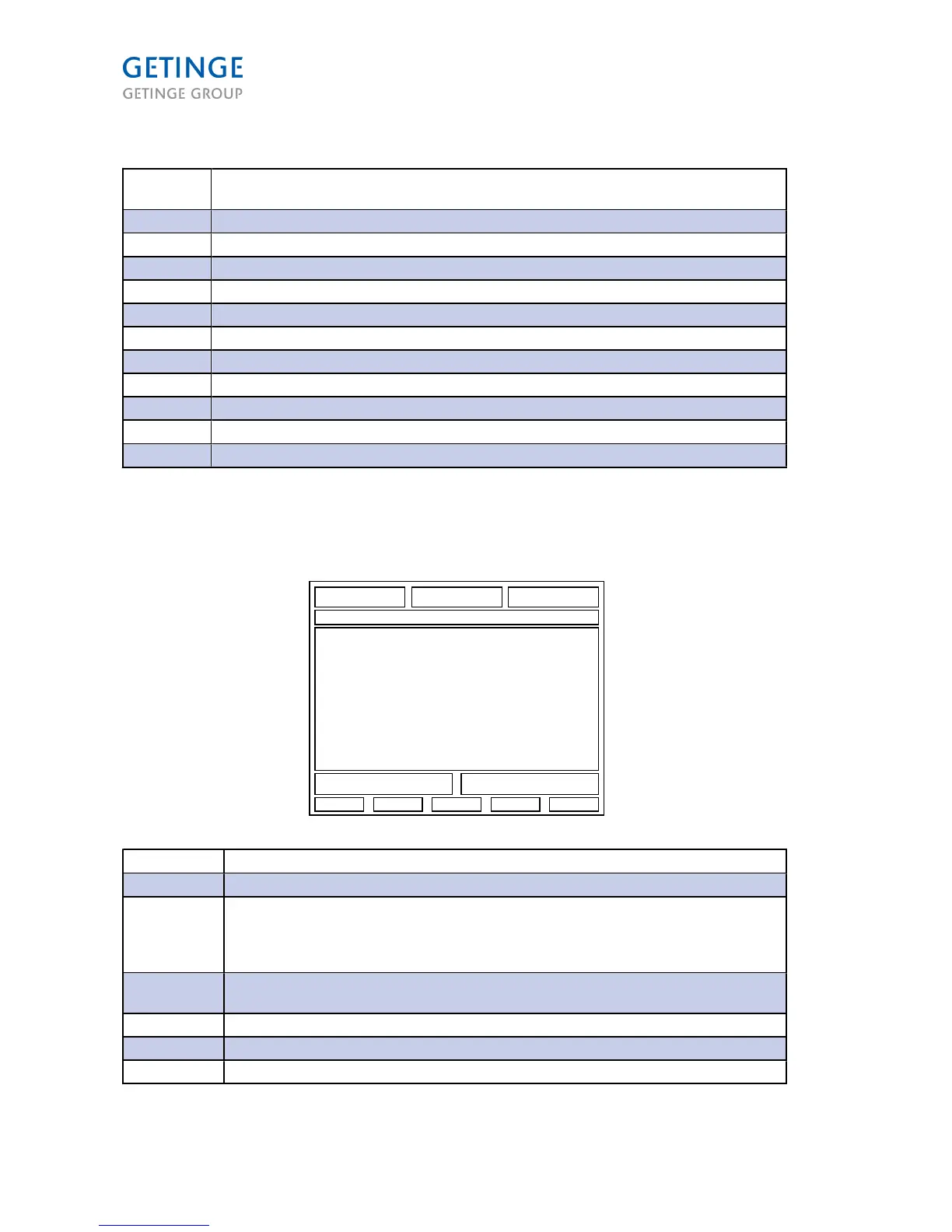
Section
Description
Section 1-3: Process value or Parameter value
Section 4: Cycle number and name + Phase name and sub number
This field is also linked to the Process Ready LED in terms of colors. If the process is
normal with no errors, a green light appears. If errors it is displayed red. If a test process,
it blinks with the same function as above.
Section 5: Main screen for text values, bar graphs, trend curves, parameter input data, test
functions, messages, system messages, etc.
Section 6: Alarm messages (tripping)
Section 7: Information and system messages (Non-critical)
Section 8-12: Softkey buttons
Page 28 of 166
<Doc_TEC><Doc_6001341502><Rel.A><Lang_en>



 To Next Page