9
Movement command display
The movement commands appear on the display when the door control receives OPEN, CLOSE or STOP
commands.
Display alternates between
E.
5 Mechanical installation
Damage to components due to extreme environmental conditions!
Extreme environmental conditions (humidity, chemical substances) at the installation site may damage the
product.
Install the product indoors only. Installed outdoors, the product must be enclosed to provide the same
conditions as in an indoor environment. Ensure that the installed connection cables are protected.
Protect the product from moisture.
Maintain the temperature range and the maximum humidity during operation.
Danger of shearing, crushing or being drawn in!
In operating mode hold-to-run, people or objects in the path are not detected.
The operation of the door without a line of sight leads to dangerous situations for other people.
Mount the door control in a position with a clear view of the door.
e door in operating mode hold
run with a clear view of the door.
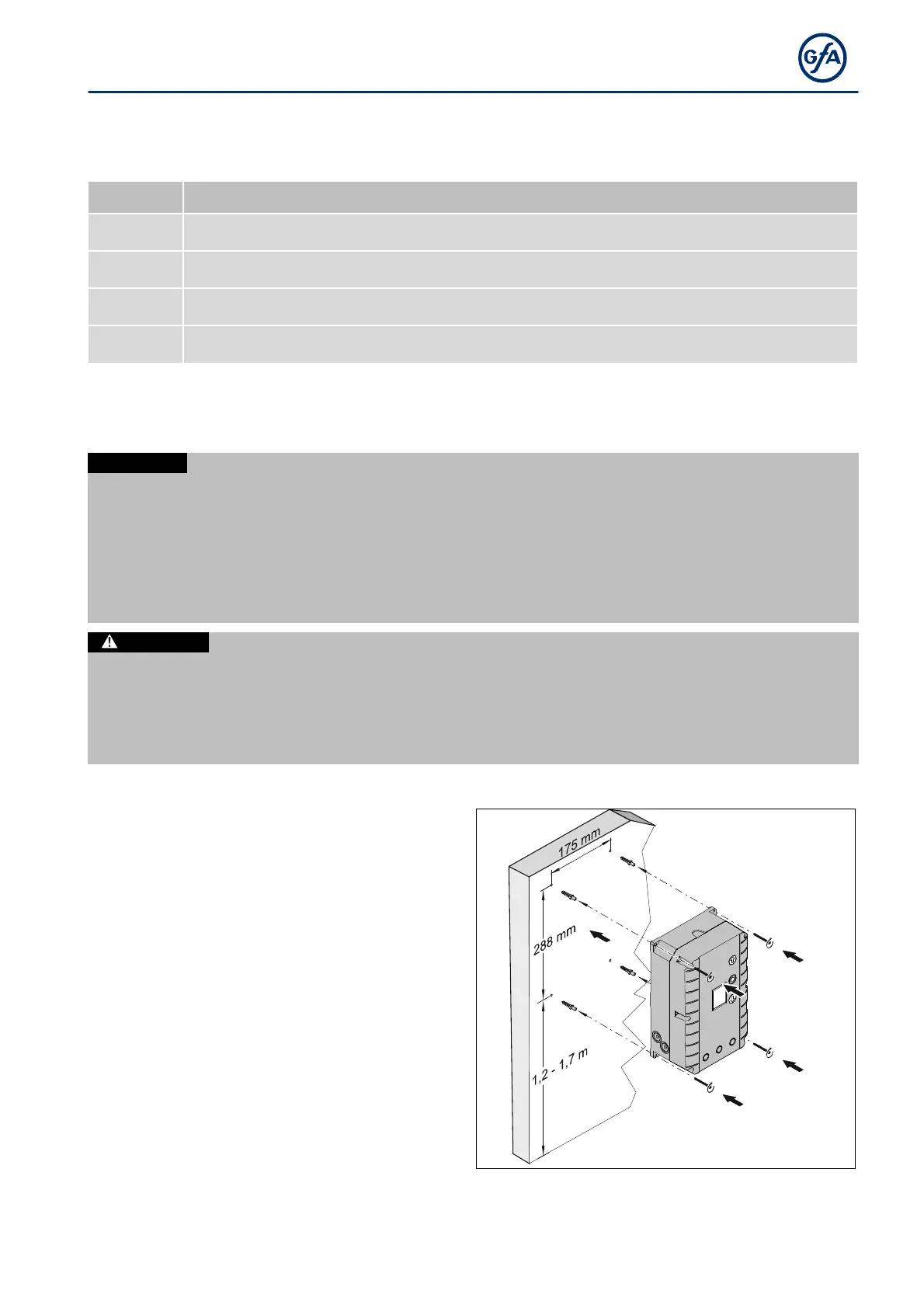
Mounting
connection and transmission elements must not
be exceeded.
Mount the door control through the 4 elongated
holes.


 To Next Page