Troubleshooting Resetting the Network Configuration to Factory Values
Page 7-12 MDE-5369G FlexPay™ IV (with Omnia V04.07) Programming and Service Manual · March 2021
7 Reconfigure the PC network configuration as follows:
• IP: 17
2.16.100.15
• Netmas
k: 255.255.255.0
8 Connect a PC with a browser to service port.
9 Open a browser and type http://172.20.100.254:3000/ in the address field.
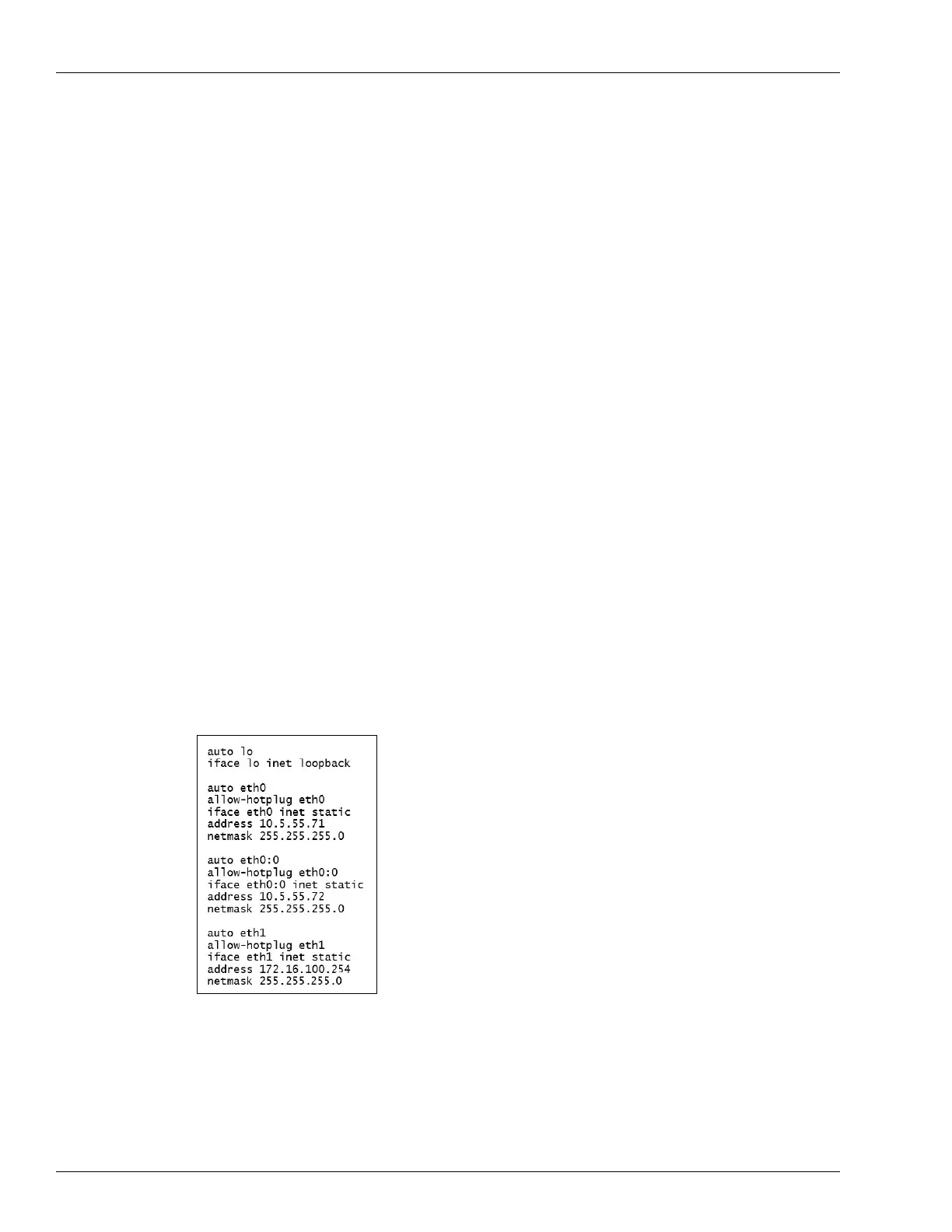
10 Apply changes to the Omnia configuration as needed. Configure the Omnia network as
follows:
External Omnia IP address for Side A
Address: 10.5.55.71
Netmask: 255.255.255.0
External Omnia IP address for Side B
Address: 10.5.55.72
Netmask: 255.255.255.0
Internal Omnia IP address
Address: 172.20.100.254
Netmask: 255.255.255.0
Note: Netmask should be 255.255.255.0
Note: If the process was successful, a log file of the change will be automatically copied to
the
usbconfig.
The network configuration should be as shown in Figure 7-1
1.
Figure 7-11: Network Configuration
Note: The log file of the operation is located in the folder “usbconfig”.
11 Restore your PC network configuration.


 To Next Page
 Loading...