42
Fryer Operation
EOF 10-10/20
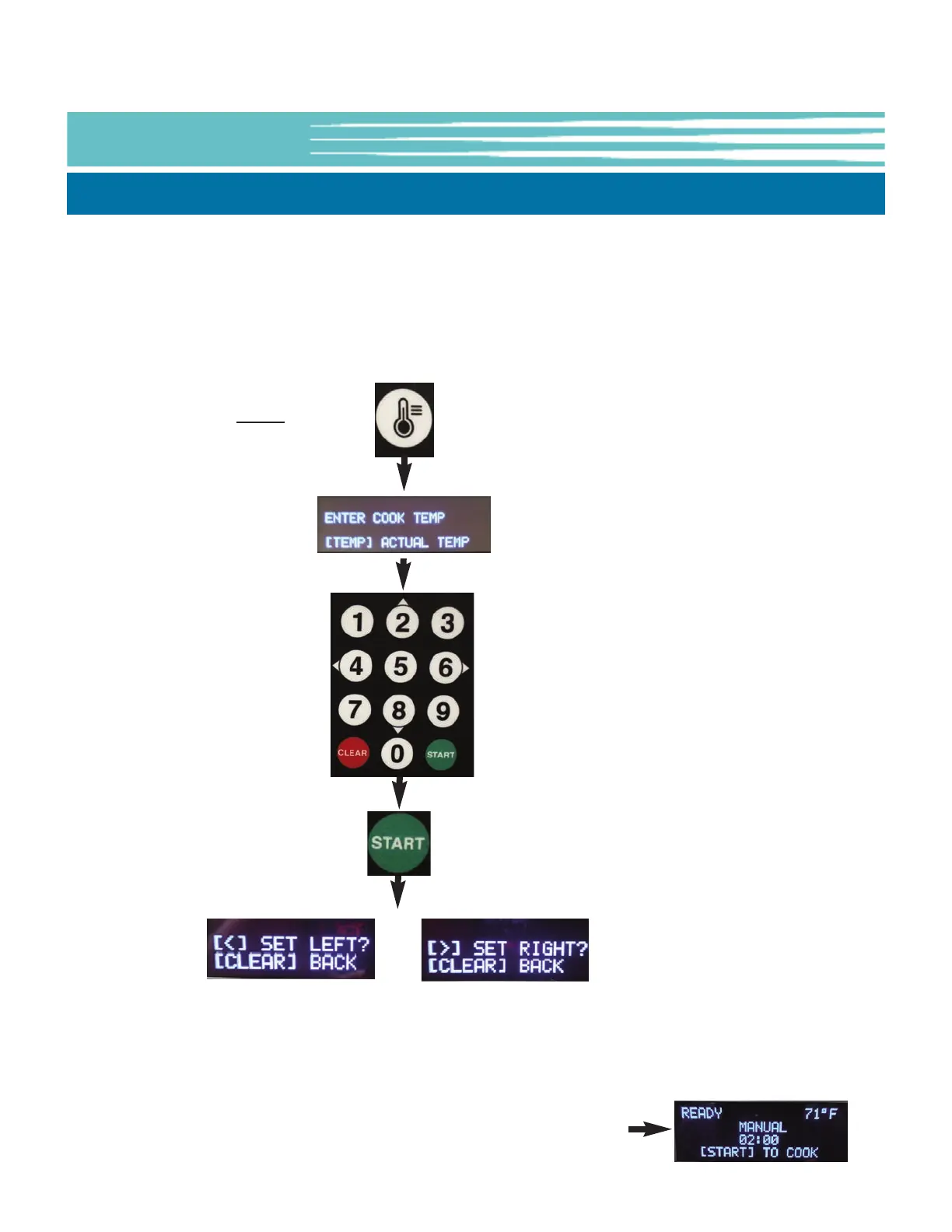
Press the
[TEMP] key
Use keypad to
enter cooking
temperature
setpoint (°F).
Ex: 325 = 325°F
Press the
[START] key
Use keypad to
select Vat Side to
set [4]=LEFT
[6]=RIGHT
Each side of the EOF10-10 unit is a separate cook Vat capable of maintaining a different cooking temperature.
Menu Item Presets stored in the Dual Display Controller include a temperature setting, as well as Menu Item Names
and cooking times, however rather than selecting a preset, temperature can also be manually set as described
below.
Information will be shown on the OLED Display to help guide Users through the process. NOTE: The left-hand
display is the active display when entering settings.
5-01.3.1 Manually Setting the Cooking Temperature, EOF10-10 Dual Display
If needed repeat
process to set a temp
for the other Vat Side
NOTE:
Pressing the [TEMP] key twice
(2x) will display the actual oil
temperature of each Vat side for
20 seconds on the respective 7-
Segment Display.
Default unit for Temperature is °F
... this can be changed in USER
SETTINGS, see Section 5-01.8.
NOTE: Menu Presets contain Item Names which are normally displayed
on the OLED Display. Manually inputting a cooking temp is a deviation
from a preset default, therefore the Name shown on the display will
change to [MANUAL].
IMPORTANT!
If the PASSCODE feature is
enabled, cooking TEMP cannot
be manually input without first
entering the required
password. Without password,
Users can only choose from the
programmed Menu Presets
available, see Section 5-01.5,
Working with Menus.



 To Next Page