54
Fryer Operation
EOF 10-10/20
5-01.7.2 COOL Mode
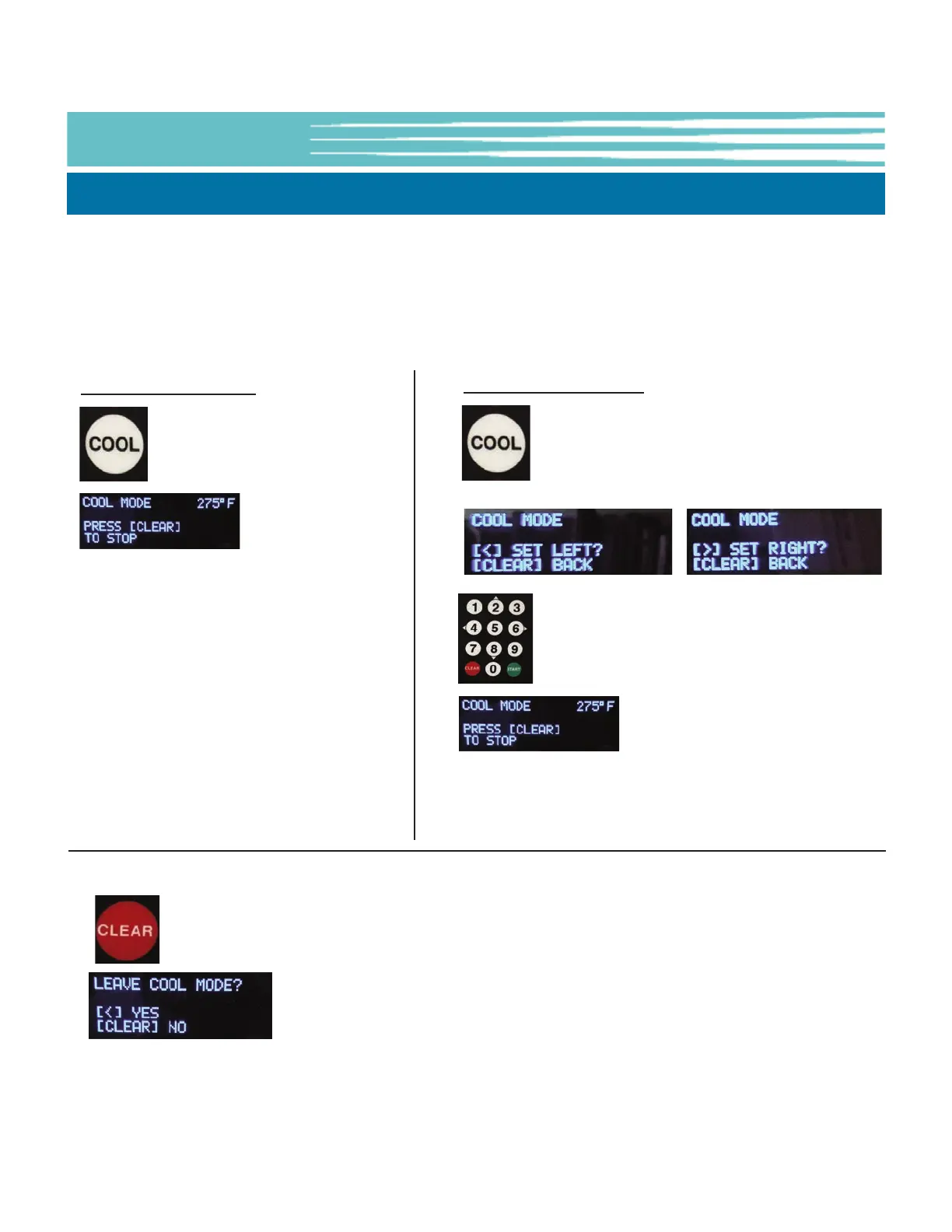
Press [COOL] key once.
• To exit COOL Mode: press the [CLEAR] key once, then press [4] key to stop
COOL Mode -OR- press [CLEAR] key again to continue COOL Mode.
• Upon exit, the temperature setpoint returns to the previous active value and
Fryer enter PREHEAT until temperature is reached.
COOL Mode is an energy-saving feature that automatically lowers oil temperature setpoint, allowing the Fryer to
idle at a lower “standby” temperature during periods of non-use downtime. COOL mode temperature is
significantly lower than cooking temp, but not so low that recovery will require too much time.
To enter COOL MODE, press the [COOL] key. The temperature setpoint will be changed to the COOL TEMP specified
in USER SETTINGS; factory-set default = 275°F. The setting can be edited by the user; valid range is 200°F to 350°F;
see Section 5.01.8, Edit User Settings.
EOF-20, SINGLE DISPLAY:
EOF10-10, DUAL DISPLAY:
Use keypad to select Vat side
[4]=LEFT [6]=RIGHT
Press [COOL] key once. Each Vat side can
be placed into COOL Mode separately.
Display changes to indicate COOL Mode
is in effect.
The display of the selected Vat changes to indicate
COOL Mode is in effect.



 To Next Page