Control Panels
FRONT PANEL
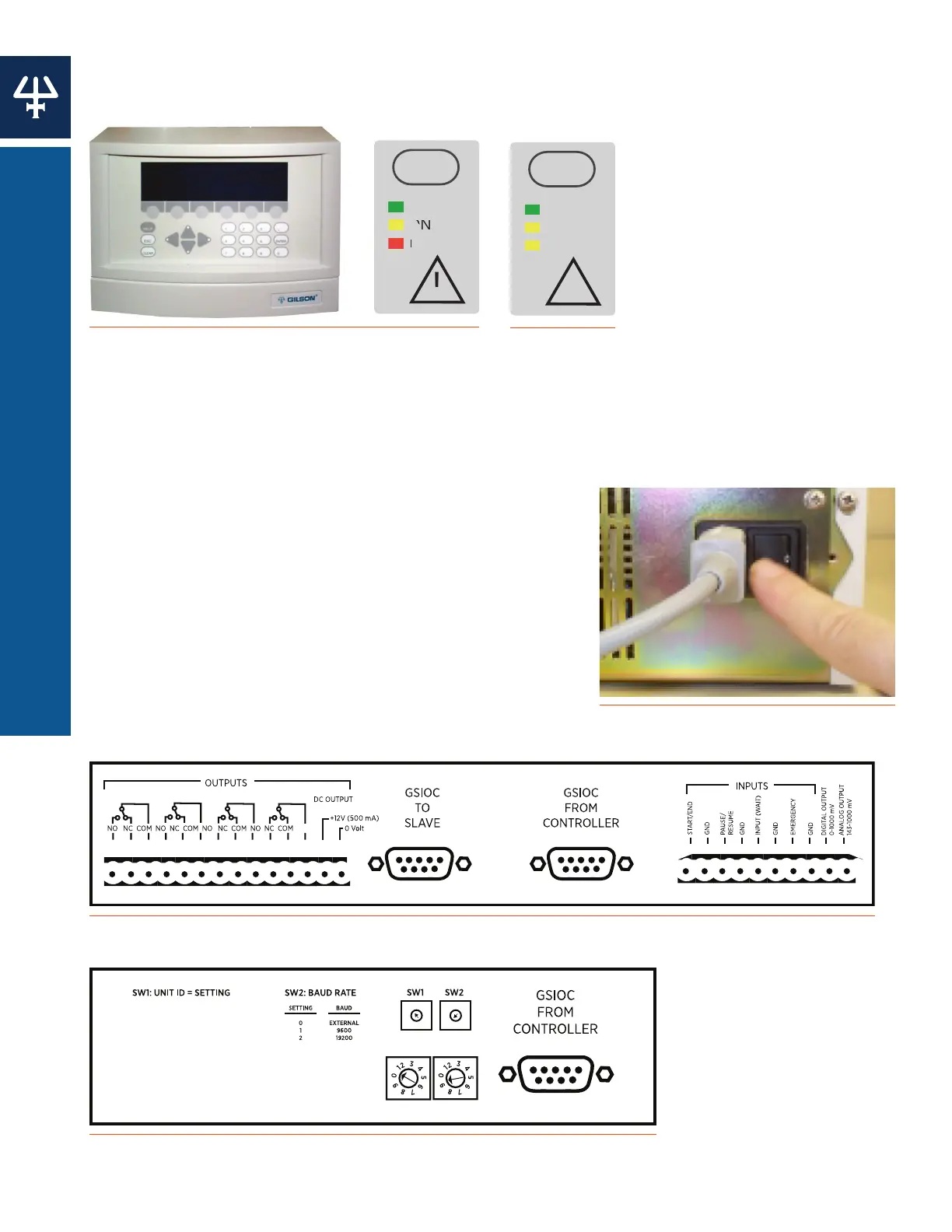
The 333 Pump features a front control panel with a display screen, soft keys, and fixed function
keys. The 334 Pump does not have a front control panel and must be controlled by the 333 Pump
or by TRILUTION® LC Software. Both pumps utilize standby panels to control power or indicate
errors.
REAR PANEL
All electrical connections are made on the rear panels. The
rear panel of the 333 Pump houses a main power switch,
14-pin contact output port, 10-pin contact input/output
port, and GSIOC ports. The rear panel of the 334 Pump
houses the main power switch, a GSIOC port, unit ID
selector, and baud rate selector. The pumps have two
ON/OFF switches: one on the power receptacle on the
rear panel and the other on the front panel above the
LEDs.
Figure 7
333 HPLC Pump Rear Panel Diagram
Figure 8
334 HPLC Pump Rear Panel Diagram
Figure 4
333 HPLC Pump Front Control Panel and Standby Panels
!
POWER
ON
ERROR
P
R
ON/OFF
!
POWER
ON
REMOTE
ON/OFF
Figure 5
334 HPLC Pump
Standby Panel
Figure 6
ON/OFF Switch on Power Receptacle
14
INTRODUCTION | 333/334 HPLC PUMPS
DESCRIPTION















 To Next Page