Pump Head
Before the pump head can be physically removed from the pump, you must disengage the
pump head from the pump motor using the dismount procedure.
Removal of the pump head is required for all maintenance described in this chapter. Refer to
the instructions in this section when removing or installing the pump head.
Do not autoclave the pump head.
Dismount Pump Heads
DISMOUNTING WITH TRILUTION LC
1. Open a method that includes the
pump in its configuration.
2. Select Run. The Application Run
window will appear.
3. Select the method name from the
Method Configuration drop-down
box.
4. Select the Method Configuration
icon.
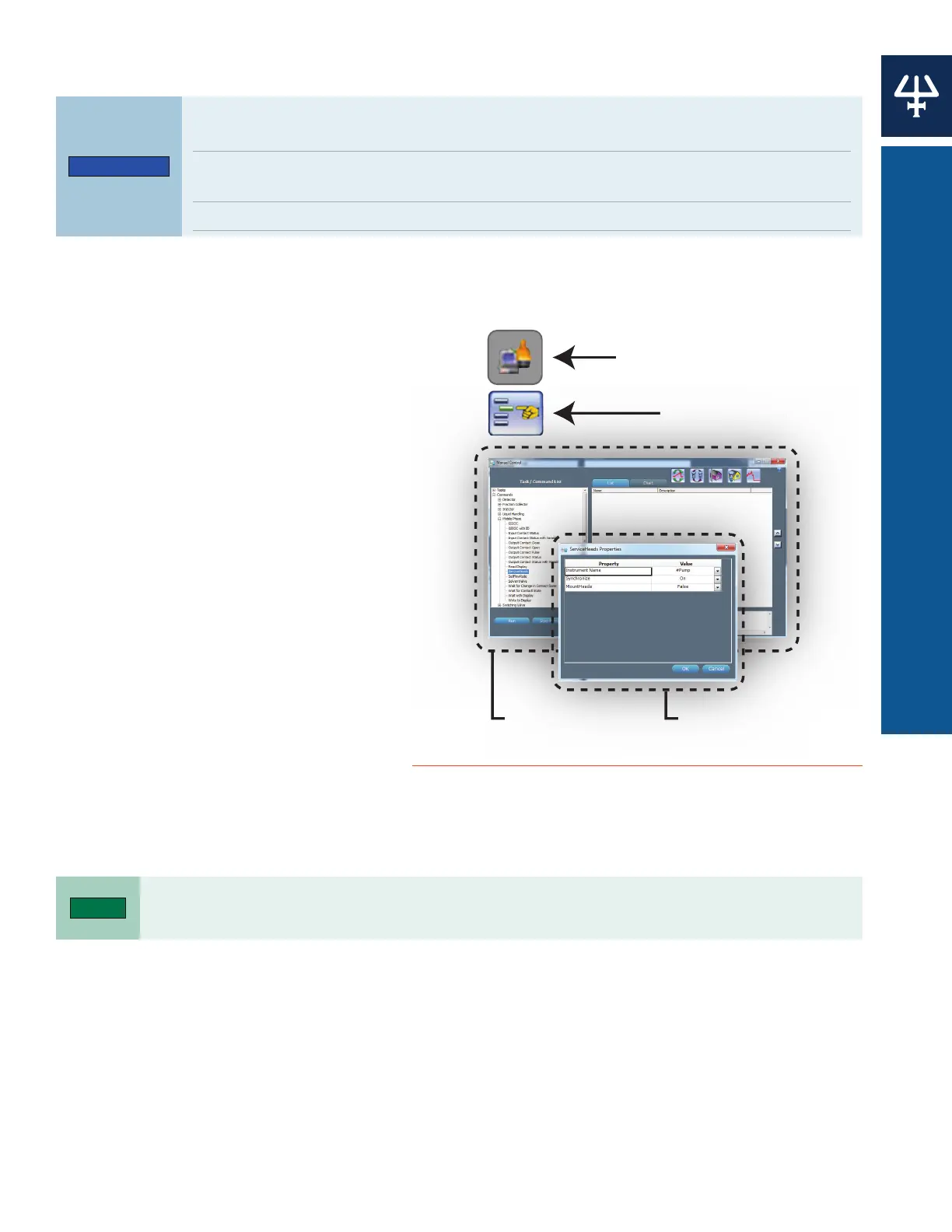
5. Select the Manual Control icon. The
Manual Control window will appear.
6. Click ‘+’ next to the Commands field
to expand the list, and then again
next to Mobile Phase.
7. Drag and then drop the ServiceHeads
command into the List space. The
ServiceHeads Properties window
appears.
8. Change the MountHeads value to
False.
9. Select OK and then select Run.
10. Wait for the pistons to fully retract.
Repeat steps 1-10 to mount the pump heads, but select TRUE for the MountHeads property in the
ServiceHeads command.
Manual Control Icon
Method Configuration Icon
M
n
l C
ntr
l I
n
Manual Control Window
ServiceHeads
Property Window
Figure 30
Manual Control Windows and Icon
41
333/334 HPLC PUMPS | USER’S GUIDE
PUMP HEAD















 To Next Page