24
INSTALLATION | 333/334 HPLC PUMPS
CABLING FOR TRILUTION LC CONTROL
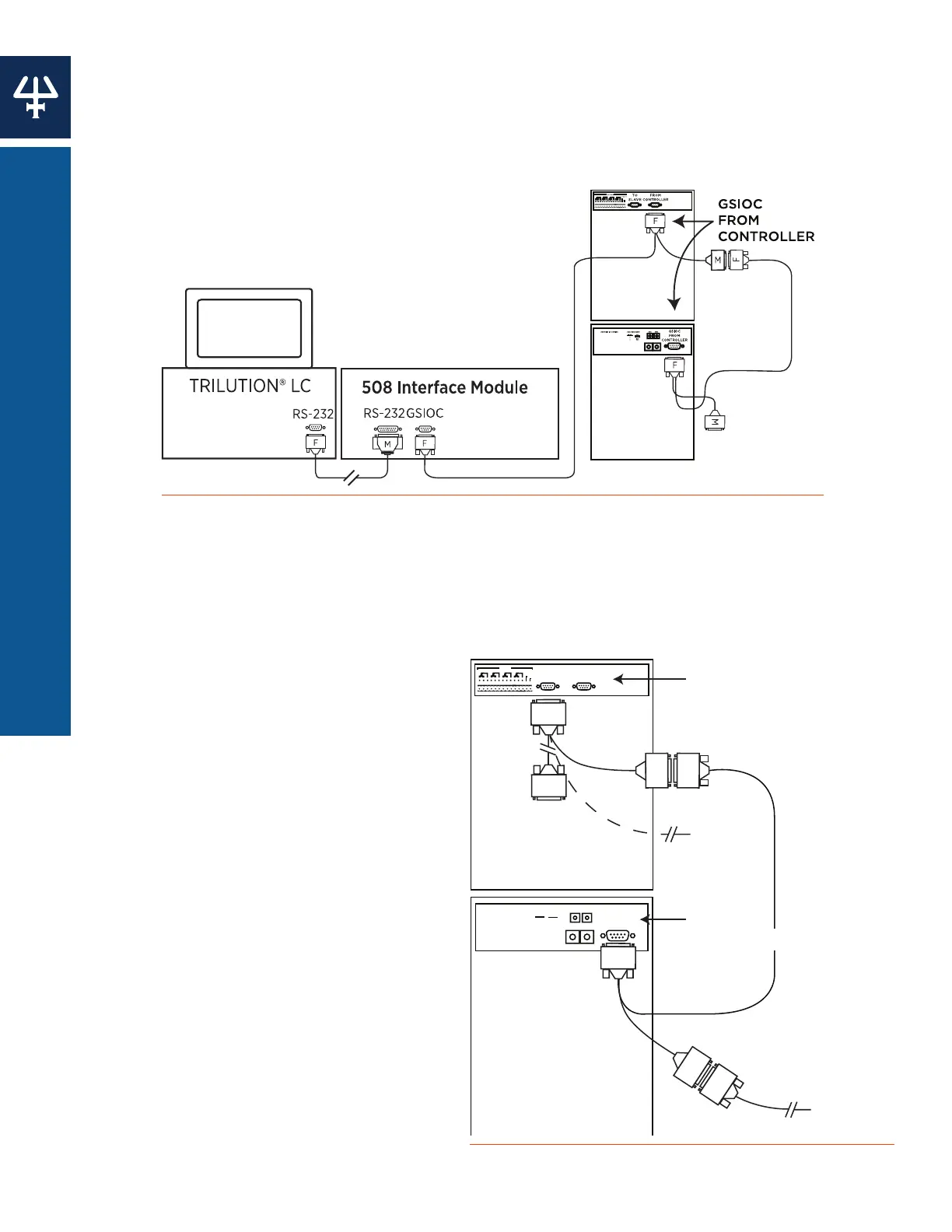
Cabling for TRILUTION LC Control
Plug one end of a GSIOC cable into the port marked GSIOC FROM CONTROLLER. Plug the
other end into the GSIOC port of an interface module (or other controlling device, such as a
Gilson liquid handler), and then connect an RS-232 cable from the interface module (or other
controlling device) to the computer.
Figure 14
Cabling Connections with TRILUTION® LC Software as Controller
Cabling for Control from 333 Pump
The 333/334 Pumps connect with the
GSIOC to Slave (333 Pump) and GSIOC
from Controller (334 Pump) ports. For
the third and subsequent instruments,
connect another cable between the male
end of the GSIOC cable to the female end
(with only one cord) of another GSIOC
cable, then out to additional instruments.
Daisy-Chaining the GSIOC Cables
Connect your instruments in a linear series.
The first pair of instruments in the chain
are connected using the female ends. For
the third and subsequent instruments,
connect another cable between the male
end on the GSIOC cable and the GSIOC
port on the next instrument. Thus, you
can ‘daisy-chain’ the pumps to other
Gilson GSIOC instruments.
GSIOC
FROM
CONTROLLER
2
3
4
5
6
7
8
9
0
1
2
3
4
5
6
7
8
9
0
1
SW1SW2
SW2: BAUD RATE
SETTING
0
1
2
BAUD
EXTERNAL
9600
19200
SW1: UNIT ID = SETTING
TO
SLAVE
FROM
CONTROLLER
NO NC COM NO NC COM NO NC COM NO NC COM
OUTPUTS
DC OUTPUT
333
334
GSIOC
FROM
CONTROLLER
GSIOC
FROM
CONTROLLER
TO
SLAVE
M
F
F
F
F
M
F
To Exte
Device
To External
Device if
Using Only
333 Pump
Figure 15
GSIOC Series Connection with 333 Pump as Control Device















 To Next Page