ENTER VALUE
:000
PROGRAMMING THE DOOR PANEL
130
System settings menu
SYSTEM CONFIG
ACCESS CONTROL
RESIDENT LIST
MASTER PANEL
GENERAL PANEL
PANEL ADDRESS
LANGUAGE
GENERAL PANEL
PANEL ADDRESS
LANGUAGE
MASTER PANEL
GENERAL PANEL
PANEL ADDRESS
LANGUAGE
MASTER PANEL
GENERAL PANEL
PANEL ADDRESS
LANGUAGE
MASTER PANEL
PANEL ADDRESS
PANEL W.CAMERA
MASTER PANEL
GENERAL PANEL
PANEL W.CAMERA
CALL TO EXCHANGE
GENERAL PANEL
PANEL ADDRESS
LLAMA A CENTRAL
IF NO ANSWER
PANEL ADDRESS
PANEL W.CAMERA
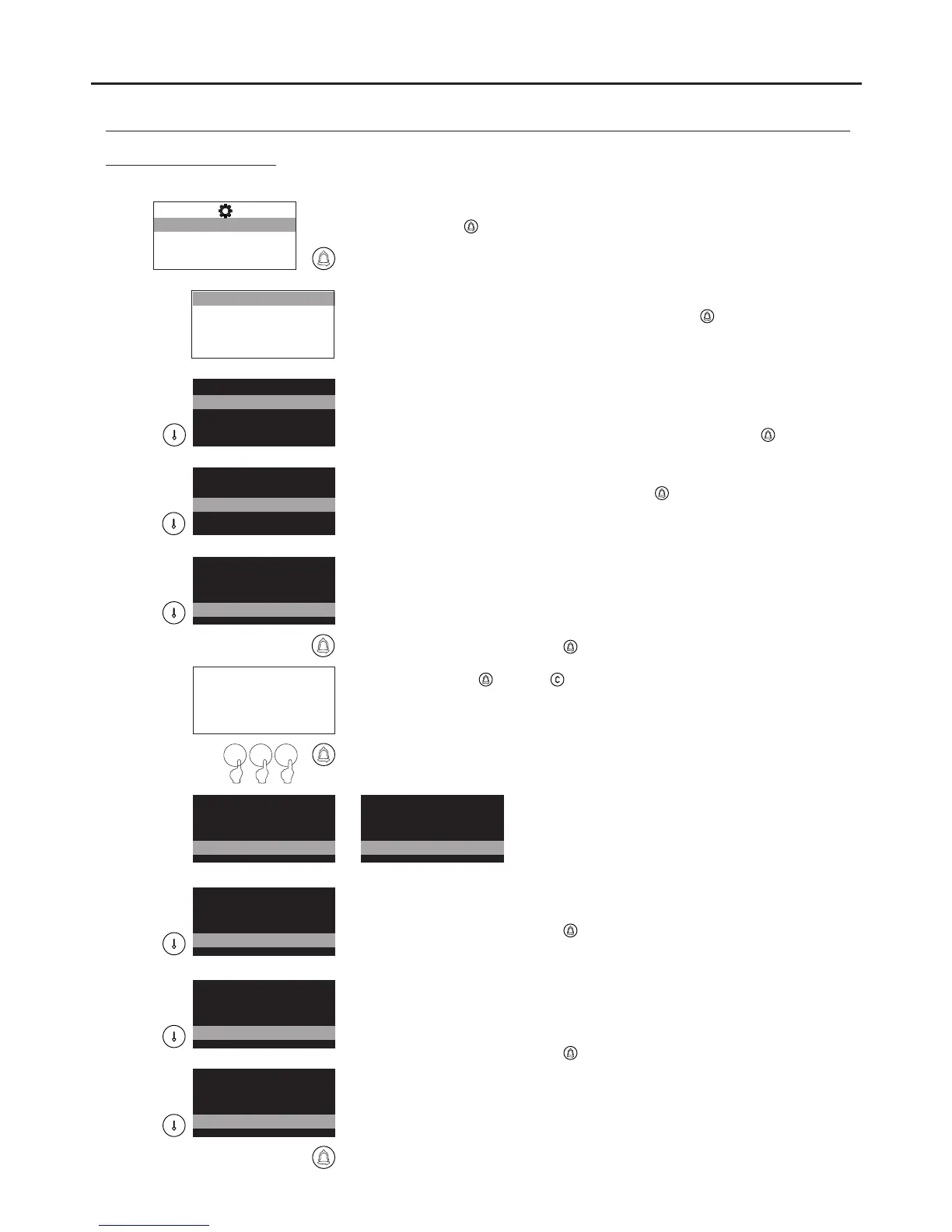
To access the configuration menu, follow the steps described on p. 129
and press when the SYSTEM CONFIG message lights up.
Enables the language for on-screen messages and configuration menus
to be selected. To change the language, press to find the correct
language.
Determines whether the door panel is master or slave. Each system must
have only one master door panel; the others must be slaves. In
systems with a general entrance door panel, set one door panel from
each building as the master. To change the value, press .
If it is a general entrance door panel in a residential complex, select the
option YES. To change the value, press .
Determines the building code. In buildings with more than one door
panel, set the same code for all of the panels; in systems with a
general entrance door panel, set code 0 for the general entrance door
panel and a di ferent code for each inner door panel (between 1 andf
255).
To change the value, press and the message ENTER VALUE will
appear; enter the building code using the numeric keypad and confirm
by pressing . Press to restore the previous value.
Note: To enable the guard unit to identify the general entrance door panel
making the call, consult our technical support services.
0 1 5
Determines whether the door panel is an electronic audio or video door
entry system.
To change the value, press .
Enables calls made from the door panel to be initially directed to the
guard unit (if any).
For the function to take effect, the guard unit needs to have the door
panel capture function activated.
To change the value, press .
Enables calls made from the door panel that go unanswered and are not
captured by the guard unit to be diverted to a second monitor in the
system. The monitor's call code must be indicated.
Note: If configured as a general entrance door panel, the call code is
composed of the inner building code and three-digit monitor address; if
not configured as a general entrance door panel, only the three-digit
monitor address needs to be entered.
GENERAL PANEL
DIRECCIÓN PLACA
LANGUAGE
MASTER PANEL
PANEL ADDRESS
GENERAL PANEL
015
LANGUAGE
MASTER PANEL
*
*
*
*
*
Continued overleaf
AUDIO AND VIDEO DOOR ENTRY SYSTEM - CODED PANEL WITH DISPLAY



 To Next Page