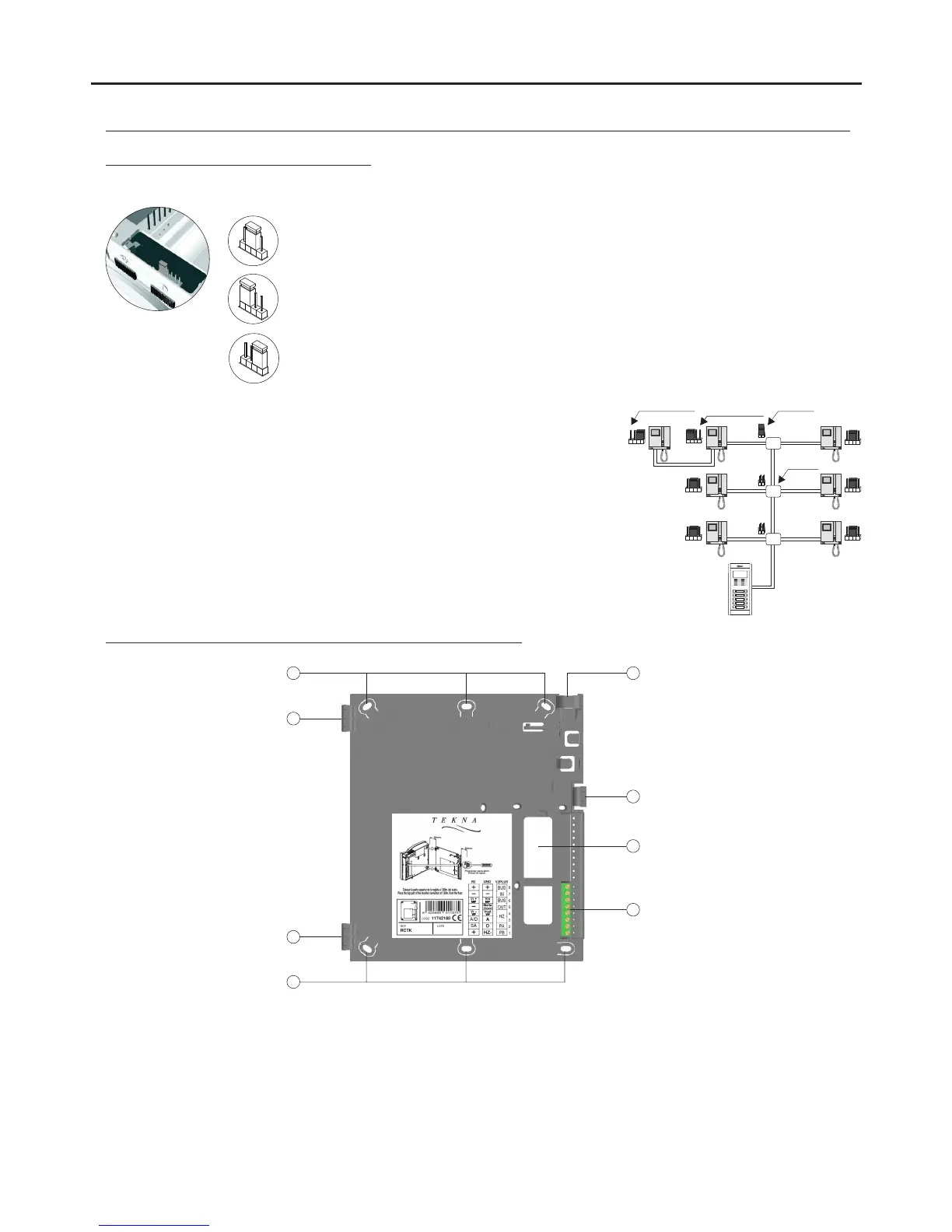
The end of line jumper is located on the CN2 connector at the bottom of the monitor. It has three
positions:
Set to the centre position when there are no parallel monitors. (Automatic mode)
If there is a parallel monitor, set to this position on the first monitor. (Deactivated mode)
CN2
CN2
CN2
If there is a parallel monitor, set to this position on the last monitor. (Activated mode)
End of line
jumper
Example configuration of the end of line jumper in the monitors.
*
* Factory setting
End of line
resistor removed
End of line
resistor installed
Distributor
52
Handling of the end of line jumper:
DESCRIPTION OF THE MONITOR
AUDIO AND VIDEO DOOR ENTRY SYSTEM - ACCESS CONTROL
The + and - terminals are duplicated to facilitate the cascade connection of other monitors or telephones.
If the monitor is not positioned on the wall mount connection block, the cascade connected monitors or
telephones will not receive power.
a. Holes for fixing to the wall (x6).
b. Monitor fixing clips (x2).
c. Vertical wiring input.
d. Fixing clip.
e. Wiring input hole.
f. Connection terminals:
Positive, negative.
Video signal MP input.
Video signal VP input.
Audio and digital communication.
Auxiliary call repeater output.
+, –:
Vi + / MP:
Vi – / VP :
A/D :
SA :
a
a
b
b
c
f
e
d
Description of the RCTK wall mount connection block:



 To Next Page