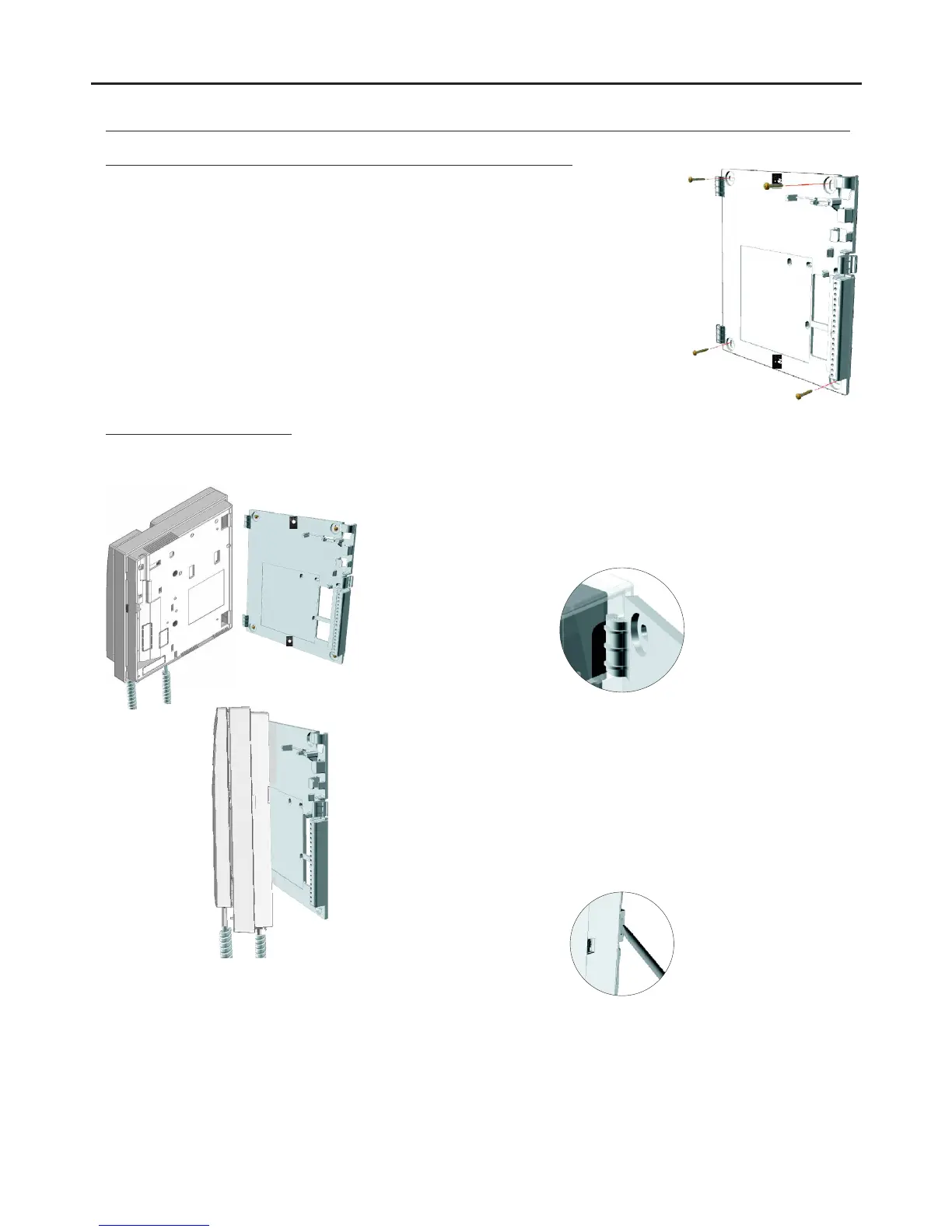
Fixing the monitor's wall mount connection block to the wall:
AUDIO AND VIDEO DOOR ENTRY SYSTEM - CODED DOOR PANEL
INSTALLATION OF THE MONITOR
Avoid dusty or smoky environments or locations near sources of heat.
To install the monitor directly over the wall, drill two holes of Ø6mm and use the supplied
screws.
The top of the wall mount connector must be positioned at a height of 1.60m. The
minimum distance between the sides of the wall mount connector and the closest
object must be 5cm.
Place the monitor at right angles to the wall mount connector and align the
holes on its base with the fixing clips of the connector, as shown in the
drawing.
Close the monitor like a book, applying pressure to the right-hand side until
the click of the connector's fixing clips can be heard.
To remove the monitor from the connector after installation, use a flat
screwdriver to release the fixing clips. Once the monitor has been
released, open it like a book and remove it from the connector, making
sure that it does not fall.
Positioning the monitor:
95



 To Next Page