PROGRAMMING THE DOOR PANEL
Editing with the keypad:
145
Use the arrow buttons to move along the text line.
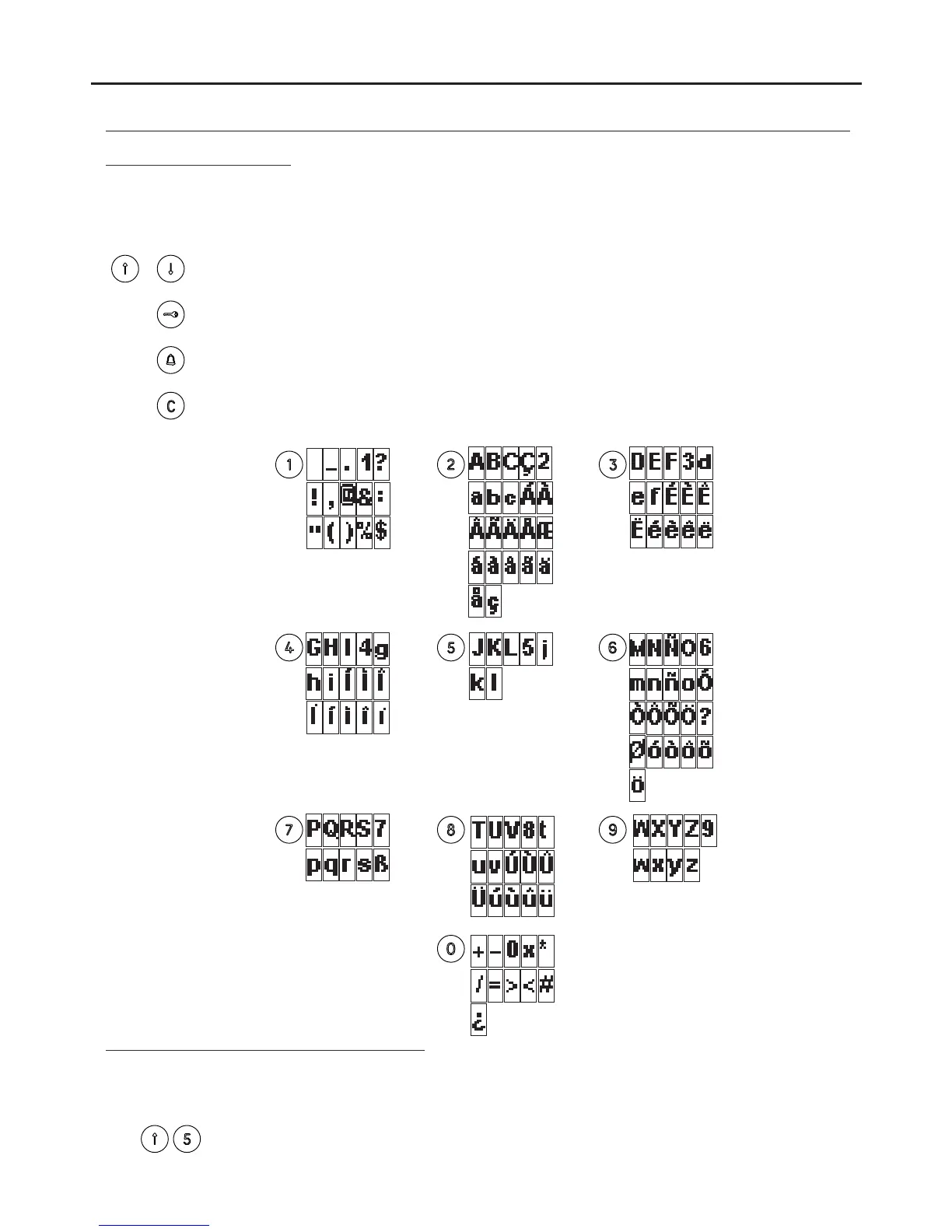
To enter or edit text during programming, use the keys as shown. The maximum number of characters in a line
of text is 16.
Characters are entered using the numeric keypad: press the key as many times as necessary to reach the
required character according to the table.
Use the OK button to confirm the entered text. The screen will show the message
DATA SAVED.
Use the CANCEL button to exit editing. The changes made will be omitted.
Use the key button to delete a character located over the cursor and move the following
text backwards.
Quick scrolling through the residents list:
To move quickly through the residents list, simply press the forward arrow followed by the number of entries to jump.
Select 0 to jump 10 entries and the key button to jump 100.
Quick scrolling is done in jumps of 5 entries.
To accelerate the search, hold down the arrow key.
AUDIO AND VIDEO DOOR ENTRY SYSTEM - CODED PANEL WITH DISPLAY



 To Next Page