José Pérez
003409
029105
0001/0100
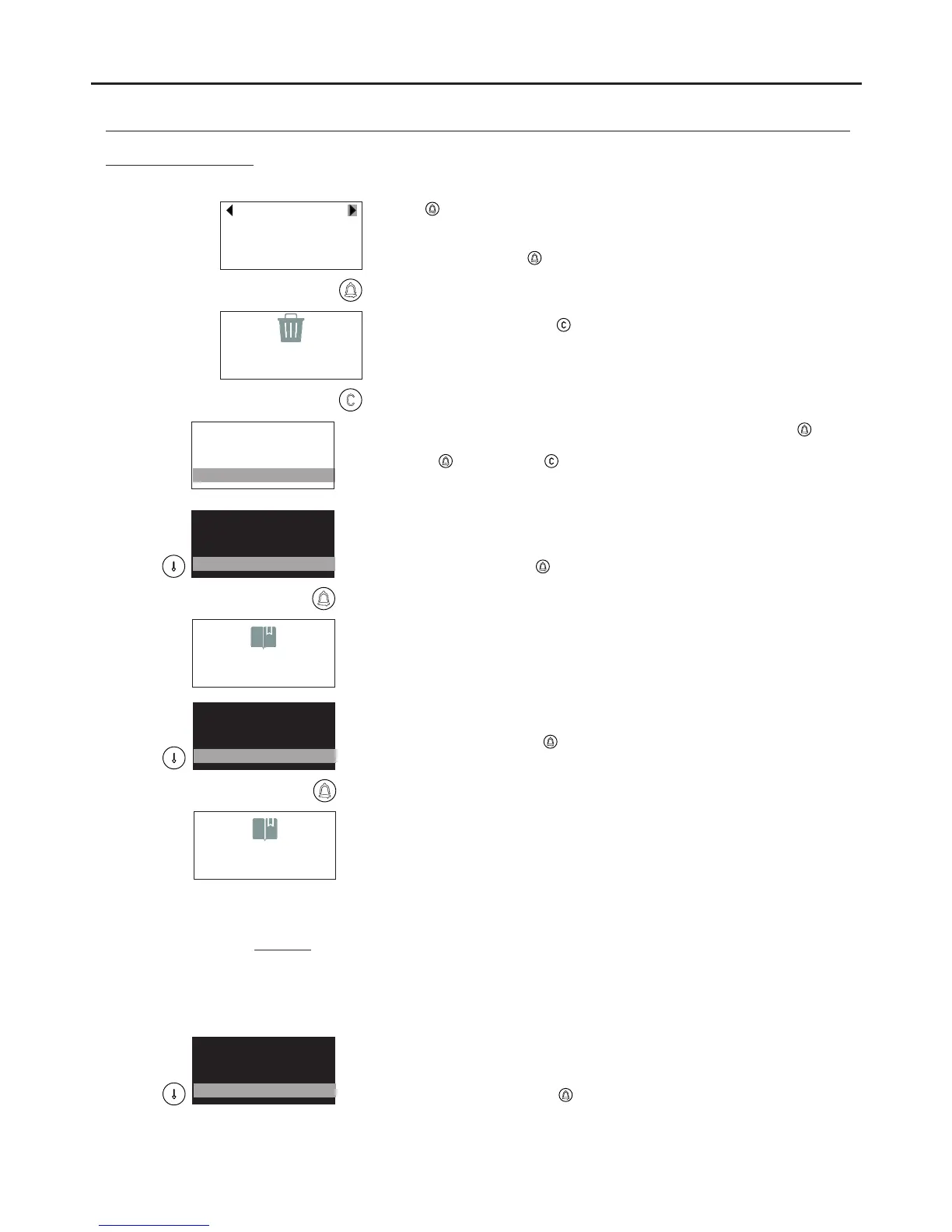
Press and the first position in the resident list will appear: if there are
no entries, the screen will show the message RESIDENT LIST EMPTY.
Use the scroll arrows to find the contact that requires deleting and
confirm by pressing .
The message DELETING… will be displayed on the screen for a few
seconds and then the following contact will appear. Repeat the process
to delete as many contacts as required.
To end the process, press
.
DELETING…
PROGRAMMING THE DOOR PANEL
144
MODIFY
DELETE
DELETE ALL
INSERT
Enables all entries in the RESIDENT LIST to be deleted. Press to
start the process. When the message CONFIRM DELETION appears,
press to confirm or to cancel the process.
Note: Once entries are deleted, they cannot be recovered.
DELETE
DELETE ALL
SEND BOOKMARK
MODIFY
Enables resident list data to be sent to another door panel or the guard
unit of the same system. Before sending, the receiving device must be
in reception mode (see following section).
To start sending, press . The screen will show the message
SENDING… and the sending record number.
After this operation, the devices will exit the configuration menu.
SENDING…
0056/0100
DELETE ALL
SEND BOOKMARK
RECEIVE BOOKMARK
DELETE
RECEIVING…
0056
Enables resident list information to be received from another door panel
or the guard unit of the same system.
To start receiving, press and set the sending device to sending mode
(see above). The screen will show the message RECEIVING… and the
reception record number.
Before reception, the device deletes the contents of the resident list and
displays the message DELETING…
After transfer, the devices will exit the configuration menu.
IMPORTANT: The transfer of entries can only be performed between two points.
DO NOT set more than one device to reception or sending mode.
During transmission, it is normal for other devices connected to the system to enter
random operation (call reception, door opening, etc.).
.
SEND BOOKMARK
RECEIVE BOOKMARK
BUS TEST
DELETE ALL
Enables a test of the monitors associated with the contacts in the
resident list to be carried out. Look through the resident list and check
that the associated monitor is connected and ready to receive calls.
To start the process, press .
R sident list menu:e
Continued from previous page
AUDIO AND VIDEO DOOR ENTRY SYSTEM - CODED PANEL WITH DISPLAY



 To Next Page